Table of Contents
1. Check status
1.1. In Git Bash / terminal
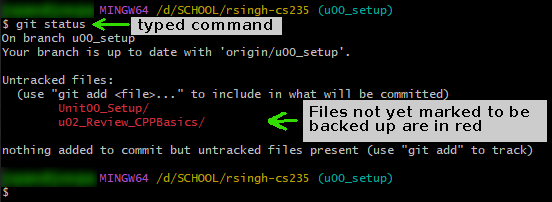
In Git Bash or the terminal, use git status…
$ git status
On branch main
Your branch is up to date with 'origin/main'.

Changes not staged for commit:
  (use "git add <file>..." to update what will be committed)
  (use "git restore <file>..." to discard changes in working directory)
        modified:   Book.h

no changes added to commit (use "git add" and/or "git commit -a")
1.2. In VS Code
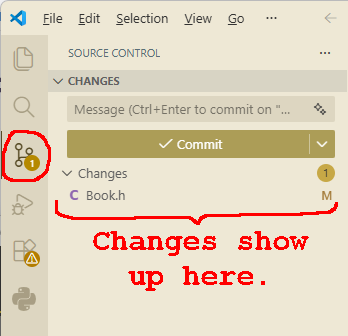
In VS Code, going to View > Source Control will show a visual of changed files in your repository…
2. Backup changes (add, commit)
2.1. In Git Bash / terminal
In Git Bash or the terminal, use git add and then a filename or
pattern…
| Command | Action |
|---|---|
git add . |
Add ALL changed items to the changeset |
git add FILENAME.EXT |
Add JUST the filename given to the changeset |
git add *.cpp |
Only add cpp files to the changeset |
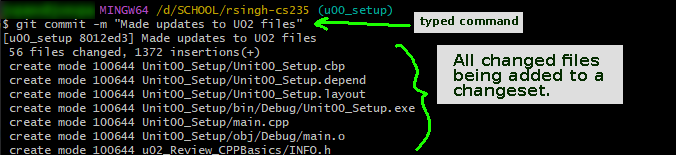
Then commit your changes with a message of what changed with git
commit…
$ git add .
warning: in the working copy of 'Week01-CS200Review/program1_review/Book.h', LF will be replaced by CRLF the next time Git touches it

$ git commit -m "Updated Book with new feature"
[main 974866d] Updated Book with new feature
 1 file changed, 1 insertion(+)

2.2. In VS Code
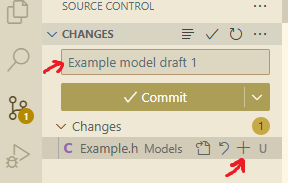
In VS Code, press "+" next to the file(s) you want to back up.
Then type a commit message and press the "Commit" button.
3. Pull from server
3.1. In Git Bash / terminal
Sometimes I might add changes to your files, or add new files to your repository. You will periodically need to sync the changes to your own machine.
In Git Bash or terminal, use git pull:
$ git pull
3.2. In VS Code
4. Push to server
4.1. In Git Bash / terminal
Once you're ready to submit your changes to the server, use git push…
$ git push
If you're on a branch besides main, use git push -u origin
BRANCHNAME.
If you get this error…
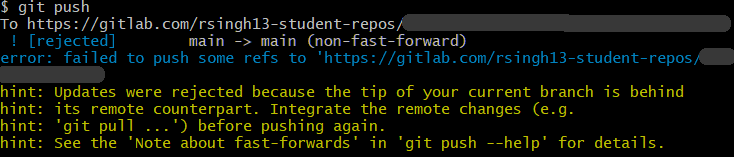
… it means you need to run git pull and merge, THEN you can push.
4.2. In VS Code
After you click the "Commit" button, it should turn into a "Sync" button.