Table of Contents
1. Introduction
There are special tools called debuggers that we can use to trace through our code, look at program flow, variable values, and more. A debugger is an invaluable tool in software development, so let's learn the super basics.
GDB stands for "GNU DeBugger", and it is a program to help you debug your programs. It allows you to step through the program as it runs, line-by-line, allows you to inspect values of variables throughout the program execution, and view which functions have been called.
On Mac computers, installing the XCode environment should
automatically also set up the lldb (L L D B, all lowercase) debugger.
Many Integrated Development Environments contain debuggers that you can use more visually, but we are going to cover the absolute basics here.
Review 1. A debugger program lets you…
- □ Pause program execution at a specific line of code
- □ View variable values
- □ View a list of function calls leading to where the program is currently at
- □ Order a pizza
2. Building a program with debugging symbols
To use your program in the debugger you need to make sure to build
it with the -g flag:
g++ FILENAME.cpp -g -o PROG.exe
Review 2. To be able to use gdb/lldb we need to build our source code with which flag?
- ○ -W
- ○ -g
- ○ -o
- ○ -f
3. Start the debugger with the built program executable
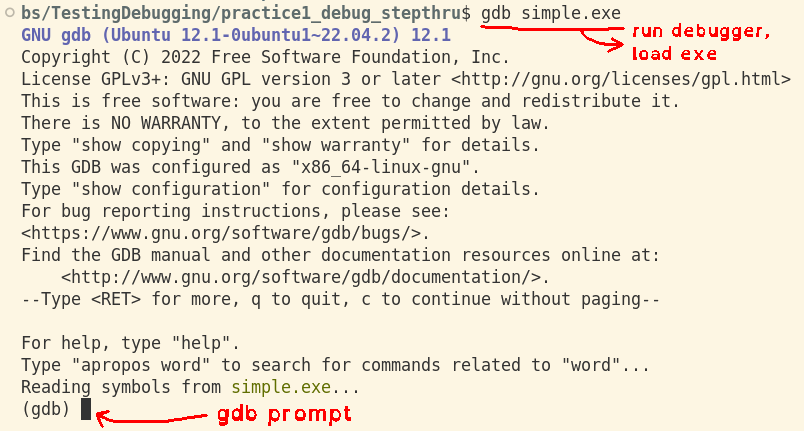
Run the debugger with the program executable second to load it into
the debugger program. When the program is running you'll see a
prompt where you can enter commands. The prompt begins with
(gdb) or (lldb).
gdb (win/linux):
gdb PROG.exe
lldb (mac/linux):
lldb PROG.exe

Review 3. The running gdb/lldb programs have a prompt where you…
- ○ enter in commands
- ○ stare at it helplessly
- ○ cry
4. Run the program
The run command will run through the program as normal and display
the program's output to the screen.
runin gdb (win/linux):(gdb) run Starting program: .../practice1_debug_stepthru/simple.exe [Thread debugging using libthread_db enabled] Using host libthread_db library "/lib/x86_64-linux-gnu/libthread_db.so.1". 1 + 91 = 92 [Inferior 1 (process 26807) exited normally]
runin lldb (mac/linux):(lldb) run Process 26332 launched: '.../practice1_debug_stepthru/simple.exe' (x86_64) 0 + 39 = 39 Process 26332 exited with status = 0 (0x00000000) (lldb)
5. Setting breakpoints
You can set breakpoints in your code. When the program is run, once the line of code with a breakpoint is hit, it will pause execution. You can then view variable values and step through the code line-by-line.
- Setting a breakpoint by function name:
breakpoint set -n mainin lldb (mac/linux):(lldb) breakpoint set -n main Breakpoint 1: where = simple.exe`main + 12 at simpleprogram.cpp:8:16, address = 0x0000000000001235
break mainin gdb (win/linux):(gdb) break main Breakpoint 1 at 0x555555555235: file simpleprogram.cpp, line 8.
- Setting a breakpoint by file/line number:
break crash.cpp:8in gdb (win/linux):(gdb) break crash.cpp:8 Breakpoint 1 at 0x555555556539: file crash.cpp, line 8.
breakpoint set --file crash.cpp --line 8in lldb (mac/linux):(lldb) breakpoint set --file crash.cpp --line 8 Breakpoint 1: where = crash.exe`DisplayValue(std::__cxx11::basic_string<char, std::char_traits<char>, std::allocator<char> >*) + 16 at crash.cpp:8:14, address = 0x0000555555556539
Review 4. How do you set the following breakpoints using gdb?
- A. A breakpoint at the start of the main function?
- B. A breakpoint in file "bob.cpp" at line 5?
6. Stepping through code
While paused in the program execution you can step line-by-line
through the program to look at how it flows. The next command will
step line by line, skipping over any function calls, while the
step command will step line by line, stepping into any function calls.
| Command | What it does |
|---|---|
next |
Step (over) to the next line |
step |
Step (into) the next line (will enter function calls) |
finish |
Leave the current function to continue stepping from previous function |
continue |
Continue running the program as normal until the next breakpoint |
7. Viewing variable values
While the program is paused you can view the value of any variables
that are currently in-scope by using the print function.
printin gdb (win/linux):(gdb) print number1 $2 = 3
printin lldb (mac/linux):(lldb) print number1 (int) $1 = 1
8. Viewing the backtrace
If the program crashes or if you're paused on a breakpoint you can
use the bt command to view the list of functions that have been
called up until the point you're at in the program. The "oldest"
(first called) function is on the bottom, and the "newest" function
is on the top.
btin gdb (win/linux):(gdb) bt #0 0x00007ffff7ebc4c4 in std::basic_ostream<char, std::char_traits<char> >& std::operator<< <char, std::char_traits<char>, std::allocator<char> >(std::basic_ostream<char, std::char_traits<char> >&, std::__cxx11::basic_string<char, std::char_traits<char>, std::allocator<char> > const&) () from /lib/x86_64-linux-gnu/libstdc++.so.6 #1 0x000055555555654f in DisplayValue (ptr=0x0) at crash.cpp:8 #2 0x00005555555565c7 in DisplayAll (ptrs=std::vector of length 4, capacity 4 = {...}) at crash.cpp:16 #3 0x0000555555556790 in main () at crash.cpp:25btin lldb (mac/linux):(lldb) bt [...] * thread #1, name = 'crash.exe', stop reason = signal SIGSEGV: invalid address (fault address: 0x8) * frame #0: 0x00007ffff7ebc4c4 libstdc++.so.6`std::basic_ostream<char, std::char_traits<char> >& std::operator<<<char, std::char_traits<char>, std::allocator<char> >(std::basic_ostream<char, std::char_traits<char> >&, std::__cxx11::basic_string<char, std::char_traits<char>, std::allocator<char> > const&) + 4 frame #1: 0x000055555555654f crash.exe`DisplayValue(ptr=<parent failed to evaluate: parent is NULL>) at crash.cpp:8:14 frame #2: 0x00005555555565c7 crash.exe`DisplayAll(ptrs=size=1) at crash.cpp:16:21 frame #3: 0x0000555555556790 crash.exe`main at crash.cpp:25:15 frame #4: 0x00007ffff7b4dd90 libc.so.6`__libc_start_call_main(main=(crash.exe`main at crash.cpp:21:1), argc=1, argv=0x00007fffffffde38) at libc_start_call_main.h:58:16 frame #5: 0x00007ffff7b4de40 libc.so.6`__libc_start_main_impl(main=(crash.exe`main at crash.cpp:21:1), argc=1, argv=0x00007fffffffde38, init=0x00007ffff7ffd040, fini=<unavailable>, rtld_fini=<unavailable>, stack_end=0x00007fffffffde28) at libc-start.c:392:3 frame #6: 0x0000555555556465 crash.exe`_start + 37
Review 5. Which command does what?
| step | next | finish | continue | bt |
- a. Move to next line in code
- b. Step into a function's code
- c. Leave the current function and return to the previous
- d. Unpause and continue running the program until the next breakpoint
- e. View a list of functions called up until this point
- f. Display the value of a variable given