Table of Contents
Overview
- 📽️ Overview video: Dynamic arrays
- Concepts:
- Why are traditional arrays fixed-length and dynamic arrays can be "resized"?
- What are the steps of allocating and deallocating memory via a pointer?
- What are the steps for "resizing" the dynamic array?
- Does a dynamic array's size need to be known at compile time?
- New code:
- Declaring a dynamic array:
TYPE* ARRNAME = new TYPE[SIZE]; - Freeing memory from a dynamic array:
delete [] ARRNAME;
- Declaring a dynamic array:
1. Program memory
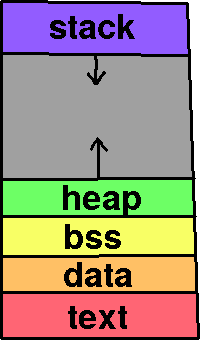
Programs have a memory space where different types of data is stored.
- Text is program instructions.
- Data is where global and static variables are stored.
- Heap space is where dynamically allocated variables/arrays are stored.
- Stack space is where local variables, parameter variables, are stored.
There is a limit to stack space. When you have something like a logic error in a recursive function and it keeps allocating space for variables eventually you'll get a Stack Overflow, running out of stack space.
Dynamically allocated variables and arrays are stored on the Heap.
Review 1. Fill in the blanks:
- a. __ space is limited, but memory is allocated and freed automatically.
- b. __ space is where we manually allocate and free our dynamic memory.
2. Dynamic array
We can use Dynamic Arrays to allocate space for an array at run-time, without having to know or hard-code the array size in our code. To do this, we need to allocate memory on the heap via a pointer.
In C++ we use the new and delete keywords to allocate and deallocate memory. Because we have to manually manage this memory, it's important to remember to delete anything that has been allocated via new.
2.1. Creating a dynamic array
We don't have to know the size of the array at compile-time, so we can do things
int size;
cout << "Enter size: ";
cin >> size;
string* products = new string[size];
like ask the user to enter a size, or otherwise base its size off a variable.
2.2. Setting elements of the array
We can access elements of the dynamic array with the subscript
operator, as before. However, we won't know the size of the array
unless we use the size variable, so it'd be better to use a for
loop to assign values instead of this example:
products[0] = "Pencil";
products[1] = "Eraser";
products[2] = "Pencil case";
products[3] = "Pencil sharpener";
products[4] = "Ruler";
2.3. Iterating over the array
Accessing elements of the array and iterating over the array is done the same way as with a traditional array.
for ( unsigned int i = 0; i < size; i++ )
{
  cout << i << ". "; // Display index
  cout << products[i] << endl; // Display element at that index
}
2.4. Freeing the memory when done
Before your pointer loses scope we need to make sure to free the space that we allocated:
delete [] products;
2.5. "Resizing" the array
When memory is allocated for an array we must know the entire size at once because all of the array's elements are contiguous in memory. Because of this, we don't technically "resize" a dynamic array, instead we allocate more space elseware and copy the data over to the new array. Here are the steps:
Allocate space for a new, bigger array
string* newArray = new string[ size + 10 ];
Copy the data from the old array to the new array
for ( unsigned int i = 0; i < size; i++ )
{
  newArray[i] = products[i];
}
Free the space at the old address
delete [] products;
Update the main array pointer to the new address
products = newArray; // Point to same address
Update your size variable
size = size + 10;
Review 2. Given this code:
int newSize = size + 10;
float * prices = new float[ newSize ];
// ... [code] ...
delete [] prices;
What will the size of the dynamic array be if the original size was 5?
Review 3. If you create a dynamic array with a pointer like this:
string* myPtr = new string[50];
Before myPtr goes out of scope you must always make sure to use…
○ free [] myPtr; / ○ delete [] myPtr; / free myPtr; / ○ delete myPtr;
Review 4. Resizing a dynamic array isn't really resizing, it's…
- ○ Allocating more space at a new location, copying the data over, freeing the old location, and pointing the array-pointer to the new locaion.
- ○ Moving all the data into a traditional C-style array.
- ○ Using a
vector<>instead. - ○ Freeing the array-pointer, allocating more space at a new location, and asking the user to re-enter all the values.
3. Arrays in the Real World
Knowing how a Dynamic Array works is an important part of understanding how software works and by knowing more about memory management you'll gain insight into how to write efficient code. This will return moreso in a Data Structures course.
At work and for your own projects just use std::vector or whatever
built-in array/list type available for your language of choice.
It's been written, it takes care of resizing and memory management,
and you can implement what you need with something that's already
robust and proven.