Table of Contents
- 1. What is a function?
- 2. Uses of functions
- 3. Anatomy of a function
- 4. Functions and structs
- 5. Functions and arrays
- 6. Common function errors
- 7. Advanced function usage
Video - Function basics:
https://youtube.com/shorts/D52AjpFLilM
Video - Scope, pass-by-value, pass-by-reference, etc.:
https://youtube.com/shorts/MLzWpeZXMm4
Video - Array parameters, const reference, function overloading:
Overview:
- Terms to know: Function declaration, function definition, function call, function header/signature, variable scope, parameters, arguments, pass-by-value, pass-by-reference
- Concepts:
- What does pass-by-value mean?
- What does pass-by-reference mean?
- How are array parameters passed?
- What is function overloading?
- How do you use default parameters?
- New code:
- Function header:
RETURNTYPE FUNCNAME( PARAM1TYPE PARAM1NAME, ... ) - Function declaration is the header with a semicolon at the end.
- Function definition is the function header plus a body within
curly braces
{ } - Function call:
TYPE VAR = FUNCNAME( VALUE1, VALUE2, ...);
- Function header:
- Common errors:
- Don't specify data types for arguments in a function call.
- Function calls must have () even if there are no arguments.
- Don't forget
As programs become more sophisticated and offer more features, the size of the
program increases. At some point, it becomes too complicated to keep your
entire program just within main(). (You could certainly do it, but
maintaining it would be a nightmare!)
One of the tools we use to build modular, easier-to-read code is functions. By using functions, we can delegate tasks out to other portions of the program, passing inputs as data to the function, and receiving some kind of output as a result.
As a basic example, let's say we need to calculate square footage of a room in
multiple places in a program. By making a
float GetArea( float width, float length ) function. Then, we only have to
implement the formula once and can use the function in every part of the
program. Then, we wouldn't be copy-and-pasting the same formula over and over
again in the code - which also means less likelihood of errors, and easier to
update later as needed.
1. What is a function?
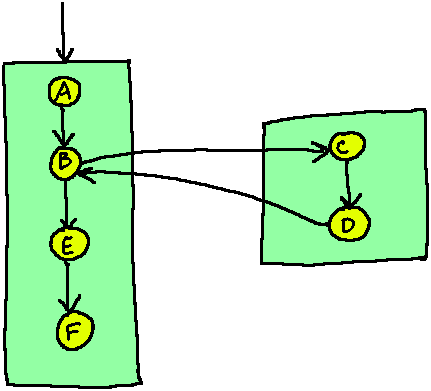
Functions are a handy way for us to split out some code from our main() function, giving that code a name (the function name) to identify it. When we do this, we make very modular programs where it is easier to maintain because everything is broken up into distinct, discrete steps. In math, a function looks like this:
f(x) = 2x+1
Where f is the function name, x is the input, and whatever is computed on the right-hand-side of the equal sign is the return output.
It's the same in programming: Our functions can have inputs (parameters), process some data, and return some outputs. And, because they're defined elseware in the program, we can call them as many times as we want.
1.1. Program flow and functions
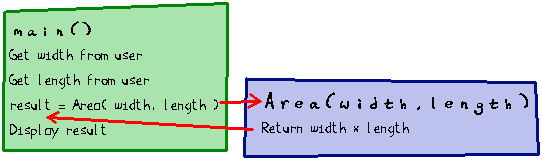
Whenever a function is called, the program flow is redirected into that function, running from top-to-bottom as normal (with branching and loops changing that flow). Once the function has completed, it can return some data, which is received by the call location.
From a design standpoint, this means we can break out different parts of programs into their own sections. Each function has a name, which should be used to label what the purpose of its code is.
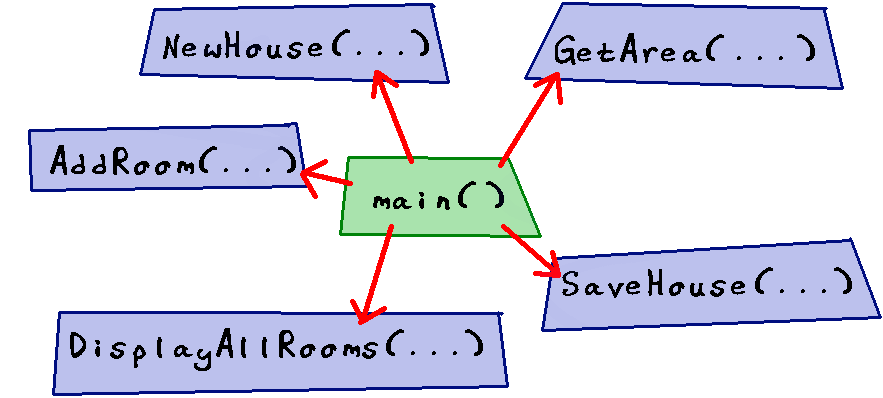
- Program flow usually goes top-to-bottom, but the flow can be
temporarily moved elseware via a…
- ○ Function call
- ○ Pointer dereference
- ○ Variable input
2. Uses of functions
2.1. Functions for formulas
In algebra, you've seen functions like this:
\[ f(x) = 2x + 3 \]
If you were like me in algebra, you might have thought to yourself, "That's the same as \(y = 2x + 3\), why did we replace \(y\) with \(f(x)\)?" The reason is that we want to write a function in terms of its input, \(x\), and its output \(f(x)\). The equation \(2x + 3\) is the function body, which specifies how we get some output given some input.
We can use functions in programming like with math as well - defining formulas that we might need a lot - but there's more to functions than just making computations.
Let's say we want to make our "GetArea" function in math. We would need two inputs: Width and Length, and the output would end up being the area, so maybe we would name the function \(A\). It might look like this:
\[ A( w, l ) = w \cdot l \]
In C++, it would look like this:
Example:
float Area( float width, float length ) {
  return width * length;
}
(Luckily we don't have to restrict ourselves to single-letter variable and function names in C++ :)
Review 2. Let's say we want to write a function that calculates the area of a rectangle based on the width and length of it. What would the function's input(s) and output(s) be?
2.2. Functions to validate
Functions can also be handy in validating data and user input, putting the validation in one place instead of having to re-implement the same checks over and over. Let's say we want to keep some variable percentage in our program between 0% and 100% - no negative values, nothing over 100%. We could implement a function that takes the percentage as an input, and either returns the same percentage, or 0%, or 100% as output…
Function definition:
int BoundPercent( int originalPercent ) {
  if ( originalPercent < 0 ) {
    return 0;
  }
  else if ( originalPercent > 100 ) {
    return 100;
  }
  else {
    return originalPercent;
  }
}
Then, anywhere in the program, we could use this function to make sure our percentages are in the right range…
Within main()…
hungerPercent       = BoundPercent( hungerPercent );
healthPercent       = BoundPercent( healthPercent );
happinessPercent    = BoundPercent( happinessPercent );

2.3. Functions to get input
Getting user input is a common part of writing software, and we will usually need to validate what the user is entering prior to doing any operations on it. Let's say your program is full of numbered menus and you want to validate the user's menu choices easily. You can use a function with a while loop in it:
int GetUserInput( int min, int max )
{
  int choice;
  cout << "Choice: ";
  cin >> choice;

  while ( choice < min || choice > max )
  {
    cout << "Invalid choice, try again: ";
    cin >> choice;
  }

  return choice;
}
You write this function once and then you can reuse it in your entire program for all menus…
cout << "1. Deposit money" << endl
     << "2. Withdraw money" << endl
     << "3. View balance" << endl;

choice = GetUserInput( 1, 3 ); // 1, 2, or 3

if ( choice == 1 )
{
  cout << "1. Checking account" << endl
       << "2. Savings account" << endl;
  choice = GetUserInput( 1, 2 ); // 1 or 2
}
Review 3. Let's say we want to write a function that handles a cin statement to get the user's input. We want to make sure the user's selection is between two numbers, min and max. Once we've validated the user's choice, we return that valid choice back to the main program. What would be the input(s) and what would be the output(s)?
2.4. Functions to output
Functions aren't required to return data. Sometimes, you just want a function
that is responsible for formatting output or displaying a menu. In this case,
a function's return type can be void.
void DisplayStudentInfo( string name, float gpa )
{
  cout << "Name:   " << name
       << "GPA:    " << gpa << endl;
}
You also aren't required to pass input to functions. In this case, the parameter list between ( ) remains empty, but the () is always required for functions:
void DisplayMainMenu()
{
  cout << "1. Deposit" << endl;
  cout << "2. Withdraw" << endl;
  cout << "3. View Balance" << endl;
  cout << "4. Log Out" << endl;
}
2.5. Other uses
These are just some examples of why you might use functions in your programs.
Anything you write in main() can go inside of a different function as well -
it's just another tool for designing clean, maintanable, and
readable code.
3. Anatomy of a function

3.1. The function signature
A function signature in C++ is required as part of both the function declaration and the definition. The signature is how you tell functions apart - what makes them unique… their signature.
The function signature takes this form:
RETURN_TYPE FUNCTION_NAME( PARAM1TYPE PARAM1NAME, PARAM2TYPE PARAM2NAME, ... )
So for instance, a GetArea function signature could look like this:
float GetArea( float width, float length )
Review 4. What is included in a function signature? Specify the proper order.
Review 5. Build the function signature given the following requirements:
- Function is named "GetRectArea".
- Function returns a float.
- Function takes in a float for the width and a float for the length.
3.2. Creating a function
When we want to create a function we need to write a function declaration and a function definition.
The function declaration is the function signature and a ; at the end. Declarations should go in header (.h) files.
int Func( int a, int b );
The definition includes the function signature but also a code block - denoted by opening and closing curly braces { }. Within this code block is where we define what the function does.
int Func( int a, int b )
{
  return a * b + 1;
}
3.2.1. Declaration in the header (.h) file
When we create a header file, it should end with .h, though sometimes ends with .hpp (depending on the programmer's style.)
The header must contain file guards:
#ifndef _MY_FILE_H
#define _MY_FILE_H

// put code in here

#endif
You can use any label to replace "_MY_FILE_H", but it should be unique for
each file. The file guard prevents the compiler from reading the same code
multiple times, and essentially thinking that you've written a bunch of
duplicate code.
Within the header file we put our function declarations:
#ifndef _MY_FILE_H
#define _MY_FILE_H

#include <string>
using namespace std;

string GetState( int zipcode );
char GetCurrencyType( string country );
float Quadratic1( float a, float b, float c );
float Quadratic2( float a, float b, float c );

#endif
If any of our function signatures have special data types like string we need to make sure to also include the appropriate library in the file as well.
3.2.2. Definition in the source (.cpp) file
Function definitions should go in source files (.cpp files). Usually, there should be one source file for main(), and a separate source file for function definitions, based on some grouping.
If you were splitting out reusable functions for doing math, you could create something like "Math.h" and "Math.cpp" to store those functions' declarations and definitions.
The .cpp files don't need file guards, but you do need to include the corresponding header file that contains the functions' declarations. In Math.cpp you'd need:
#include "Math.h"
As a program grows, you might have many different sets of files, so it's good to group things by similar functionality. Within the .cpp file, you define the functions.
#include "Functions.h"

#include <string>
using namespace std;

string GetState( int zipcode )
{
  if      ( zipcode == 64063 ) { return "Lee's Summit"; }
  else if ( zipcode == 64138 ) { return "Raytown"; }
  else                         { return "UNKNOWN"; }
}

// ...etc...
Review 6. Identify which code snippet is the function declaration and which is the function definition.
a. ○ Declaration / ○ Definition
int Sum( int a, int b )
{
    return a + b;
}
b. ○ Declaration / ○ Definition
int Sum( int a, int b );
Review 7. File guards are needed for _ file(s).
3.3. #include
When we have our functions declared in a file separate from where we
have our main(), in order for our main file to "see" the new
function, we have to include the file. Any other files in our
program will also need to include the header if it is using
functions within that file.
#include "MYFILE.h"
Note: DO NOT use include for cpp files! This will cause build errors!
3.4. Calling functions
The third piece is the function call, when we are actually putting it into use in our code. The function call occurs from outside of the function, such as within main() (or, one function can call another function!)
The function call is of this form:
FunctionName( arg1, arg2, arg3 );
Or, if the function returns data, we need to make sure to put the result somewhere. The data type of the variable you use to store the result should match the function's return type:
float result = Sum( 2, 4 );
We can pass hard-coded literals in as the input, or we can pass in existing variables as the inputs.
float num1 = 3;
float num2 = 5;
float result = Sum( num1, num2 ); // Two variables
float result2 = Sum( 1, 3 );      // Two int literals
float result3 = Sum( num1, 3 );   // A variable and a literal
Review 8. Given the following function declaration:
float PricePlusTax( float price, float tax );
And assuming within main() we have variables myPrice,
myTax, and priceAfterTax, how would we call the PricePlusTax
function and store its result?
3.5. Arguments vs. parameters
Another key piece of terminology is parameters versus arguments.
When we're declaring or defining a function and we have input variables in the signature, like this:
float Sum( float a, float b );
Those two input variables a and b are known as parameters. When we're creating the function, we define the input parameters.
When we're calling the function and passing in data - whether as a literal or a variable's data, like this:
float result = Sum( 1, 2 );
float result = Sum( myNum1, myNum2 );
The data being passed as input are called arguments.
3.5.1. Pass-by-value
When we create a parameter in our function and declare it as a normal variable, that parameter is pass-by-value. This means that a copy of the argument is made, and any changes to the parameter within the function will only exist within that function… back out at the caller, the original argument will not have any changes.
void PassByValue( int num )
{
    cout << "Before assignment: " << num << endl;
    num = 10;
    cout << "After assignment: " << num << endl;
}

int main()
{
    int number = 100;

    cout << "Before function: " << number << endl;
    PassByValue( number );
    cout << "After function: " << number << endl;

    return 0;
}
Within main(), the number variable will always be 100. In the function,
num will start off with 100, but then be changed to 10. This change isn't
preserved back out in main().
3.5.2. Pass-by-reference
We can also pass our arguments by-reference. To do this, in our function signature we mark the parameter's type with an ampersand, this marks it as "pass-by-reference":
void PassByReference( int& num )
{
    cout << "Before assignment: " << num << endl;
    num = 10;
    cout << "After assignment: " << num << endl;
}
The function call from main() will look the same, but now any changes made
to num within the function will be applied to number back out in
main().
3.5.3. Passing arrays
When traditional arrays are passed to functions, they are automatically passed as a pointer. Any change made to the array within the function will be reflected back out at the caller level.
void Setup( string names[], int size )
{
    for ( int i = 0; i < size; i++ )
    {
        cout << "Enter name " << i << ": ";
        getline( cin, names[i] );
    }
}

int main()
{
    string names[3];
    Setup( names, 3 );
}
3.5.4. Passing pointers
We can also mark a parameter as a pointer-variable. This gives the parameter access to the address of the argument, so we can also change the original argument's value.
void PassPointer( int* ptrNum )
{
    cout << "Before assignment: " << *ptrNum << endl;
    *ptrNum = 10;
    cout << "After assignment: " << *ptrNum << endl;
}

int main()
{
    int number = 100;

    cout << "Before function: " << number << endl;
    PassPointer( &number ); // Pass the address
    cout << "After function: " << number << endl;

    return 0;
}
3.5.5. Summary: Ways to pass data to/from functions
The following table illustrates different ways we can define our parameters, and what the goal is. "RT" means "Return Type", "T" is the "Type" of the parameter.
| Function | Read | Return | Info | |
|---|---|---|---|---|
| 1. | RT func( T X ) |
yes | no | Pass-by-value X |
| 2. | RT func( const T& X ) |
yes | no | Const pass-by-reference X |
| 3. | RT func( T& X ) |
yes | yes | Pass-by-reference X |
Xis pass-by-value, which is fine for primitive data types like ints, floats, chars, and bools.Xis passed by const-reference becauseXis a mose sophisticated data type like a string or other class-based object. (Longer time to copy if passed by value.)- The function can read from
Xbut also overwrite its value and the change will be reflected back to the argument being passed to the function call.
Review 9. Given these code snippets:
float Sum( float a, float b, float c )
{
  return a + b + c;
}

int main()
{
  float myint1, myint2, myint3;
  cout << "Enter three numbers separated by a space: ";
  cin >> myint1 >> myint2 >> myint3;

  float result = Sum( myint1, myint2, myint3 );
  cout << "Result: " << result << endl;

  return 0;
}
Identify which variables are arguments and which are parameters.
Review 10. Does the name of the input argument variables need to match the name of the corresponding parameter? Or will a function call work even if the argument variable doesn't have the same name as its corresponding parameter?
- ○ The parameter and argument names must match.
- ○ The parameter and argument names do not need to match.
Review 11. When something is passed-by-value to a function…
- ○ The changes made in the function are also applied to the original argument from the caller; we have direct access to it.
- ○ The changes made in the function are only present in the function; the caller retains the original version of the argument.
- When something is passed-by-reference to a function…
- ○ The changes made in the function are also applied to the original argument from the caller; we have direct access to it.
- ○ The changes made in the function are only present in the function; the caller retains the original version of the argument.
3.6. Scope
Variables have different life times. Where they exist in the program is known as its scope. A variable lives within the code block { } it is declared within, and does not exist outside of it.
For example, this variable totalCats will exist all throughout main():
int main()
{
  int totalCats = 10;
  // ...
}
And the variable quotient only exists within this if statement:
int main()
{
  float num = 3, denom = 4;

  if ( denom != 0 )
  {
    float quotient = num / denom;
  }

  // ...
  return 0;
}
Variables can be used within code blocks that are inside their own code block and beneath where the variable is declared. Here, a can be used anywhere in main(), including in the if statement. b, however, can only be used within main() anywhere after its declaration. c can only be used inside the if statement it was declared within:
int main()
{
  int a = 1;

  if ( a < 0 )
  {
    int c = -a;
  }

  int b = 2;
  cout << b << endl;

  // ...
  return 0;
}
Just like how a variable declared at the top of main() will exist throughout main(), the same is true for functions. If we declare a variable at the top, we can use it throughout the entire function - and, we can use the function's parameters anywhere within the function.
But variables don't exist between functions. Something declared in one function cannot be used in another function. Variable names can, however, be reused in different scopes.
Review 14. Given this code snippet:
float SandPerGuest( float sand, float guest ) { return sand/guest; }

int main()
{
  float totalSandwiches = 10;
  float totalGuests = 5;

  if ( totalGuests != 0 )
  {
    float sandwichesPerGuest = SandPerGuest( totalSandwiches, totalGuests );
    cout << "Sandwiches per guest: " << sandwichesPerGuest << endl;
  }


  return 0;
}
Where can the totalSandwiches variable be used?
Where can the sandwichesPerGuest variable be used?
Where can the sand variable be used?
Review 15. How are Sum's a and b variables related to Diff's a and b variables?
float Sum( float a, float b )
{
  return a + b;
}

float Diff( float a, float b )
{
  return a - b;
}
- ○ Any changes to a and b in one function will be reflected in the other function.
- ○ Sum can affect Diff's variables but not vice versa.
- ○ They are not related at all; they are completely distinct variables that happen to have the same name.
4. Functions and structs
Structs can also be passed to functions and returned from functions. Let's say we have a product struct:
struct Product
{
  string name;
  float price;
  int inStock;
};
And we want some helper functions. Here are some example declarations:
void Load1( Product& prod, string filename );
Product Load2( string filename );
void Display( Product prod );
The first Load function takes a Product item as a pass-by-reference parameter, loads data from a text file, and updates that product parameter:
void Load1( Product& prod, string filename )
{
  ifstream input( filename );
  getline( input, prod.name );
  input >> prod.price;
  input >> prod.inStock;
}
In main(), we create a Product and then pass it in to that function:
Product product1;
Load1( product1, "product1.txt" );
We pass this struct as "pass-by-reference" (denoted by the ampersand next to
the parameter data type: Product&) so that any changes we make to the
object within the function will also be preserved outside of the function.
If we didn't do this, the function would only have a copy of the object and
not be making changes to the original item.
The second load function doesn't take in a Product parameter but instead has a Product as its return type. It still loads data from a file but a Product is created within the function itself, and then returned with the return keyword:
Product Load2( string filename )
{
  Product newProd;
  ifstream input( filename );
  getline( input, newProd.name );
  input >> newProd.price;
  input >> newProd.inStock;
  return newProd;
}
This time when we call the function, we need to call the function and assign its return value to our Product in main():
Product product2;
product2 = Load2( "product2.txt" );
The Display function takes in a pass-by-value Product and will display its contents to the screen in a clean way:
void Display( Product prod )
{
  cout << setw( 10 ) << prod.name
    << setw( 1 ) << "$"
    << setw( 9 ) << prod.price
    << setw( 10 ) << prod.inStock << endl;
}
The function can be called with any Product variables we've created:
Display( product1 );
Display( product2 );
With a function that is only meant to display contents to the screen, any
reasonable person would assume that the "display" function isn't going to
also alter the data. In this case, we can pass the Product item either as
pass-by-value (make a copy) with Product prod, or we could pass it by
const-reference, which would be the most efficient: const Product& prod.
- The first Load function takes a Product item as a
pass-by-reference parameter, loads data from a text file, and updates that product parameter:
void Load1( Product& prod, string filename )
{
  ifstream input( filename );
  getline( input, prod.name );
  input >> prod.price;
  input >> prod.inStock;
}
In main(), we create a Product and then pass it in to that function:
Product product1;
Load1( product1, "product1.txt" );
Why is the Product parameter being passed-by-reference?
- ○ If the Product is pass-by-value then anything loaded inside the function won't be reflected back in main().
- ○ It could be pass-by-value, this was just an aesthetic choice.
- The Display function takes in a pass-by-value Product and
will display its contents to the screen in a clean way:
void Display( Product prod )
{
  cout << setw( 10 ) << prod.name
    << setw( 1 ) << "$"
    << setw( 9 ) << prod.price
    << setw( 10 ) << prod.inStock << endl;
}
The function can be called with any Product variables we've created:
Display( product1 );
Display( product2 );
Why is the Product parameter pass-by-value here and not pass-by-reference?
- ○ The Display function isn't supposed to make any changes to the Product, so it can just be pass-by-value where it works with a copy of the data.
- ○ The Display function will not allow pass-by-reference as the keyword Display is meant for only pass-by-value data.
5. Functions and arrays
Arrays can be passed into functions as well, and this can be useful for initializing array content, displaying array contents, or other operations.
We can pass both traditional arrays and std::array objects to functions, and the parameter will look like a normal array declaration:
void Function1( int arr[4], int size );
void Function2( array<int, 4> arr );
void Function3( array<int, 4>& arr );
When we call these functions and want to pass the array data, we just use the array name - no other information:
int testArray1[4] = { 1, 1, 1, 1 };
Function1( testArray1, 4 );

array<int, 4> testArray2 = { 2, 2, 2, 2 };
Function2( testArray2 );

array<int, 4> testArray3 = { 3, 3, 3, 3 };
Function3( testArray3 );
FUNCTION TEST 1: In the example code for test 1, we create a traditional array and pass it into Function1:
int testArray1[4] = { 1, 1, 1, 1 };
Function1( testArray1, 4 );
Function1 iterates through all the elements of the array and replaces each item:
void Function1( int arr[4], int size )
{
  for ( int i = 0; i < size; i++ )
  {
    arr[i] = i;
  }
}
FUNCTION TEST 2: In the example code for test 2, we create a traditional array and pass it into Function2:
array<int, 4> testArray2 = { 2, 2, 2, 2 };
Function2( testArray2 );
Function2 iterates through all the elements of the array and replaces each item:
void Function2( array<int, 4> arr )
{
  for ( size_t i = 0; i < arr.size(); i++ )
  {
    arr[i] = i;
  }
}
FUNCTION TEST 3: In the example code for test 3, we create a traditional array and pass it into Function3:
array<int, 4> testArray3 = { 3, 3, 3, 3 };
Function3( testArray3 );
Function3 receives the array as pass-by-reference and iterates through all the elements of the array and replaces each item:
void Function3( array<int, 4>& arr )
{
  for ( size_t i = 0; i < arr.size(); i++ )
  {
    arr[i] = i;
  }
}
6. Common function errors
When you're declaring/defining a function you specify data types - the return type and the parameters' data types. When you're calling a function, you do not include data types!
| Works | sqft = GetArea( room_width, room_length ); |
| Doesn't work | sqft = GetArea( float room_width, float room_length ); |
Functions must have parentheses ()! If you're missing the parentheses,
your program isn't going to call the function!
| Works | DisplayMenu(); |
| Doesn't work | DisplayMenu; |
If a function contains a return statement, then you must store the returned
data in a variable! If you don't assign the return anywhere, it will be lost!
| Works | sqft = GetArea( room_width, room_length ); |
| Doesn't work | GetArea( room_width, room_length ); |
7. Advanced function usage
7.1. Default parameters
When declaring a function, you can also set default parameters. These are the default values assigned to the parameters if the user doesn't pass anything in. The default parameters are only specified in a function declaration - NOT the definition!
In this example, it could be a function that displays ingredients for a recipe, and by default the batch is set to 1.0 (one batch).
void OutputIngredients( float eggs, float sugar, float flour, float batch = 1.0 );
The function could be called without passing in a batch:
cout << "Ingredients:" << endl;
OutputIngredients( 1, 2.0, 3.5 );
Or they could pass a batch amount explicitly:
cout << "Ingredients:" << endl;
OutputIngredients( 1, 2.0, 3.5, 0.5 );  // half batch
You can have multiple default parameters specified in your function declaration - but all variables with default values must go after any variables without default values.
7.2. Function Overloading
In C++, you can also write multiple functions that have the same name, but a different parameter list. This is known as function overloading.
Let's say you want to be able to sum numbers, and you make a version for floats and a version for integers:
int Sum( int a, int b )
{
  return a + b;
}

float Sum( float a, float b )
{
  return a + b;
}
You can write as many versions of the function as you like, so long as the function headers are uniquely identifiable to the compiler, which means:
- The functions have a different amount of parameters, or
- The data types of the parameters are different, or
- The parameters are in a different order (when mixing data types).
These will become much more useful once we cover classes and objects.