Table of Contents
Video - Memory basics:
Video - Pointers:
Overview:
- Terms to know: Address, pointer, dereference, address-of-operator, dereference-operator, nullptr.
- Concepts:
- Set pointers to
nullptrwhen not in use for safety.
- Set pointers to
- New code:
- Get the address of a variable:
&VARIABLE - Declare a pointer variable:
TYPE* PTRVAR; - Declare and initialize a pointer variable:
TYPE* PTRVAR = nullptr; - Assign an address to a pointer variable:
PTRVAR = &VARIABLE; - Display the address that the pointer is pointing to:
cout << PTRVAR; - Display the value of the item at that address by dereferencing:
cout << *PTRVAR; - Overwriting the value stored at the address by dereferencing:
cin >> *PTRVAR;*PTRVAR = VALUE;
- Get the address of a variable:

1. Bits and Bytes
When we declare a variable, what we're actually doing is telling the computer to set aside some memory (in RAM) to hold some information. Depending on what data type we declare, a different amount of memory will need to be reserved for that variable.
| Data type | Size |
|---|---|
| boolean | 1 byte |
| character | 1 byte |
| integer | 4 bytes |
| float | 4 bytes |
| double | 8 bytes |
A bit is the smallest unit, storing just 0 or 1.
A byte is a set of 8 bits. With a byte, we can store numbers from 0 to 255, for an unsigned number (only 0 and positive numbers, no negatives).
The minimum possible value for 1 byte is 0.
(Decimal value = \(128 \cdot 0 + 64 \cdot 0 + 32 \cdot 0 + 8 \cdot 0 + 4 \cdot 0 + 2 \cdot 0 + 1 \cdot 0\))
| place | 128 | 64 | 32 | 16 | 8 | 4 | 2 | 1 |
|---|---|---|---|---|---|---|---|---|
| value | 0 | 0 | 0 | 0 | 0 | 0 | 0 | 0 |
The maximum possible value for 1 byte is 255.
(Decimal value = \(128 \cdot 1 + 64 \cdot 1 + 32 \cdot 1 + 8 \cdot 1 + 4 \cdot 1 + 2 \cdot 1 + 1 \cdot 1\))
| place | 128 | 64 | 32 | 16 | 8 | 4 | 2 | 1 |
|---|---|---|---|---|---|---|---|---|
| value | 1 | 1 | 1 | 1 | 1 | 1 | 1 | 1 |
Some data types, like a bool and a char, use only 1 byte.
But others, like int and float, use more. Since an integer
uses 4 bytes, that means it has \(8 \cdot 4\) = 32 bits available
to store data. \(2^{32} = 4,294,967,296\), so floats and integers
can store this many different values. (Note that this doesn't
mean that an integer goes from 0 to 4,294,967,296, because we have
to account for negative values.)
1.1. Memory addresses
Whenever a variable is declared, we need space to store what its value is. We have already looked at how many bytes a data type takes up, but where is the variable's data stored? – In working memory. You can think of this as the RAM, though the Operating System interacts with the RAM and gives us a "virtual memory space" to work with. But, to keep it simple, we will think of this as the RAM.
Each block of space in memory has a memory address, one after another…
| Bit address | 0 | 1 | 2 | 3 | 4 | 5 | 6 | 7 |
Though to the computer, it represents these addresses in binary (base 2) or hexadecimal (base 16):
| Address | 0x00 | 0x01 | 0x02 | 0x03 | 0x04 | 0x05 | 0x06 | 0x07 |
Hexadecimal goes from 0 to 16, but values from 10 and up are represented with letters. This is so each "number" in the value only takes 1 character (10 is two characters: 1 and 0). So, a quick reference for hexadecimal is like this:
| Base 16 (Hex) | A | B | C | D | E | F |
|---|---|---|---|---|---|---|
| Base 10 | 10 | 11 | 12 | 13 | 14 | 15 |
| Base 2 (Binary) | 1010 | 1011 | 1100 | 1101 | 1110 | 1111 |
Review 1. Memory addresses are usually written as…
- ○ Decimal (base-10)
- ○ Hexadecimal (base-16)
- ○ Octal (base-8)
1.2. Example: Variable in memory
Let's say we're investigating some blocks of memory.
If we declare a char, which gets 1 byte, it will take up any
available memory where 8 bits are available side-by-side. Some
blocks in memory might already be taken, so whatever is available
will be used:
| Address | Variables (BEFORE) | Address | Variables (AFTER) | |
|---|---|---|---|---|
| 0x0 | (used) | 0x0 | (used) | |
| 0x1 | (used) | 0x1 | (used) | |
| 0x2 | 0x2 | char1 | ||
| 0x3 | 0x3 | char1 | ||
| 0x4 | 0x4 | char1 | ||
| 0x5 | 0x5 | char1 | ||
| 0x6 | 0x6 | char1 | ||
| 0x7 | 0x7 | char1 | ||
| 0x8 | 0x8 | char1 | ||
| 0x9 | 0x9 | char1 | ||
| 0xA(10) | (used) | 0xA(10) | (used) | |
| 0xB(11) | (used) | 0xB(11) | (used) | |
| 0xC(12) | 0xC(12) | |||
| 0xD(13) | 0xD(13) | |||
| 0xE(14) | (used) | 0xE(14) | (used) | |
| 0xF(15) | (used) | 0xF(15) | (used) |
In this case, declaring our variable,
char char1 = 'A';
its data will be placed with its first bit at address 0x2.
We can use the address-of operator & to see what any variable's
address in memory is.
cout << "Value:   " << char1 << "\t";
cout << "Address: " << &char1 << endl;
Getting the address-of a variable will return the address of its first bit, so the output here would be:
Program output:
Value: A Address: 0x2
(Again, keep in mind that the representation of addresses here is simplified.)
Review 2. How do you access the address of a variable?
- ○
&variable_name - ○
*variable_name - ○
!variable_name
1.3. Example: Variable value in memory
We can see where the variable is stored at in memory, but let's look at how it's value will be stored as well.
Given the declaration:
char char1 = 'A';
The value of 'A' is stored in 1 byte. Technically, our computer
stores the letter "uppercase A" as the number code 65. This can
be converted into binary: (65)10 = 0100 0001. This is the
data that would be stored in that memory address.
| Address | Variables | Value |
|---|---|---|
| 0x0 | (used) | |
| 0x1 | (used) | |
| 0x2 | char1 | 0 |
| 0x3 | char1 | 1 |
| 0x4 | char1 | 0 |
| 0x5 | char1 | 0 |
| 0x6 | char1 | 0 |
| 0x7 | char1 | 0 |
| 0x8 | char1 | 0 |
| 0x9 | char1 | 1 |
| 0xA(10) | (used) | |
| 0xB(11) | (used) | |
| 0xC(12) | ||
| 0xD(13) | ||
| 0xE(14) | (used) | |
| 0xF(15) | (used) |
This is just a basic representation, again. One thing you'll learn more about in future Computer Science courses is endian-ness, such as whether a number has its most-significant bit on the left side or the right side. We're not worrying about that here. :)
2. Pointer variables
Pointer variables are another type of variable, but instead of
storing a value like "ABC", 'X', 10.35, or 4, it stores
a memory address instead.
2.1. Pointer declaration
When we declare a normal variable, we have to specify its
data type. With a pointer variable, we specify the data type of
the data it's pointing to, plus the * character (after the data
type) to show that this is a pointer variable.
Declaration forms
DATATYPE* PTRNAME;DATATYPE * PTRNAME;DATATYPE *PTRNAME;DATATYPE* PTRNAME = nullptr;DATATYPE* PTRNAME{nullptr};
The pointer variable declaration takes the same form as a normal
variable's declaration except we have to put the asterisk *
after the data type. The asterisk can be attached to the data type
, the name, or free-standing, it doesn't really matter, but I
prefer keeping it with the data type.
2.2. Pointer assignment
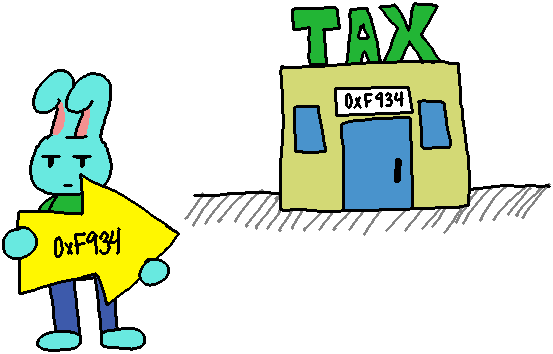
Once we have a pointer, we can point it to the address of any variable with a matching data type. To do this, we have to use the address-of operator to access the variable's address - this is what gets stored as the pointer's value.
Assignment forms
Assigning an address during declaration:
int* ptr = &somevariable;Assigning an address after declaration:
ptr = &somevariable;
After assigning an address to a pointer, if we cout the pointer it
will display the memory address of the pointed-to variable -
just like if we had used cout to display the address-of that variable.
2.2.1. Example: A variable and a pointer
// Declare normal variable
int someVariable = 100;

// Declare pointer variable,
// point to someVariable's address
int* ptr = &someVariable;

// Both show someVariable's address
cout << &someVariable;
cout << ptr << endl;
Review 3. How do you declare a pointer variable?
Review 4. How do you assign the address of a variable to a pointer?
2.3. Dereferencing pointers to get values
Once the pointer is pointing to the address of a variable, we can
access that pointed-to variable's value by dereferencing our
pointer. This gives us the ability to read the value stored at that
memory address, or overwrite the value stored at that memory address.
We dereference the pointer by prefixing the pointer's name with a
* - again, another symbol being reused but in a different context.
Dereference forms
Displaying pointed-to value:
cout << *ptr;Overwriting pointed-to value:
*ptr = 200;Overwriting pointed-to value with user input:
cin >> *ptr;
2.3.1. Example: A variable and a pointer
// Declare normal variable
int someVariable = 100;

// Declare pointer variable,
// point to someVariable's address
int* ptr = &someVariable;

// Both show someVariable's address
cout << &someVariable;
cout << ptr << endl;

// Both show someVariable's value
cout << someVariable << endl;
cout << *ptr << endl;

// Update the variable's value via the poitner
*ptr = 50;
Review 5. How do you dereference a pointer to display the value of the address that it is pointing to?
Review 6. How do you dereference a pointer to store a new value in the pointed-to memory block?
3. Safety with pointers!

Remember how variables in C++ store garbage in them initially? The same is true with pointers - it will store a garbage memory address. This can cause problems if we try to work with a pointer while it's storing garbage.
To play it safe, any pointer that is not currently in use
should be initialized to nullptr (or NULL if you're going
back to plain old C language :).
Review 7. When a pointer is not currently in use, it should be set to…
- ○
dont_use - ○
nullptr - ○
INVALID - ○
cant_touch_this