Table of Contents
Overview:
- Terms to know: Strings, library, concatenation,
- Concepts:
- To use string library you need to have
#include <string> - A
stringis technically an array of characters. string::nposis used for the find function when a substring is NOT found within the first string.
- To use string library you need to have
- New code:
1. Strings as arrays
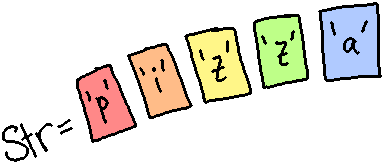
A string is a special data type that really is just an array of char variables. A string has a lot going on behind-the-scenes, and it also has a set of functions you can use to do some common operations on a string - finding text, getting a letter at some position, and more.
Note that everything with strings is case-sensitive. A computer considers
the letter 'a' and 'A' different, since they are represented by different
number codes. Keep that in mind for each of the string's functions.
Review 1. A char is…
- ○ Multiple letters, numbers, or symbols, stored in double quotes.
- ○ Multiple letters, numbers, or symbols, stored in single quotes.
- ○ A single letter, number, or symbol, stored in double quotes.
- ○ A single letter, numbe,r or symbol, stored in single quotes.
Review 2. To a C++ program, the letter 'a' and 'A' are considered…
- ○ Different characters
- ○ The same characters
Using strings
When we declare a string like this:
string str = "pizza";
what we have behind-the-scenes is an array like this:
| Value: | 'p' |
'i' |
'z' |
'z' |
'a' |
| Index: | 0 | 1 | 2 | 3 | 4 |
Declaring a string actually gives us an array of char variables. We
can access the string as a whole by using the string variable's name (str),
or access one char at a time by treating str like an array.
1.1. Subscript operator - get one char with [ ]
We can access each letter of the string directly with the subscript operator, just like an array:
Example: Outputting each letter of a string
cout << str[0] << endl; // Outputs p
cout << str[1] << endl; // Outputs i
cout << str[2] << endl; // Outputs z
cout << str[3] << endl; // Outputs z
cout << str[4] << endl; // Outputs a
Because we can act on a string like an array, this means we can also use a variable to access an arbitrary index of a character in the array…
Example: Accessing one letter at some position i
int i;
cout << "Get which letter? ";
cin >> i;
cout << str[i];
Or even iterate over the string with a for loop…
Example: Iterating and displaying each letter of a string
for ( int i = 0; i < str.size(); i++ )
{
    cout << i << " = " << str[i] << endl;
}
Additionally, strings have a set of functions that we can use to manipulate, search, and otherwise work with them.
Review 3. Given the variables
string name = "LUNA";
char letter;
The first letter of the name is at index 0. How do we store the
first letter of name in the char letter variable?
Review 4. Identify the index of each letter in LUNA:
| Index | ||||
| Value | 'L' | 'U' | 'N' | 'A' |
2. Additional string library functionality
2.1. Size of the string
size_t size() const;The string's
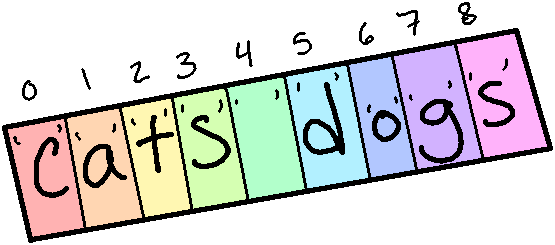
size()function will return the size of the string - how many characters are stored in the string. Thesize_tdata type is just a type of integer - an unsigned integer, because sizes cannot be negative amounts.Documentation: https://www.cplusplus.com/reference/string/string/size/
Example: Outputting a string's length
Let's write a little program that asks the user to enter some text, and then outputs the length of the string:
string text;
cout << "Enter some text: ";
getline( cin, text );
cout << "That string is " << text.size()
    << " characters long!" << endl;
When the user enters a line of text, it will count all characters (including
spaces) in the string, so the text "cats dogs" would be 9 characters long.
Program output:
Enter some text: cats dogs
That string is 9 characters long!
Example: Counting z's

If we wanted to use a for loop to iterate over all the letters of an array, we could! Perhaps we want to count the amount of z's that show up:
string text;
int zCount = 0;

cout << "Enter some text: ";
getline( cin, text );

// Iterate from i=0 to the size of the string (not-inclusive)
for ( unsigned int i = 0; i < text.size(); i++ )
{
    // If this letter is a lower-case z or upper-case Z
    if ( text[i] == 'z' || text[i] == 'Z' )
    {
        // Add one to z count
        zCount++;
    }
}

// Display the result
cout << "There were " << zCount
    << " z(s) in the string!" << endl;
Program output:
Enter some text: The wizard fought a zombie lizard
There were 3 z(s) in the string!
Review 5. Given the string:
string text = "a cat";
What will the output of this code be? (Remember what whitespace counts as a character.)
cout << text.size() << endl;
2.2. Concatenating strings with +

We can use the + operator to add strings together as well. This is called
concatenation.
Let's say we have two strings we want to combine - favoriteColor and
petName, we can use the concatenation operator + to build a new
string, superSecurePassword.
string favoriteColor = "purple";
string petName = "Luna";
string superSecurePassword = favoriteColor + petName;
cout << superSecurePassword << endl; // = purpleLuna
We can also add onto strings by using the += operator. Let's say you're
building a string over time in a program, and want to append parts separately.
string pizzaToppings = "";

// Later on...
pizzaToppings += "Buffalo sauce, ";

// Later on...
pizzaToppings += "Cheese, ";

// Later on...
pizzaToppings += "Pineapple";

// Later on...
cout << pizzaToppings << endl;
At the end of the program, the value of pizzaToppings would be:
"Buffalo sauce, Cheese, Pineapple"
Review 6. Given the strings:
string str1 = "t";
string str2 = "e";
string str3 = "a";
What will the output of this code be?
cout << str3 + str1 + str2 << endl;
2.3. Finding text with find()
size_t find (const string& str, size_t pos = 0 ) const;The find function can be used to look for a substring in a bigger string. If the substring is found, its position is returned. Otherwise, the value of
string::nposis found.When a starting
posis included, it only begins the search at that position. If left off, it defaults to 0 (the start of the string).Documentation: https://www.cplusplus.com/reference/string/string/find/
So when we want to search a string for some text, we can call it like
bigString.find( findMeString ), and that function call will return an
unsigned integer: the location of the findMeString within bigString, or
the value of string::npos when it is not found.
string str = "this was written during the 2021 winter storm make it stop please.";

string findMe = "winter";

size_t position = str.find( findMe );

cout << "The text \"" << findMe
    << "\" was found at position " << position << endl;
Program output:
The text "winter" was found at position 33
Review 7. Given the string:
string text = "The quick brown fox jumps over the lazy dog.";
where the letters have the following indices:
0    1    2    3    4    5    6    7    8    9    10   11   12   13
-------------------------------------------------------------------
T    h    e         q    u    i    c    k         b    r    o    w

14   15   16   17   18   19   20   21   22   23   24   25   26   27   28
------------------------------------------------------------------------
n         f    o    x         j    u    m    p    s         o    v    e

29   30   31   32   33   34   35   36   37   38   39   40   41   42   43
------------------------------------------------------------------------
r         t    h    e         l    a    z    y         d    o    g    .
What will the output of the following be?
cout << text.find( "fox" ) << endl;
2.4. Finding substrings with substr()
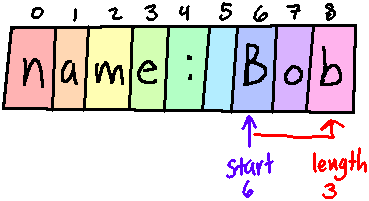
string substr (size_t pos = 0, size_t len = npos) const;Returns a string within the string, starting at the position
posprovided, and with a length oflen.Documentation: https://www.cplusplus.com/reference/string/string/substr/
With the substr() function, we can pull part of a string out, using a
starting point and a length.
string text = "Name: Bob";

int start = 6;
int length = 3;

string name = text.substr( start, length );

cout << "Extracted \"" << name << "\"." << endl;
Program output:
Extracted "Bob".
Review 8. Given the string:
string text = "Once upon a time...";
where the letters have the following indices:
0    1    2    3    4    5    6    7    8    9    10   11   12   13   14   15   16   17   18
---------------------------------------------------------------------------------------------
O    n    c    e         u    p    o    n         a         t    i    m    e    .    .    .
What will the output of the following be?
cout << text.substr( 5, 4 ) << endl;
2.5. Comparing text with compare()

int compare (const string& str) const;This compares the string with
strand returns an integer:
- \(0\) is returned if both strings are the same.
- \(< 1\) (a negative number) is returned if the caller string is "less-than" the
strstring.- \(> 1\) (a positive number) is returned if the caller string is "greater-than" the
strstring.One character is "less than" another if it comes before, and it is "greater than" if it comes after, alphabetically.
(Remember that lower-case and upper-case letters are considered separate, so comparing
'a'to'A'would actually return a positive number.)Documentation: https://www.cplusplus.com/reference/string/string/compare/
string first;
string second;

cout << "Enter first string: ";
cin >> first;

cout << "Enter second string: ";
cin >> second;

int order = first.compare( second );

cout << endl << "Result: " << order << endl;
Program output:
Enter first string: apple
Enter second string: banana

Result: -1
Review 9. Given the variables:
string strAlchemy = "ALCHEMY";
string strMoose = "MOOSE";
string strXylophone = "XYLOPHONE";
a. Snippet 1:
cout << strMoose.compare( strAlchemy ) << endl;
The output will be ○ Postive / ○ Negative / ○ Zero
b. Snippet 2:
cout << strMoose.compare( strXylophone ) << endl;
The output will be ○ Postive / ○ Negative / ○ Zero
2.6. Inserting text into a string with insert()
string& insert (size_t pos, const string& str);This function will take the calling string and modify it by inserting the string
strat the positionpos.Documentation: https://www.cplusplus.com/reference/string/string/insert/
string text = "helloworld";

cout << "Original text: " << text << endl;

int start;
string insertText;

cout << "Enter text to insert: ";
getline( cin, insertText );

cout << "Enter position to insert: ";
cin >> start;

text = text.insert( start, insertText );

cout << endl << "String is now: " << text << endl;
Program output:
Original text: helloworld
Enter text to insert: -to the-
Enter position to insert: 5

String is now: hello-to the-world
Review 10. Given the string:
string text = "crding";
What will the output of the following be?
cout << text.insert( 2, "ow" ) << endl;
2.7. Erasing a chunk of text with erase()
string& erase (size_t pos = 0, size_t len = npos);This function will return a string with a portion erased, starting at position
posand pulling out a length oflen.Documentation: https://www.cplusplus.com/reference/string/string/erase/
string text = "helloworld";

cout << "Original text: " << text << endl;

int start;
int length;

cout << "Enter position to begin erasing: ";
cin >> start;

cout << "Enter length of text to erase: ";
cin >> length;

text = text.erase( start, length );
cout << endl << "String is now: " << text << endl;
Program output:
Original text: helloworld
Enter position to begin erasing: 2
Enter length of text to erase: 5

String is now: herld
Review 11. Given the string:
string text = "nowhere";
What will the output of the following be?
cout << text.erase( 0, 3 ) << endl;
2.8. Replacing a region of text with replace()
string& replace (size_t pos, size_t len, const string& str);This function is similar to erase, except it will insert the string
strin place of the erased text.Documentation: https://www.cplusplus.com/reference/string/string/replace/
string text = "helloworld";

cout << "Original text: " << text << endl;

int start;
int length;
string replaceWith;

cout << "Enter string to replace with: ";
getline( cin, replaceWith );

cout << "Enter position to begin replacing: ";
cin >> start;

cout << "Enter length of text to replacing: ";
cin >> length;

text = text.replace( start, length, replaceWith );
cout << endl << "String is now: " << text << endl;
Program output:
Original text: helloworld
Enter string to replace with: BYE
Enter position to begin replacing: 2
Enter length of text to replacing: 5

String is now: heBYErld
Review 12. Given the string:
string text = "hopeless";
What will the output of the following be?
cout << text.replace( 4, 4, "ful" ) << endl;