Table of Contents
Overview:
- Terms to know: Index, element, array, subscript operator, initializer list, parallel arrays, multidimensional arrays
- Concepts:
- Why must an array's size be CONSTANT and known at compile-time?
- Minimum and maximum valid indices of an array given a size is…
- With a traditional array, we need to create separate variables and named constants to store array size and total items stored in the array if we want to work with these numbers. Why?
- How do you use an integer variable to access an element of an array at some index?
- How do you use a for loop to iterate over a 1D array? A 2D array?
- New code:
- Declare a traditional array:
TYPE ARRNAME[SIZE]; - Declare an array with an initializer list:
TYPE ARRNAME[] = { ITEM1, ITEM2, ITEM3 }; - Access an element of the array at index 0:
ARRNAME[0] - Display the item at element 2:
cout << ARRNAME[2];
- Declare a traditional array:
1. Array basics - what are arrays?
In C++, arrays are a built-in way to store a series of similar data all under one name. Before now, if we wanted to store a list of students in a class (or similar kind of data), we would have to declare a bunch of separate variables and write the same code over and over to manage it:
Example: Creating separate variables for three students and creating 3 different prompts and inputs for each variable
string student1, student2, student3;

cout << "Enter student 1 name: ";
cin >> student1;

cout << "Enter student 2 name: ";
cin >> student2;

cout << "Enter student 3 name: ";
cin >> student3;
This would quickly become unmanageable if you were writing a program with tens, hundreds, or thousands of students stored in it. Instead, we can make use of arrays to store a series of related data together.
Example: Creating an array and asking the user to enter a value for every element of the array
string students[100];
for ( int i = 0; i < 100; i++ )
{
  cout << "Enter student " << (i+1) << " name: ";
  cin >> student[i];
}
Arrays allow us to operate on the same name (e.g., student), but addressing
different elements of the array with an index number. This way, we can
write code to act on the data once, just modifying that index to work with
different pieces of data.
Example: student array of size 4:
| Element | Rai | Anuj | Rebekah | Rose |
|---|---|---|---|---|
| Index | 0 | 1 | 2 | 3 |
Each item in the array has a corresponding index marking its position in the list, with 0 being the first value. If an array is of size \(n\), then the valid indices are 0 through \(n-1\).
An element is the information stored at that index position, which is essentially a single variable in an array of variables.
Review 1. When we have a list of data to store, it is better to store it as… ○ an array / ○ a bunch of separate variables
2. Using traditional (C-style) arrays
2.1. Rules of traditional arrays
Array data types
Arrays can be declared with any data type. To the computer, we are just
declaring \(n\) amount of some variable, and it takes care of putting all the
n variables back-to-back in memory.
First index is 0
Most programming languages (but not all) have 0 as the first index
for arrays of items. (In the Lua programming language, we start at 1!)
Review 2. In C++, arrays begin at index: _
Review 3. If we have access to indices [0], [1], and [2] in our
array, then how many total elements are in the array? _
Size must be known at compile-time
Traditional C-style arrays must have its size be defined during its declaration and the array cannot be resized during the program's execution. Because the array size can't change, and because we may need to know the size of the array throughout the program, we will generally use a named constant to store the size of the array.
const int MAX_STUDENTS = 100;
string students[MAX_STUDENTS];
Array size (const) vs. item count (variable)
Because an array's size cannot be changed after its declaration, it often becomes necessary to overshoot the amount of spaces we need in the array so that we always have enough room for our data. Perhaps a school's classrooms range from 20 to 70 seats, so we would want to declare the array of the biggest size so that we don't run out of space. Because of this, not all spaces in the array may be taken up at any given time.
C++ doesn't have a function to directly get the amount of elements in an array, so generally when declaring an array we need to also have an associated variable to track how many items we've stored in the array.
Example: Declaring an array, storing a value for the element at index 0, adding 1 to the item count
const int MAX_STUDENTS = 100;   // total array size
int studentCount = 0;           // how many elements
string students[MAX_STUDENTS];  // array declaration

students[0] = "Rai";            // setting up first student
studentCount++;                 // adding 1 to student count
Review 4. If you're working with a traditional array, best practice is to store its size in a…
- ○ integer variable /
- ○ named int constant
2.2. Array declaration
In C++, we declare an array similarly to how we declare a variable, except that we need to specify an array size during declaration:
Example: Declaring an array of strings of size 100
// An array of size 100
string students[100];
Or, if we already have data to put into it, we can initialize it with an initializer list. Then the array will be sized at however many items you give it.
Example: Declaring an array of strings, initializing the data with an initializer list
// An array of size 4
string students[] = {"Rai", "Anuj", "Rebekah", "Rose"};
2.3. Accessing elements of an array
Valid indices
As stated earlier, if an array is of size \(n\), then its valid indices are 0 to
n-1. In most computer languages, arrays and lists start at index 0 and go up
from there, meaning to count for items we have "0, 1, 2, 3".
Warning!
A common source of program crashes is going outside the bounds of an array!
This happens if you try to access an invalid index, such as student[-1]
or student[100] (for an array of size 100; valid indices are 0-99).
Accessing array elements via index
After we've declared an array, we can treat its elements like normal
variables, storing data within it and accessing that data. Each one can be
accessed via its index (position in the array) and the subscript operator:
[].
In math, you might be used to these subscripts:
\[ a_n = a_{n-1} + 2 \]
But with C++, subscripts look like this:
a[n] = a[n-1] + 2
So, declaring an array and accessing its values can look like this:
Example: Declaring an array and storing values for each element, displaying the value of the element at index 0
string courses[4];
courses[0] = "CS 134";
courses[1] = "CS 200";
courses[2] = "CS 210";
courses[3] = "ASL 120";

cout << "First course: " << courses[0] << endl;
Or, with modern C++ (from 2011 and later) you can initialize an array with an
initializer list, {}
Example: Using an initializer list to initialize an array's elements
string courses[4] = {
  "CS 134",
  "CS 200",
  "CS 210",
  "ASL 120"
};

cout << "First course: " << courses[0] << endl;
Design!
It's common for array names to be plural - it is a structure that stores
multiple items - multiple courses, multiple products, multiple grades, etc.
So, to be clear, it is best to give your arrays plural names: courses,
products, grades, instead of singular.
Review 5. Given an array declared like this:
string cats[4];
The first element is at index __ and the last element is at index __.
Review 6. Given this array:
| [?] | [?] | [?] | [?] | [?] |
|---|---|---|---|---|
| Kat | Kabe | Luna | Pixel | Korra |
Assuming the first item is on the left and the last item is on the right, what is the element at index 3?
3. Arrays and memory
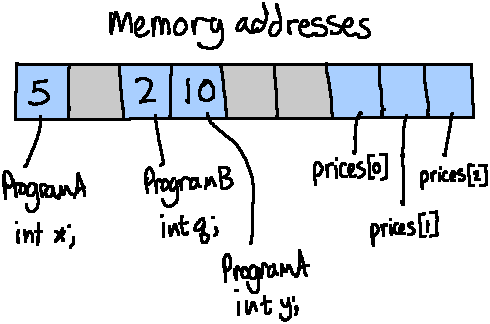
When we declare any variable it is assigned a memory address as it is stored somewhere in memory. You can think of this as it being stored in RAM (though the operating system abstracts this a bit more). When a program starts and variables are declared, space is taken up "in RAM" and then freed when the program closes or when the variable is destroyed. This way, other programs running in the operating system can utilize that space.
A memory address is a numeric value. Computers work on binary, but we often write memory addresses in hexadecimal to shorten the length of the addresses. An example memory address is: 0x7ffd1f7ba26c.
Example: Here's a simple program that creates two different variables, assigns values, and outputs the values and their memory addresses:
int main()
{
    int num = 10;
    string name = "Hello!";

    cout << "The variable 'num' has a value of " << num
         << "\n at the address " << &num << endl << endl;
    cout << "The variable 'name' has a value of " << name
         << "\n at the address " << &name << endl;

    return 0;
}
When it is run, it will give output like this:
The variable 'num' has a value of 10
at the address 0x7fff28b210bc

The variable 'name' has a value of "Hello!"
at the address 0x7fff28b210c0
Contiguous addresses
When a variable is declared, it will automatically have space allocated in memory. For an array's elements, those elements are going to be side-by-side in memory (contiguous).
Let's say we have an array of bool elements, which are 1 byte each.
If we declare it like this:
bool arr[4];
the address of each element might be something like…
Address of arr[0]: 0x7ffeeb9740d4
Address of arr[1]: 0x7ffeeb9740d5
Address of arr[2]: 0x7ffeeb9740d6
Address of arr[3]: 0x7ffeeb9740d7
The addresses would change each run, but they will always be 1 byte
apart in memory, since each bool is 1 byte big.
Let's also look at an array of integers. Each int is 4 bytes. We
declare it like this:
int arr[4];
the address of each element might be something like…
Address of arr[0]: 0x7ffded346a70
Address of arr[1]: 0x7ffded346a74
Address of arr[2]: 0x7ffded346a78
Address of arr[3]: 0x7ffded346a7c
Each element is still side-by-side in memory, but since each int
takes 4 bytes, each address is offset by 4. (0… 4… 8… then
c which is 12.)
Review 7. The elements of an array will be stored…
- ○ at random
○ side-by-side
… in memory.
4. Design patterns
Since arrays require quite a bit of management to work with, you could implement some basic functions to do this management, instead of having to re-write the same code over and over.
4.1. Storing array size and item count
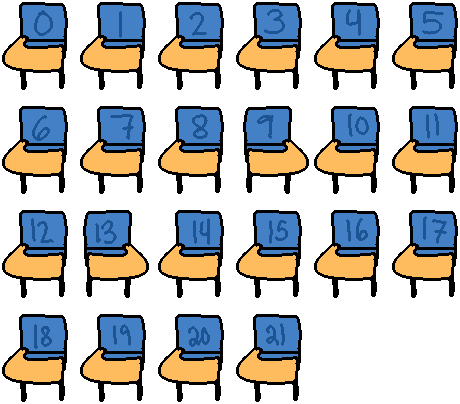
Let's say we have our student array and a maximum amount of 22 seats:
const int TOTAL_SEATS = 22;
string students[TOTAL_SEATS];
One design consideration to think about here is that, if we iterate from i = 0
to TOTAL_SEATS, we're going to iterate over seats that have students AND seats
that are empty. What if we were writing a program and JUST wanted to display a
list of students enrolled in the course, and not waste paper space or screen
space drawing blank links for empty seats?
In this case we usually need to keep a variable to track how many items we're actually storing in the array. For example:
int studentCount;
so the TOTAL_SEATS would be the size of the array, but the studentCount might
be less than or equal to that number. Every time we added a student we would
add +1 to the studentCount. That way, we could use studentCount in our for loop
to display just active students, none of the empty seats.
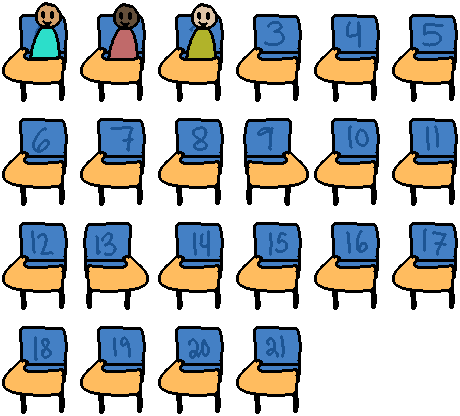
… The TOTAL_SEATS remain the same, even as the studentCount grows from
more students taking up space in available seats…
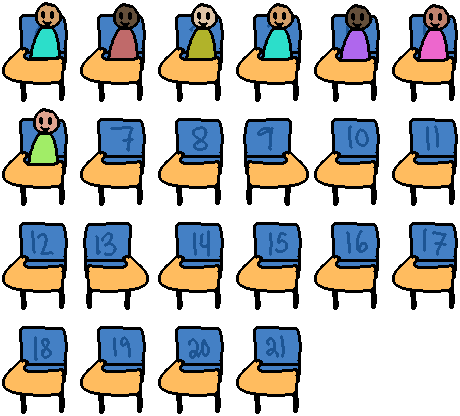
Review 8. Let's say we have our array of students and the TOTAL_SEATS
is 22, and the studentCount begins at 0.
After three students register for the course, then
TOTAL_SEATS value is: __ and studentCount value is: __
4.2. Accessing indices with variables
Since the array index is always an integer, we could use a variable to determine which item in an array to modify - such as asking the user which item they want to edit.
Example: Asking the user to enter an index and displaying the element at that index
cout << "Edit which item? (0-9): ";
cin >> itemIndex;
cout << "Enter price for item: ";
cin >> prices[ itemIndex ];
4.3. Asking the user to enter all elements
Using for loops is the most common way to iterate over all the data in an
array, setting data or accessing data. Have an array of size n? We want to
iterate from i = 0 to \(n-1\), going up by 1 each time.
We can iterate over all the items in an array and have the user enter information for each element by using a loop. Since the first index is 0, we sometimes just add +1 to the index for the user's benefit, since people generally aren't used to lists starting at 0.
const int TOTAL_ITEMS = 10;
float prices[TOTAL_ITEMS];

for ( int i = 0; i < TOTAL_ITEMS; i++ )
{
  cout << "Enter price for item " << (i+1) << ": ";
  cin >> prices[i];
}
4.4. Displaying all items in an array
We can display all the elements of an array by using a loop as well, though we usually don't want to show all elements of the array - usually just the items we know we're storing data in. Recall that we usually will have an extra integer variable to count how many items have actually been stored in the array, which is different from the total array size.
const int MAX_STUDENTS = 100;
int studentCount = 0;
string students[MAX_STUDENTS];

// (...Let's say 20 students were added here...)

// Iterate from index 0 to 19, since we have stored
// 20 students so far.
for ( int i = 0; i < studentCount; i++ )
{
  cout << "Student " << (i+1)
    << " is " << students[i] << endl;
}
You can also use a range-based for loop in versions of C++ from 2011 or later:
for ( auto & student : students )
{
  cout << student << endl;
}
4.5. Clear array
Sets all elements of this string array to an empty string and resets
the elementCount to 0 afterwards.
Example: Iterating over an array and setting each element's value to 0
void Clear( string arr[], int & elementCount )
{
  for ( int i = 0; i < elementCount; i++ )
  {
    arr[i] = "";
  }
  elementCount = 0;
}
4.6. Add new element to array
Often in our programs we will only set up one item at a time (perhaps when selected from a menu). This means we need to get the data for the array and figure out where in the array it will go.
void AddItem( string arr[], int & elementCount )
{
  cout << "Enter new element: ";
  cin >> arr[ elementCount ];
  elementCount++;
}
For an array, elementCount starts at 0 when the array is empty. This also
happens to be the index where we will insert our first element - at 0.
| Element | ||||
| Index | 0 | 1 | 2 | 3 |
Once we add our first element, our elementCount will be 1, and the next index
to insert data at will also be 1.
| Element | Cats | |||
| Index | 0 | 1 | 2 | 3 |
Then, elementCount will be 2, and the next index to insert at will be 2.
| Element | Cats | Dogs | ||
| Index | 0 | 1 | 2 | 3 |
Because of this, the elementCount variable both tells us how many
items have been stored in the array and what is the next index to
store new information at.
Review 9. If we had an array declared like this:
string names[5];
The for loop header to iterate over all the elements would look like…
for( ________________ ; ________________ ; ________________ )
Review 10. What does the following code snippet do?
for ( int i = 0; i < ARRAY_SIZE; i++ )
{
    employeeWage[i] += 5.12;
}
- ○ Iterates over all elements in the employeeWage array and adds 5.12 to each item.
- ○ Iterates over all elements in the employeeWage array and displays each element's value to the screen.
- ○ Iterates over all elements in the employeeWage array and overwrites each element with a value of 5.12.
4.7. Parallel arrays
Let's say we're writing a simple restaurant program where we need a list of dishes and their prices together. Later on, we will write our own data type using structs and classes to keep these items together. But for now, we would implement this relationship by keeping track of two separate arrays with the data we need.
This is an option, design-wise, however usually it's better to store the two arrays within a structure or class instead of making parallel arrays.
Example: Using 3 parallel arrays to store a dish's name, price, and if its vegetarian
const int MAX_DISHES = 20;
int dishCount = 0;

// Information about a dish
string  dishNames[MAX_DISHES];
float   dishPrices[MAX_DISHES];
bool    dishVegetarian[MAX_DISHES];

// ... Let's say we created some dishes here...

// Display the menu
cout << "What would you like to order?" << endl;
for ( int i = 0; i < dishCount; i++ )
{
  cout << "Dish #" << i << ":" << endl;
  cout << "* Name:   " << dishNames[i] << endl;
  cout << "* Price: $" << dishPrices[i] << endl;

  if ( dishVegetarian[i] ) {
    cout << "* Is vegetarian" << endl;
  }

  cout << endl;
}

// Get the index of dish they want
int whichDish;
cout << "Selection: ";
cin >> whichDish;
5. Multidimensional arrays
We can declare an array with two dimensions. A 1 dimensional array we can think of like this:
| CS134 | CS200 | CS210 | CS211 | CS235 |
Whereas a 2 dimensional array we can think of like a spreadsheet with multiple rows and columns:
| CS134 | Spring 2022 | PW | A |
| CS200 | Summer 2022 | RS | A |
| CS235 | Fall 0222 | RS | A |
Or even as a 2D display on a screen with an (x, y) position for pixels:

Generally when talking about rows and columns, rows comes first and columns come second.
Row is a horizontal grouping of information, a column is a vertical grouping of information. On a spreadsheet, a "cell" is a single item denoted by a row and a column.
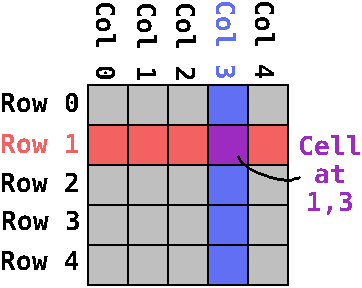
Often, the column relates to a specific field of data (such as a student's name, age, gpa, etc.) - Think of a struct and its member variables.
Then, each row corresponds to one record. So if we had an array of students, each row would be student 0, 1, 2, 3, etc. and then each column would be name, age, gpa, etc.
5.1. Example: Displaying all the elements of a 2D array
To display the contents of a 2D array, it can be useful to have two for loops, one nested in the other. The outer for loop will only increment once the inner one finishes its cycle. I usually put the rows as the outer loop and the columns as the inner-loop.
for ( int row = 0; row < ROWS; row++ )
{
    cout << "Row: " << row << endl;
    for ( int col = 0; col < COLUMNS; col++ )
    {
        cout << "\t Col: " << col
             << ": " << arr[row][col]
             << endl;
    }
}
5.2. Example: Declaring a 2D and a 3D array
string spreadsheet[32][32]; // rows and columns
int vertices[4][4][4];    // x, y, z
Let's say we wanted to turn a day planner into a program. Perhaps we originally stored the day plan like this:
| Day | Time | Task |
|---|---|---|
| Monday | 8:00 | Work meeting with Bob |
| Monday | 13:00 | Project review |
| Tuesday | 10:00 | Customer meeting |
| Tuesday | 12:00 | Crying in car |
| Wednesday | 14:00 | Sprint Retrospective |
We can convert this into a 2D array of strings (the "task"), with one dimension being for "day of the week" and the other dimension being for "hour of the day"…
5.3. Example: Declaring a 2D array of strings
int DAYS_OF_WEEK = 7;
int HOURS_IN_DAY = 24;
string todo[ DAYS_OF_WEEK ][ HOURS_IN_DAY ];
We could ask the user what day they want to set a task for, and if they type "Sunday" that could translate to 0, and "Saturday" could translate to 6 (or however you want to organize your week)…
| Sunday | Monday | Tuesday | Wednesday | Thursday | Friday | Saturday |
|---|---|---|---|---|---|---|
| 0 | 1 | 2 | 3 | 4 | 5 | 6 |
We could ask them next for what hour the task is at, and that can map to the second index: "0" for midnight, "8" for 8 am, "13" for 1 pm, and so on to 23.
With this information, we can get the user's todo task and store it at the appropriate indices:
5.4. Example: Asking the user to enter a day and hour and using those as indices
int day, hour;

cout << "Enter the day:" << endl;
cout << "0. Sunday    \n"
     << "1. Monday    \n"
     << "2. Tuesday   \n"
     << "3. Wednesday \n"
     << "4. Thursday  \n"
     << "5. Friday    \n"
     << "6. Saturday  \n";

cout << "Day: ";
cin >> day;

cout << "Enter the hour (0 to 23): ";
cin >> hour;

cout << "Enter your task: ";
cin >> todo[ day ][ hour ];
With the user's week planned out, you could then display it back to the user by using a nested for loop: One loop for the day, one loop for the hour.
5.5. Example: Nested for loop to display all elements of the 2D array
cout << "YOUR SCHEDULE" << endl;

for ( int day = 0; day < DAYS_OF_WEEK; day++ )
{
  for ( int hour = 0; hour < HOURS_IN_DAY; hour++ )
  {
    cout << day << ", "
         << hour << ": "
         << todo[ day ][ hour ] << endl;
  }
}
Though you'd probably want to do some extra formatting; such as determining that if the day is 0, then write "Sunday" instead of the number "0".
Review 11. Even with a 2-dimensional array each element is still the same data type. You declare a 2d array similarly to a 1d array, but with an extra size:
const int ROWS = 10;
const int COLUMNS = 3;
string spreadsheet[ROWS][COLUMNS];
Given 10 rows and 3 columns, how many elements would this be?
Review 12. To display the contents of a 2D array, it can be useful to have two for loops, one nested in the other. The outer for loop will only increment once the inner one finishes its cycle.
Given the following 2D array declaration:
const int ROWS = 3;
const int COLUMNS = 4;
string pixelColors[ROWS][COLUMNS];
How would you create for loops that will display the element data like this?
Row: 0
   Col: 0: #00ffff
   Col: 1: #ff00ff
   Col: 2: #000000
   Col: 3: #00ff00
Row: 1
   Col: 0: #000000
   Col: 1: #00ffff
   Col: 2: #ff0000
   Col: 3: #0000ff
Row: 2
   Col: 0: #000000
   Col: 1: #ffff00
   Col: 2: #ff0000
   Col: 3: #00ff00
6. Common errors
What happens if we have an array declared like this:
float prices[5];
But we try to access an index that it outside its range, like…
cout << prices[-1];
cout << prices[100];
If this occurs, this is an out of bounds error, and will cause the program to crash! So now we have a very reliable way to crash our programs now. :)
Review 13. Given the array declaration:
int myArr[10];
Are any of the following out of bounds?
myArr[0]is ○ OK / ○ Out-of-boundsmyArr[5]is ○ OK / ○ Out-of-boundsmyArr[10]is ○ OK / ○ Out-of-boundsmyArr[11]is ○ OK / ○ Out-of-bounds