Table of Contents
Video - Variables:
Video - Named constants:
Overview:
- Terms to know: Variables, integers, floats, chars, booleans, strings, variable declaration, assignment, initialization, named constants, garbage data, arithmetic operators, compound operations, string concatenation, LHS, RHS, unsigned data types, literal, auto, unsigned, case sensitivity
- New code:
- Variable declaration:
TYPE VARNAME; - Variable declaration and initialization:
TYPE VARNAME = VALUE; - Variable assignment (after declaration):
VARNAME = VALUE; - Variable assignment with math expression:
VARNAME = NUM1 + NUM2; - Named constant declaration:
const TYPE NAME = VALUE; - string literals must be written in double quotes "", char literals must be written in single quotes ''.
- Variable declaration:
- Common errors:
- If you don't initialize a variable with a value, then it will contain garbage by default.
1. Storing data in variables
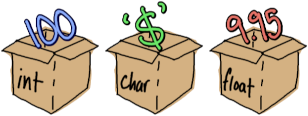
Variables are named locations where we can store information.
We use variables in programming as places to temporarily store data so that we can manipulate that data. We can have the user write to it via the keyboard, we can use files to write data to variables, we can do math operations or modify these variables, and we can print* them back out to the screen or a text file. (*Printing here meaning "display on the screen"; not to a printer.)
When we're writing programs in C++, we need to tell our program what the data type of each variable is, and give each variable a variable name (aka identifier). When a variable is declared, a space in RAM is allocated to that variable and it can store its data there. That data can be manipulated or overwritten later as needed in the program.
Some examples of things we might store as variables:
- A student's information:
string studentName, the name of a studentfloat studentGpa, the GPA of that studentint creditHoursCompleted, the total amount of credit hours the student has completedbool activeStudent, whether the student is an active student or not (e.g., graduated?)
- A store website's item listing:
string name, the name of the productfloat price, the price of the productint quantity, how much of this product is in stock
Review 1. When a variable is declared, where is that data stored?
- ○ CPU
- ○ Hard drive
- ○ Graphics card
- ○ RAM
Review 2. In order to use a variable in C++ we must specify…
- ○ what type of data will be stored in it.
- ○ how much space in RAM we require, in bytes.
Review 3. True or false: A variable's value can be overwritten.
- ○ True
- ○ False
2. Data types
In C++, when we want to create a variable we need to tell the compiler what the data type of the variable is. Data types specify what is stored in the variable (whole numbers? numbers with decimal values? text? true/false values?). Each data type takes up a different amount of space in memory.
Some of the common data types we'll use are:
| Data type | Values | Size | Example code |
| char | single symbols - letters, numbers, anything | 1 byte | char currency = '$'; |
| boolean | true or false |
1 byte | bool savedGame = false; |
| integer | whole numbers | 4 bytes | int age = 100; |
| float | numbers w/ decimals | 4 bytes | float price = 9.95; |
| double | numbers w/ decimals | 8 bytes | double price = 1.95; |
| string | any text, numbers, symbols, any length | 4 bytes | string password = "123secure"; |
- Floats and doubles both store numbers with fractional (decimal) parts, but a double takes up double the memory in RAM, allowing to store more accurate fractional amounts. A float has 6 to 9 digits of precision and a double has 15 to 18 digits of precision. (From https://www.learncpp.com/cpp-tutorial/floating-point-numbers/)
- Boolean data types store true and false values, but will also accept integer values when assigned. It will convert a value of 0 to false and any other number to true.
- String variables' values must be written within double quotes
"Hello!" - Character variables' values must be written within single quotes
'Z'
Additional information: Unsigned data types
Sometimes it doesn't make sense to store negative values in a
variable - such as speed (which isn't directional, like velocity),
the size of a list (can't have negative items), or measurement
(can't have negative width). You can mark a variable as unsigned
to essentially double its range (by getting rid of the negative side
of values). For instance, a normal int can store values from
-2,147,483,648 to 2,147,483,647, but if you mark it as unsigned,
then your range is 0 to 4,294,967,295.
Review 4. Identify which data types would work best for each variable description
Types: float, int, string, char
Variables:
prices |
temperature |
letterGrade |
seatsAvailable |
howManyRegistered |
names |
addresses |
3. Declaring variables and assigning values to variables
3.1. Variable declaration
When we're declaring a variable, it needs to follow one of these formats:
Declaration forms
DATATYPE VARIABLENAME;DATATYPE VARIABLENAME = VALUE;DATATYPE VAR1, VAR2, VAR3;DATATYPE VAR1 = VALUE1, VAR2 = VALUE2;DATATYPE VARIABLENAME{VALUE};- Newer versions of C++
The data type goes first, then the variable name/identifier, and if you'd like, you can also assign a value during the same step (though this is not required). Once a variable has been declared, you don't need to declare it again. This means you don't need to re-specify its data type when you're using it. Just address the variable by its name, and that's all.
// Declaring variables and assigning values
int totalCandies{10};
int totalKids{5};
int candiesPerKid{totalCandies / totalKids};

// Reusing the same variables later on
totalCandies = 100;
totalKids = 10;
candiesPerKid = totalCandies / totalKids;
float price = 9.99;
float tax = 0.11;
// Text output to the screen. Can do math within!
cout << "Please pay " << (price + price * tax);
Additional information: Modern C++: auto
In C++11 (from 2011) and later, you can use the keyword auto as the "data
type" in your variable declaration that includes an assignment statement. When
you use auto, it uses the assigned value to automatically figure out the
variable's data type, so you don't have to explicitly define it:
auto price = 9.99;      // it's a double!
auto price2 = 2.95f;    // it's a float!
auto player = '@';      // it's a char!
auto amount = 20;       // it's an int!
3.2. Variable assignment
Assignment forms
Stores the LITERAL value in VARIABLENAME:
VARIABLENAME = LITERAL;Copies the value from VARIABLENAME2 to VARIABLENAME1.:
VARIABLENAME1 = VARIABLENAME2;
When assigning a value to a variable, the variable being assigned to always goes on the left-hand side ("LHS") of the equal sign =. The = sign is known here as the assignment operator.
The item on the right-hand side ("RHS") will be the value stored in the variable specified on the LHS. This can be a literal (a hard-coded value) or it can be a different variable of the same data type, whose value you want to copy over.
price = 9.99;       // 9.99 is a float literal
state = "Kansas";   // "Kansas" is a string literal
operation = '+';    // '+' is a char literal
// Declare and initialize our variables
string student1 = "Hikaru";
string student2 = "Umi";
string student3 = "Fuu";
string bestStudent;

// Assignment statement
bestStudent = student3;
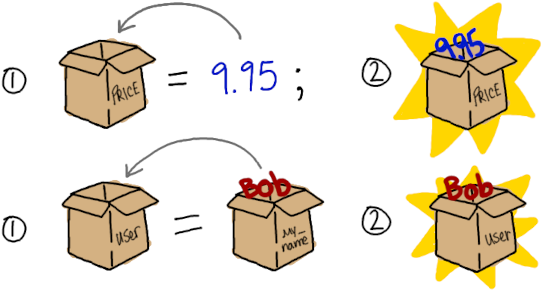
3.3. Variable copying
If you use two variables in an assignment statement, like this:
bestStudent = myName;
This will copy the value in myName and store that copy
in bestStudent.
3.4. Variable initialization
When we declare a variable and give it a value in the same line of code, that is called initialization. The equal sign can be used in this regard:
string productName = "Candybar";
float productPrice = 3.25;
But with more modern C++, it's recommended that we use braced initialization:
string productName{ "Candybar" };
float productPrice{ 3.25 };
You might see both of these ways used to initialize variables in starter code.
3.5. Additional information: Garbage!
If a variable is not initialized with some value, it will have some garbage value assigned to it - whatever was left over in the memory space where it was created. This data isn't useful to us, and usually shows up as random large numbers (12734827), so it's good to make sure to initialize your variables!
Review 5. How would we declare a variable to represent a person's temperature and give it a value of 98.6?
Review 6. How would we declare a variable to represent a student's name and assign it the value of Maryam?
Review 7. What data t ype will the compiler set this variable as?
- ○ bool
- ○ char
- ○ float
- ○ string
Review 8. A boolean variable has already been declared and it is named savedGame. How do you assign a value of true to the variable?
Review 9. Given the two variables declared…
string user1 = "Bob";
strin guser2 = "Ami";
And then this assignment statement is executed: user1 = user2;
What will the value of each variable be afterwrard?
user1is _.user2is _.
4. Named constants

Whenever you find yourself using a literal value in your assignment statements, you may want to think about whether you should replace it with a named constant instead.
const CONSTNAME = LITERAL;
A named constant looks like a variable when you declare it, but it also has the keyword const - meaning that the value can't change after its declaration.
Let's say you wrote a program and hard-coded the tax rate:
// Somewhere in the code...
totalPrice = cartTotal + ( cartTotal * 0.0948 );

// Somewhere else in the code...
cout << 0.0948 << " sales tax" << endl;
Then the tax rate changes later on. You would have to go into your program and search for "0.0948" and update all those places! Instead, it would have been easier to assign the tax rate ONCE to a named constant and referred to that instead:
// Beginning of program somewhere...
const SALES_TAX = 0.0948;

// Somewhere in the code...
totalPrice = cartTotal + (cartTotal * SALES_TAX);

// Somewhere else in the code...
cout << SALES_TAX << " sales tax" << endl;
If you ever find yourself using the same literal multiple times in your program, then perhaps consider replacing it with a named constant.
Review 10. How would we declare a named constant to represent the maximum amount of students in a class and assign it a value of 30?
5. Naming conventions

While you can generally name a variable whatever you'd like, you still need to adhere to the syntax rules of the C++ language. In particular:
- Names can only contain letters (upper- and lower-case), numbers, and underscores.
- Spaces are not allowed in a variable name!
- Names cannot start with a number.
- A name cannot be a keyword in C++, a name reserved for something
else in the language, such as
void,if,int, etc.
There are also naming conventions used so that variables (and later on functions and structs/classes) have a consistent naming scheme:
- Variables:
- One common style is
lowerFirstLetterThenUpperCasefor variable names - this is called Camel Case. - Another style you might see in C++ code is
all_lower_with_underscores. - You might see both of these styles in my starter code or examples, but I try to stick to one style for a program. You should also choose one and stay consistent in each program.
- One common style is
- Named constants:
- It is customary to give your named constants names in ALL CAPS,
using underscores (
_) to separate words. For example:TOTAL_STUDENTS,OP_TAX_RATE, etc.
- It is customary to give your named constants names in ALL CAPS,
using underscores (
Everything in C++ is case sensitive, which means if you name a
variable username, it will be a different variable from one named
userName (or if you type "userName" when the variable is called
"username," the compiler will complain at you because it doesn't know
what you mean).
Review 11. Identify which variable names are valid or invalid.
- ○ Valid / ○ Invalid
total Pizzas - ○ Valid / ○ Invalid
int - ○ Valid / ○ Invalid
farmName - ○ Valid / ○ Invalid
my_int
6. Basic operations on variables
Now that you have variables available in your program to play with, what can you even do with them?
6.1. Outputting variable values
Using the cout (character-out) statement, you can display text to
the screen with string literals:
cout << "Hello, world!" << endl;
But you can also display the values stored within variables, simply by using the variable's name:
cout << myUsername << endl;
You can also chain as many literals, variables, and commands together
as long as they have the output stream operator << in-between.
cout << "Student: " << name
     << endl << "GPA: " << gpa
     << endl << "Year: " << year << endl << endl;
6.2. Inputting variable values
We can use the cin (character-in) statement to get the user to
enter something on the keyboard and store that data into a variable:
float gpa;
cin >> gpa;
cin >> can be used on strings, but it will not read anything after
a space. Instead, we use the getline function to read whole lines
of text into string variables:
string oneLine;
getline( cin, oneLine );

string oneWord;
cin >> oneWord;
There will be more information on input and output in a later section.
6.3. Math operations

With variables with numeric data types (ints, floats, doubles), we can do arithmetic with the +, -, *, and / operators.
| Symbol | Description |
|---|---|
+ |
Addition |
- |
Subtraction |
* |
Multiplication |
/ |
Division |
Make sure to put the result somewhere! When you do a math operation and you want to use the result elsewhere in the program, make sure you're storing the result in a variable via an assignment statement! If you just do this, nothing will happen:
totalCats + 1;
You can use an assignment statement to store the result in a new variable:
newCatTotal = totalCats + 1;
Or overwrite the variable you're working with:
totalCats = totalCats + 1;

6.4. Compound operations
There are also shortcut operations you can use to quickly do some math and overwrite the original variable. This works with each of the arithmetic operations:
// Long way:
totalCats = totalCats + 5;

// Compound operation:
totalCats += 5;
Other shorthand:
| Description | Long version | Short 1 | Short 2 |
|---|---|---|---|
| Increment | x = x + 1; | x += 1; | x++; OR ++x; |
| Increment | x = x + 2; | x += 2; | |
| Decrement | x = x - 1; | x -= 1; | x–; OR –x; |
| Decrement | x = x - 2; | x -= 2; | |
| Multiply | x = x * 2; | x *= 2; | |
| Divide | x = x / 2; | x /= 2; |
6.5. String operations
Strings have some special operations you can do on them. You can also see a list of functions supported by strings here: C++ String Reference (We will cover more with strings in a later part).
Concatenating strings
You can use the + symbol to combine strings together. When used
in this context, the + sign is called the concatenation operator.
string type = "pepperoni";
string food = "pizza";

// Creates the string "pepperoni pizza"
string order = type + " " + food;
Letter-of-the-string
You can also use the subscript operator [ ] (more on this when we
cover arrays) to access a letter at some position in the string.
Note that in C++, the position starts at 0, not 1.
string food = "pizza";

char letter1 = food[0];  // Stores 'p'
char letter2 = food[1];  // Stores 'i'
char letter3 = food[2];  // Stores 'z'
char letter4 = food[3];  // Stores 'z'
char letter5 = food[4];  // Stores 'a'
Review 12. Given the variables x = 4 and y = 2, after the statement
z = x + y;
The value of z will be: _
Review 13. Given these variables and their values:
int a = 10;
int b = 20;
int c = 30;
int d = 40;
What is the result of the variable after each of the following operations?
awill be _ after:a++;
bwill be _ after:b--;
cwill be _ after:c *= 2;dwill be _ after:d /= 2;
Review 15. A float variable named ratio has already been declared. Which of the following assigns a float literal as a value for the variable?
- ○ ratio = Calculate( grade, total );
- ○ ratio = grade / total;
- ○ ratio = 0.5;
- ○ ratio = ratio + 1.0;