Table of Contents
Overview:
- Terms to know: Source code, codeblock, main() function, compile/build, standard library, cout, iostream, stream operator, arguments
- Terminal commands:
- Compile a source file:
g++ FILE.cpp -o PROGNAME.exe - Run a compiled source file:
./PROGNAME.exe - Run a compiled source file (with arguments):
./PROGNAME.exe arg1 arg2
- Compile a source file:
- New code:
- Include a library:
#include <LIBRARY> - Display text:
cout << "Hello!" << endl;
- Include a library:
1. Computers and binary, humans and C++
Our computer's CPU only understand commands given to it as binary codes - strings of 1's and 0's, like this: Early programmers had to write their software using this machine code, though over time programming languages evolved. When we write source code these days, we write in a human-made, somewhat human-readable text, with specific grammars and rules to it. These source code files are plaintext - they're just simple text that can be opened in a text editor. We will be using VS Code as the editor where we will write our C++ source code.
Files on a computer use an extention to identify what kind of
file it is, such as a .jpg for jpeg format images, .mp3 for audio
files, .html for website layouts.
At minimum, a C++ program requires one file - a .cpp source file.
Usually programs are bigger and contain multiple files, like .h
header files as well as other .cpp source files. The file that
contains the program starting point is usually named main.cpp,
though this name is not required.
Review 1. A C++ source file is plaintext, so it can be opened…
Review 2. The following file type(s) are valid C++ source code files:
2. Contents of a starter C++ program
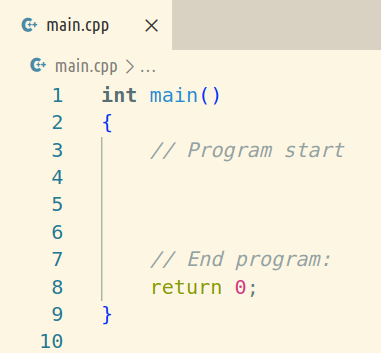
The bare-minimum C++ program looks like this:
int main()
{
  // Code goes here
  return 0;
}
Every C++ program begins at a main() function.
For now you can take this code for granted but you will understand it more as the class continues. But, some basic info:
- The
int main()is the function that starts our program. - The contents of the program must be between the opening curly
brace
{and the closing curly brace}. This region is known asmain()'s codeblock. We will see more codeblocks (with { }) later in the class. - The
return 0;is where the program ends. 0 is returned for 0 errors. - Code we add will go after the
{and before the return 0;.
Additionally, C++ is case sensitive, so capitalization matters. Make
sure you write main() in all lower case - Main() and MAIN() won't work!
Review 3. All C++ programs must have a starting point, and it will always be…
Review 4. The space between { and } is known as…
3. Creating a program: Building source code into a program
Remember that your computer expects to read binary 1010101010, and does not understand English or other human languages. When we're ready to run our C++ program, we need to run it through a program called a compiler.
A compiler goes through your source code, generating binary code based on what you wrote. The end result is an executable file, also known as a binary file. This is the type of program where, if you double-click it on your computer, it will run.
The compiler program we are using in class is called g++ (or
MinGW, which is a Windows port of g++). When we're ready to test
out our code, we can open up a terminal in VS Code and enter the
command:
g++ main.cpp
We're telling the g++ compiler program to convert our main.cpp
source code file into an executable. By default, it will either
generate a.exe (on Windows) or a.out (on Linux/Mac), but we can
always rename our program, or we can tell g++ what to name our
program in the same step:
g++ main.cpp -o MyProgram.exe
Once we're ready to run our program, we would then launch it from the terminal like this:
./MyProgram.exe
Though at the moment, this program does nothing except exit! :
Review 5. In order to specify a custom name for your program executable, you need to use which of these flags?
Review 6. What is the name of the compiler program we use to turn our source code into an executable file?