Table of Contents
Overview:
- Terms to know: Struct, class, object, dot operator, member variable, member function (method), accessibility, public, private, protected, getter (accessor), setter (mutator), constructor, destructor, scope resolution operator, shallow copy, deep copy
- Concepts:
- How to declare a class and its members in a .h file.
- How to define a class' member functions (methods) in a .cpp file.
- How to declare an object-variable whose type is a class.
- How to access members via an object-variable.
- What can access public, protected, and private members?
- How to declare and define getter and setter functions.
- How to declare and define constructors and destructors
1. Structs vs. Classes
Structs in C++ have all the same functionality of a Class, but are generally used design-wise to group a few variables together, maybe some functions, into a simple structure. A class, on the other hand, is usually used for much bigger and more complex objects.
In C++, the only difference between Structs and Classes are default
accessibility - if you don't specify the accessibility of your
variables/functions within a struct, they are public by default.
This means that anything in the program can access those
variables/functions. For Classes, everything is private by
default - only that Class itself can use the variables/functions.
1.1. Declaring a struct
Struct declarations go in header (.h) files. Usually the file name should reflect the name of the struct itself, and the file guard labels should also match.
#ifndef _STRUCTNAME
#define _STRUCTNAME

struct STRUCTNAME
{
  int var;
  void Func();
};

#endif
Design-wise, structs should only contain a small amount of data. While structs can contain functions, it is generally better to create a class if you find yourself needing functions.
An example of a small struct would be grouping x and y
coordinates together in a Coordinate Pair…
struct CoordinatePair
{
    float x, y;
};
Sometimes we need to group some basic variables together. Structs are great for this.
struct Rectangle
{
    float left, right, top, bottom;
};
1.2. Declaring object variables
Once a struct has been declared in a program, you can then create a
variable with that data type. To access the internal variables of the
struct, you use the variable's name followed by the dot operator .
and then the name of the member variable.
// Declare two variables
CoordinatePair point1, point2;

cout << "Enter the x y coordinates for the first point: ";
cin >> point1.x >> point1.y;

cout << "Enter the x y coordinates for the second point: ";
cin >> point2.x >> point2.y;

float slope = ( point2.y - point1.y ) / ( point2.x - point1.x );
cout << "The slope is: " << slope << endl;
We will have more examples during the section on Classes, since that's mostly what we will be using. Again, structs are useful for combining a small amount of member variables together under one name, usually used for structures for math (coordinates, rectangles, etc.) but more sophisticated objects ought to be created with a class.
Best practices:
2. Classes introduction
Traditionally, a struct is used to create small objects that join a few variables together. Classes are much more heavily used in C++ and is the back-bone of Object Oriented Programming. There is a lot we can do with classes, but for now we are just going to look at the basics.
A class declaration looks just like a struct declaration except that
we use the keyword class. Take note that with a struct and class
declaration, we must end the closing curly brace with a semi-colon.
Best practices:
Example: Declaring a Player class
class Player
{
  public:
  void SetPosition( int newX, int newY );
  void Move();

  private:
  int x, y;
};
Review 1. Structs should be used for…
- ○ larger objects with variables and functions
○ small objects with just a few variables
… and Classes should be used for…
- ○ larger objects with variables and functions
- ○ small objects with just a few variables
3. Member accessibility
We can define our member variables and functions with three different levels of accessibility, dictating where these members can be accessed throughout the program:
- public:
- Any part of the program can access these members. This is usually used for the member functions of a class.
- private:
- These members can only be accessed by the class itself, from within its functions.
- protected:
- Similar to private except that classes that inherit from the class we're defining will also have access to protected members. More on this when we cover inheritance.
Best practices:
Review 2. Given this snippet of code:
int main()
{
  Button submitButton;
  submitButton.text = "Sign up!";
}
The Button class must have a member variable named "text", and its accessibility is…
○ public / ○ protected / ○ private
Review 3. It is good practice to make member variables private and provide public functions as a way to interface with those behind-the-scenes variables.
According C++ Core Guidelines C.9: Minimize exposure of members, what are the reason(s) for this? Select all relevant answers.
- □ Annoy fellow programmers
- □ Information hiding
- □ Minimize the chance of unintended access
- □ Simplifies maintenance
4. Header and Source files
When we are creating a class, we generally will put the class declaration within its own header file. Header files end with .h or .hpp - I tend to use .hpp since we're using C++ and I like to explicitly state this is a "C++ header"; the .h extension was also used in C. However, the C++ Core Guidelines document says to use .cpp for code files and .h for interface files.
Additionally, don't forget that your header files need file
guards! Microsoft likes to default to #pragma once, but best
practice is to use #ifndef ... #define ... #end because it's portable.
Review 4. Class declarations go in _ files and the class' function definitions go in _ files.
Review 5. True or false: Other programmers will never write code that inadvertently messes up your code.
Review 6. True or false: You don't need to make sure the data in your program is safe and valid.
Example: Rectangle class
Rectangle.h - Class declaration
#ifndef _RECTANGLE_H
#define _RECTANGLE_H

class Rectangle
{
  public:
  void SetPosition( int newX, int newY );
  void SetDimensions( int newWidth, int newHeight );

  private:
  int x, int y, int width, int height;
};

#endif
Rectangle.cpp - Class' function definitions
#include "Rectangle.h"

void Rectangle::SetPosition( int newX, int newY )
{
  x = newX;
  y = newY;
}

void Rectangle::SetDimensions( int newWidth,
                            int newHeight )
{
  width = newWidth;
  height = newHeight;
}
In our source file (.cpp), we need to make sure to include the
header that goes with our class so it knows about the class
declaration. Then, we can define the member functions here.
Note that when we're defining the functions outside of the class
declaration, we must prefix the function name with the class name,
followed by the scope resolution operator ::…
void Rectangle::SetPosition( int newX, int newY )
This is the standard way C++ files are organized - for each class we create, we create a header and a source file for it.
5. Additional context with classes
- What is
#ifndef?- In C++, when we
#include "Rectangle.h"in a different source file, the compiler essentially copy-pastes the code from the included file into the include file. Because of this, if multiple files are#include "Rectangle.h"-ing (or any other header), the same code in that header gets copied multiple times, making the compiler think you've declared the same class over and over. #ifndef,#define, and#endifare preprocessor commands used by the compiler. We are essentially saying "if-not-defined_RECTANGLE_H, define_RECTANGLE_H, … … end-if.", preventing the compiler from copying the same file twice.
- In C++, when we
- Defining member functions inside the class declaration
- It is completely possible to define our member functions inside the class declaration, getting rid of the need for the .cpp file. However, this does end up being treated differently by the compiler - writing our class this way makes the functions inline… Basically, instead of having a separate function that the compiler will mark as "call this", it will copy the contents of the inlined function to the function call, basically replacing the call with the contents of the function. I haven't written much about how the compiler works since that's a more specialized topic and we don't need to worry about it at this stage of learning C++. This is just here for your own info.
- Should you define functions in the .h or the .cpp?
- It is standard to put class declarations and function declarations in .h files, and the function/method definitions in the .cpp files. You should follow this best practice.
- What is a Function vs. Method?
- A method is a word that means "member function". In Java and C#, the term method is used instead of function, since you physically cannot have functions defined outside of a class in those languages.
- I tend to stick with the term "member function", but if I write "method", it means that, whereas a "function" would be a standalone function elseware in the program.
Best practices:
- SF.2: A header file must not contain object definitions or non-inline function definitions
- SF.3: Use header files for all declarations used in multiple source files
- SF.5: A .cpp file must include the header file(s) that defines its interface
- SF.8: Use #include guards for all header files
- NL.27: Use a .cpp suffix for code files and .h for interface files
6. Getters and Setters
In Object Oriented Programming, we generally want to hide the inner-workings of a class from the outside world (other functions and other classes). If everything were exposed, then other parts of the program could make changes to our class and it could be difficult to track down all those modifying locations (this, in particular, is a nightmare at a job with a large codebase). We generally write all our member variables as private - accessible only to the class' member functions themselves - and use public member functions to interface with those variables as needed.
For example, in our Rectangle class, we might have a function to set up the entire Rectangle all at once…
Rectangle.cpp - Defining Rectangle's Setup function
void Rectangle::Setup( int newX, int newY, int newWidth, int newHeight )
{
  x = newX;
  y = newY;
  width = newWidth;
  height = newHeight;
}
… or just a couple things at a time …
Rectangle.cpp - Defining Rectangle's SetPosition function
void Rectangle::SetPosition( int newX, int newY )
{
  x = newX;
  y = newY;
}
Setter functions (mutators)
Or, we might want to just set one member variable's value. In this case, we write a member function called a setter (aka mutator) that is responsible for setting a member variable's value:
Rectangle.cpp - Defining Rectangle's SetX function
void Rectangle::SetX( int newX )
{
  x = newX;
}
The good thing about having setters instead of directly updating
the x variable is that we can add error checks in our setter. Say,
perhaps, that we don't want x to be negative, so we validate the
input before changing it…
void Rectangle::SetX( int newX )
{
  if ( newX >= 0 )
  {
    x = newX;
  }
}
If somewhere else in the program tries to set a negative value for
the x variable, it will just ignore that command. (We could also
throw an exception or display an error message or set a default
value - it's up to your design.)
Getter functions (accessors)
Likewise, sometimes we want to access those member variables to see what values they store. In this case, we write Getter member functions that are responsible for returning a copy of the data (or, in some cases, a reference to it - but that's a design decision).
int Rectangle::GetX()
{
  return x;
}
Getters are also handy for formatting output prior to returning it,
or doing some other operation before returning something. Let's say
we have a member function for a Student class, and a GetName
function is going to combine their names and return it together:
int Student::GetFullName()
{
  return lastName + ", " + firstName;
}
To summarize…
- Setters: Sets the value of a member variable. Generally, return
type is
voidand there is one parameter for the new value.void SetThing( int newValue ); - Getters: Returns the value of a member variable. Generally,
return type matches that variable, and there are no parameters.
int GetThing();
Review 8. Having a setter/mutator function is good for…
- ○ Doing error checks before updating the data
- ○ Formatting the data before returning it
- ○ Wasting a programmer's time
Review 9. Having a getter/accessor function is good for…
- ○ Doing error checks before updating the data
- ○ Formatting the data before returning it
- ○ Making the tech writer's job harder
7. Constructors and Destructors
Constructors and Destructors are special types of member functions in a class.
- Constructor:
- Runs automatically as soon as a new object is declared.
- Can declare more than one constructor.
- No return type
- Constructor name must match name of the class.
- Destructor:
- Runs automatically as soon as a new object is destroyed.
- Can only have one destructor.
- No return type
- Destructor name \underline=must= match name of the class,
prefixed with a tilde
\~.
Example: Text file wrapper
Let's say we're writing a class that works with a text file.
When the object is created, the constructor will open the file and get it ready to write to. With various member functions we can write to that text file as the program is running. Then, when the program ends and the object is destroyed, it will automatically close the text file for us.
Logger.h - Logger class declaration
class Logger
{
    public:
    // constructors
    Logger( string filename );
    Logger();

    // destructor
    ~Logger();

    // other method
    void Write( string text );

    private:
    ofstream m_output;
};
We have two constructors: one where we pass in a filename for a file to open, and one where we don't. In the second case, we can use a default file name.
Context: Why "m_" with the variable?
In some places, it is standard to prefix private member variables
with an underscore (_output) or (m_output). I tend to use the
latter when writing private member variables of a class. The "m"
stands for "member".
The constructor definitions could look like this:
Logger::Logger( string filename )
{
    m_output.open( filename );
}

Logger::Logger()
{
    m_output.open( "log.txt" );
}
The Write function could be used to write information to that
text file, and could be implemented like this:
void Logger::Write( string text )
{
    m_output << text << endl;
}
And then the destructor would be used to close up the file at the end:
Logger::~Logger()
{
    m_output.close();
}
Now, we don't have to manually deal with file operations since this class wraps that functionality and deals with it for us.
To use the program, we just declare the object variable:
#include "Logger.h"

int main()
{
    // This one calls the default constructor
    Logger logDefault;

    // This one calls the parameterized constructor
    Logger log( "logfile.txt" );

    // Writing to the text file
    log.Write( "Hello!" );
    log.Write( "How are you?" );

    // Program ends here. The destructor
    // is called automatically when the log variable
    // goes out of scope and is destroyed.
    return 0;
}
It can often be handy to overload our constructors so that we can initialize our objects in several different ways.
7.1. Default Constructors
A default constructor is a constructor with no parameters in it. This will be called when a variable of this class type is declared with no constructor explicitly called.
Usually, a default constructor would be used to initialize variables
to default values, and if your class contains pointers, this
constructor should initialize those pointers to point to nullptr.
Declaring a class with a default constructor
class MyClass
{
public:
MyClass() // Default constructor
{
  m_value = 0;
}

private:
  int m_value;
};
When we create a new object of this type like this, the default constructor will be called:
Instantiating a MyClass object variable, which will automatically call the default constructor
MyClass classVar;
7.2. Parameterized Constructors
Parameterized Constructors take in one or more parameters to help initialize the member variables of the object. We can have 0, one, or multiple parameterized constructors for our class.
A class with a default constructor and a parameterized constructor
class MyClass
{
  public:
  MyClass() {             // Default
    m_value = 0;
  }

  MyClass( int value ) {  //  Parameterized
    m_value = value;
  }

  // etc
};
When we instantiate our object, we can pass in argument(s) in order to call the parameterized version of the constructor:
Creating an object with its parameterized constructor
MyClass classVar( 100 );
If you declare a parameterized constructor but not a default constructor, then the C++ compiler will assume that you don't want an object to be declared with the default constructor. This means, you would only be able to declare the variable with an explicit call to the constructor and with arguments.
If this isn't the desired design, make sure to include a default constructor, even if you just leave it blank.
7.3. Copy Constructors
A copy constructor takes in another object of the same type as its parameter and uses this to copy over members from the parameter to the new object.
A class with default, parameterized, and copy constructors
class MyClass
{
  public:
  MyClass()         // Default
  {
    m_value = 0;
  }

  MyClass( int value )  // Parameterized
  {
    m_value = value;
  }

  MyClass( const MyClass& other )   // Copy
  {
    m_value = other.m_value;
  }

  private:
  int m_value;
};
In this case, we might already have an object of this type available, and when we are creating a new object, we want to make a copy of the old object:
First object is created with the parameterized constructor, second object is created with the copy constructor.
MyClass classVar( 100 );
MyClass anotherOne( classVar ); // Copy
- Design: When a class has multiple member variables, it is up to us to decide which variables get copied over during this operation. There could be some design cases where all information is copied over except certain fields (maybe a unique customerID or a name).
- Default copy constructor: If you don't explicitly declare a copy constructor, the C++ compiler will provide one for the class behind-the-scenes. This implicit copy constructor will only do shallow copies.
Ways to copy
- A Shallow Copy is where values of variables are copied over. This is generally fine for any sort of non-pointer-based variables. If the class contains a pointer that is pointing to some address, the shallow-copy of the pointer will point to the same address.
- A Deep Copy is where values are copied over like with a shallow copy, but also will allocate new memory for a dynamic array (if the class has one) in order to copy over values of the element of the array to the new class copy.
- Example of a shallow copy:

With the implicit copy constructor, any pointers in the copied version will be pointing to the same address as in the original. If the class contains a dynamic array, both the copy and the original will end up pointing to the same address of the array in memory.
- Example of a deep copy:
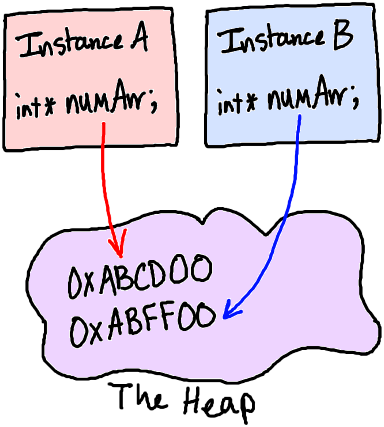
A new block of memory has been allocated for the
int * numArr. The values from InstanceA'snumArrwould be copied to InstanceB'snumArrvia a for loop during construction.Best practices:
- C.41: A constructor should create a fully initialized object
- C.43: Ensure that a copyable class has a default constructor
- C.45: Don’t define a default constructor that only initializes data members; use default member initializers instead
Review 9. Identify each of the following constructors:
class Book
{
    public:
    Book();
    Book( string newTitle, string newAuthor );
    Book( const Book& otherBook );
    ~Book();

   /* ... */
};
- Copy constructor is:
- Default constructor is:
- Parameterized constructor is:
Review 10. The constructors and destructor must…
- ○ be declared as non-member functions
- ○ be Setter and Getter functions, respectively
- ○ match the name of the class
8. Const member methods
When we declare a class' member function as const, we are saying that this function should not ever change any values of any member variables of this class. This can be handy for methods like a Display() where we just want to output member variables but should never change them.
class Coordinates
{
  public:
  int GetX() const;   // Can't change m_x or m_y
  int GetY() const;   // Can't change m_x or m_y

  void SetX( int val );
  void SetY( int val );

  void Display() const; // Can't change m_x or m_y

  private:
  int m_x, m_y;
};
The function definition will also need to have this const marked at the end of the function header as well.
int Coordinates::GetX() const
{
  return m_x;
}

void Coordinates::Display() const
{
    cout << "(" << m_x << ", " << m_y << ")";
}
Review 11. If we mark a class' member function as const (at the end of the function's header), this means that…
- ○ no class member variables can change values within this function
- ○ the return value of the function cannot be altered outside of the function
- ○ the function's definition cannot be updated by another programmer editing the code file
9. this pointer
Within our class methods, we can explicitly refer to the object we
are currently working with as this. this is a pointer, so it is
pointing to a memory address. Any member of the class can also be
accessed via the this pointer:
class MyClass
{
public:
  void SetVar( int var )
  {
      // Set member var to parameter var
      this->var = var;
  }

private:
  int var;
};
In this example, the SetVar function takes in a parameter var, but
the class also has a member variable named var. In order to deal
with the ambiguity, we use this->var to explicitly mark that we
want "this" object's member variable version on the left-hand side
of our assignment statement.
Usually I get around this ambiguity by naming my parameters with something more unique, like…
void SetVar( int newVar )
{
    // Set member var to parameter var
    m_var = newVar;
}