Table of Contents
1. Breaking free from a basic array
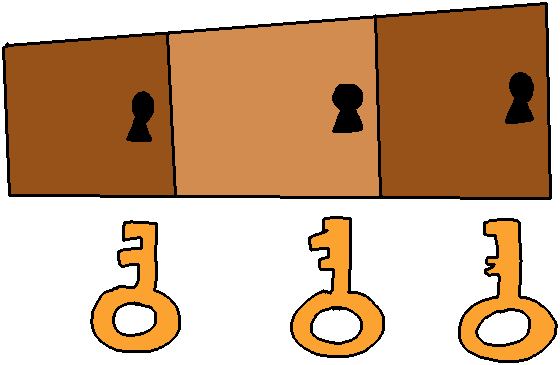
As you might remember with std::map in C++ or something like a
Dictionary in Python, sometimes we don't just want a series of
elements in an array with indices like 0, 1, 2, 3, … etc. Why use
positional indices when we can also use the "index" to store useful data?
Instead, we can store data as key/value pairs, where some key (unique identifier) is mapped to some value.
The Key and the Value can each be any data type, and they can be different data types from each other. Often, the key will be a basic data type like an integer or string, while the value will be a class that contains more data.
Hash Tables are how we can implement our own Map or Dictionary type.
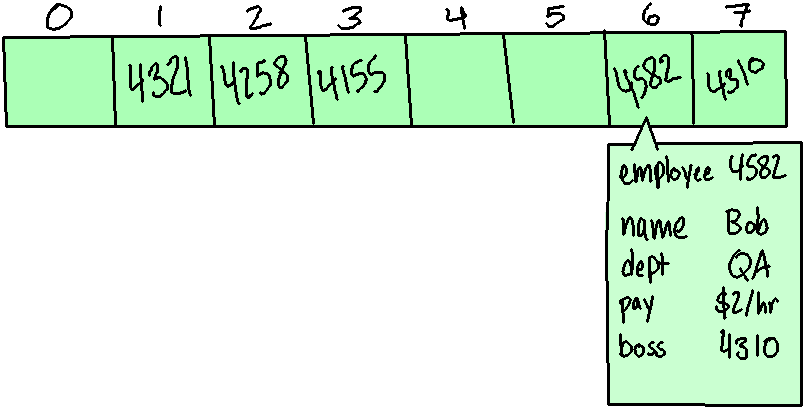
With this, we utilize a Hashing Function to convert a unique key into an index of an array.
Because we're taking a key, doing a simple math operation, and getting an index from that, the best case access-time for a Hash Table is O(1)… However, sometimes different keys might map to the same index - that's where collision strategies come into play.
Review 1. With a basic array, each element's value is stored at some index, which represents the element's…
- ○ length
- ○ position
- ○ total bytes
…in the array
2. Key-value pairs
Dictionaries are often thought of as "key-value pairs," where we have some data to store (this is the value), and we can look it up by its key (some searchable identifier).
When designing a class around this, we can reuse some piece of information as the key, as long as it's going to be unique in the table.
| Employee ID (key) | Employee object (value) |
|---|---|
| 1024 | Name: Amina, Employee ID: 1024, Department: Dev |
| 2048 | Name: Benita, Employee ID: 2048, Department: Sales |
| 1280 | Name: Caiyun, Employee ID: 1280, Department: QA |
The key should be a datatype that can be easily put into a mathematical function - such as an integer. Strings can also be used, but a complex data type like a class wouldn't work very well as a key.
The value can be any data type, usually a specific class that stores more data.
Some examples of key-value uses are:
- People lookup - Associating an employee ID, student ID, etc. (key) to an Employee or Student object (value).
- Address book - Associating a phone number (key) with a contact entry (value).
- Dictionaries - searching for a word (key), finding the definition (value).
- Book lookup - Associating an ISBN (key) to a Book object (value).
- Word counter - Associating each word (key) with the amount of times it has shown up in a document (value).
Review 2. A key is a…
- ○ unique identifier
- ○ unsigned integer
- ○ value stored in the table
… and …
- ○ can be any data type
- ○ must be an integer or a character
- ○ must be a float or a boolean
Review 3. In a hash table we are mapping some
○ pointer / ○ positional index / ○ unique key / ○ value
…to some…
○ pointer / ○ positional index / ○ unique key / ○ value
3. Hashing the Key to get the index
With our Hash Tables, each element in the array will be associated with a key - similar to our Binary Search Trees. The key is a unique identifier, allowing us to access a set of data mapped to the key.
The way we do this is we use this key as the input of a function that converts the key into an index - somewhere from 0 (the beginning of the array) to (n-1) (the end of the array). This is known as the hash function. A simple hash function could be taking the key and using the modulus operator with the size of the array to get an index.
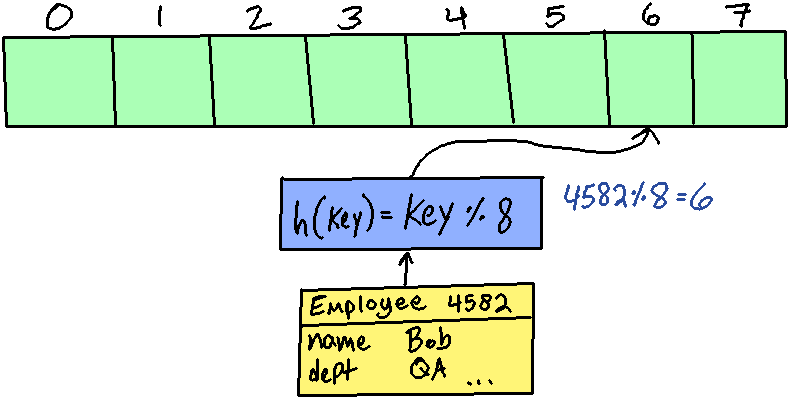
Because of this hash function, the efficiency of both inserting and searching is (O(1)) - unless there are collisions, where multiple keys map to the same index. This also means that, with minimal collisions, the speed to insert/search is going to be near instantaneous whether we have 10 items or 10,000 items.
Hashing functions
The simplest hashing function will just take the key and the size of the array and use modulus to find a resulting index:
Hash(key) = key % ARRAY_SIZE
Using the modulus operator restricts the resulting indices so that they will be
between 0 and ARRAY_SIZE-1. For example, if we had an array of size 5 and
were generating indices, everything would be between 0 and 4:
| index | 0 | 1 | 2 | 3 | 4 |
|---|---|---|---|---|---|
| key | 0 | 1 | 2 | 3 | 4 |
| 5 | 6 | 7 | 8 | 9 | |
| 10 | 11 | 12 | 13 | 14 | |
| 15 | 16 | 17 | 18 | 19 |
Looking at the table above, if we had something with the key 5 and the key 10, this would cause a collision - they would both map to the index position 0. If we do encounter a collision, we will need a strategy to find a new index – more on that later.
As an example of a hash function, let’s say we’re going to store employees in a Hash Table by their unique employee IDs. Employee IDs begin at 1000 (not 0 like the array index) and can be any 4-digit number. They’re not sequential. We want to assign an array index to each employee ID so we can quickly search for an employee by their ID. For this, we need a hash function. The simple hash function would look like this:
// Input: employee ID integer (key)
// Output: array index
int Hash(int employeeId) {
    return employeeId % ARRAY_SIZE;
}
Review 4. The modulus operation gets the…
- ○ power from a polynomial
- ○ quotient from a division
- ○ remainder from a division
- ○ result from a square root
Review 5. What is the solution for both of these operations? (They have the same result)
- a. 28 mod 11
- b. 39 mod 11
Review 6. What is the solution for both of these operations? (They have the same result)
- c. 24 mod 11
- d. 35 mod 11
Review 7. How can two unique keys end up with the same index?
- ○ When
Hash( key )returns the same value - ○ When
PushBack( key )is used twice in a row - ○ When the keys are the same
4. Collision strategies
Sooner or later, a collision will occur, and you will need a way to take care of it - basically, to generate a different index than the one that our hash function gives us. There are several ways we can design our hash tables and collision strategies. We're going to cover 3 in this course:
Linear Probing: Just move forward by 1 index until an available space is found. The form here would generally be:
newIndex = originalIndex + collisionCount
Quadratic Probing: Move forward by collisions2 until an available space is found. The form here would generally be:
newIndex = originalIndex + ( collisionCount * collisionCount )
Double Hashing: Use a secondary hash function and the collision count to compute a new index. The form here would generally be:
newIndex = Hash1( key ) + collisionCount * Hash2( key )
Review 8. If two keys Hash to the same index, this is a…
- ○ collision
- ○ element
- ○ hash
- ○ key
4.1. Linear Probing (Open Addressing)
With linear probing, the solution to a collision is simply to go forward by one index and see if that position is free. If not, continue stepping forward by 1 until an available space is found.
Initial hash table:
index 0 1 2 3 4 value 6 12 Insert new employee ID 16…
H(16) = 16 % 5 = 1COLLISION: Index 1 is already taken!
Move forward by 1…
H(16) + 1 = (16 % 5) + 1 = (1) + 1 = 2COLLISION: Index 2 is already taken!
Move forward by 1…
H(16) + 2 = (16 % 5) + 2 = (1) + 2 = 3Index 3 is available!
index 0 1 2 3 4 value 6 12 16
As an example of a hash function, let’s say we’re going to store employees in a Hash Table by their unique employee IDs. Employee IDs begin at 1000 (not 0 like the array index) and can be any 4 digit number. They’re not sequential. We want to assign an array index to each employee ID so we can quickly search for an employee by their ID. For this, we need a hash function. The simple hash function would look like this:
// Input: employee ID integer (key)
// Output: array index
int Hash( int employeeId )
{
    return employeeId % ARRAY_SIZE;
}
Review 9. Given this table:
| Index     | 0        | 1        | 2        | 3        | 4        |
|-----------|----------|----------|----------|----------|----------|
| Key/Value | 10/Astha | 1/Zane   | 12/Lola  |          |          |
A new item is being added with a key = 6, value = "Bob". This table is using Linear Probing as its collision strategy. What index will Bob end up at (after resolving all collisions)?
4.2. Quadratic Probing (Open Addressing)
With quadratic probing, we will keep stepping forward until we find an available spot, just like with linear probing. However, the amount we step forward by changes each time we hit a collision on an insert.
Initial hash table:
index 0 1 2 3 4 5 6 7 8 9 10 11 12 value 14 41 18 Insert new employee ID 27…
H(27) = 27 % 13 = 1COLLISION: Index 1 is already taken!
Collisions = 1, shift over by \(collisions^2\)…
H(27) + 1^2 = (27 % 13) + 1^2 = (1) + 1^2 = 2COLLISION: Index 2 is already taken!
Collisions = 2, shift over by \(collisions^2\)…
H(27) + 2^2 = (27 % 13) + 2^2 = (1) + 2^2 = 5COLLISION: Index 5 is already taken!
Collisions = 3, shift over by \(collisions^2\)…
H(27) + 3^2 = (27 % 13) + 3^2 = (1) + 3^2 = 10Index 10 is available!
Each time there's a collision, we search further from the original hashed index: +1 space, then +4 spaces, then +9 spaces.

The probing function would look something like this:
int QuadraticProbe( int originalIndex,
   int collisionCount )
{
  return originalIndex + pow( collisionCount, 2 );
}
Review 10. Given this table:
| Index     | 0         | 1         | 2        | 3        | 4        |
|-----------|-----------|-----------|----------|----------|----------|
| Key/Value | 10/Charly | 11/Kiley  |          |          |          |
A new item is being added with a key = 5, value = "Bob". This table is using Quadratic Probing. What index will Bob end up at (after resolving all collisions)?
4.3. Double Hashing (Open Addressing)
With double hashing, we have two hash functions. If the first hash function returns an index that is already taken, then we use the second hash function on the key to generate an offset, instead of just using a linear or quadratic formula.
With this method, our new index after a collision will be:
\(newIndex=Hash(key)+collisionCount⋅Hash2(key)\)
It is up to our design to figure out a second hash function, but generally it should also work with prime numbers. For example:
int Hash( int key )
{
  return key % ARRAY_SIZE;
}

int Hash2( int key )
{
  return 7 - ( key % 7 );
}
Review 11. Given this table:
| Index     | 0         | 1         | 2        | 3        | 4        |
|-----------|-----------|-----------|----------|----------|----------|
| Key/Value | 10/Charly | 11/Kiley  |          |          |          |
A new item is being added with a key = 5, value = "Bob".
This table is using Double Hashing, with the second Hash
function (used for the "offset-by" amount) being:
H2(k) = 3 - k MOD 3
What index will Bob end up at (after resolving all collisions)?
5. Additional considerations
Index wrap-around
Note that with all of these operations, we will also do an additional operation
of index % ARRAY_SIZE to make sure the index stays within the bounds of the
array.
The problem of clustering Clustering is a problem that arises, particularly when using linear probing. If we’re only stepping forward by 1 index every time there’s a collision, then we tend to get a Dictionary table where all the elements are clustered together in groups.
| index | 0 | 1 | 2 | 3 | 4 | 5 | 6 | 7 | 8 | 9 |
|---|---|---|---|---|---|---|---|---|---|---|
| value | A | B | C | X | Y | Z |
Because of this, the more full the Hash Table gets, the less efficient it becomes when using linear probing.
Sizing a Hash Table Array When we’re writing a hash function, we will want to take into account how likely a collision will be. A general design rule is that making your array size a prime number helps reduce collisions.
Pushing to a Hash Table When Pushing a new { key : value } pair to a hash table first we try to use the Hash function to turn key into an index. If there is no collision, then we're good and we insert the new item to the table with that index.
However, while there is a collision, we need to add 1 to a collision counter and generate a new index. As long as that position in the table is taken, we encounter another collision and repeat.
Getting from a Hash Table
Similarly for the Get function we continue looping to find the index for our key. In this case, we're looping while we see a taken index but that item's key doesn't match. This means our loop ends if: (1) We've found an empty spot in the array (so our key isn't in the hash table at all), or (2) We've found an index where our key matches.
In the case where we find our desired key, then we return the value at that position, the array[index].
Review 12. The size of your table should generally be a(n)…
- ○ even
- ○ imaginary
- ○ prime
- ○ rational
…number.
6. Hash Table Efficiency
In an ideal world with no collisions, a Hash Table would have an \(O(1)\) growth rate for its Search, Insert, and Deletion no matter how many items it stores. However, since collisions may occur, the efficiency of the Hash Table can vary.
Pros
- Searching and Inserting is relatively quick: Since we use hash functions and collision functions to find the index to insert at and to access, it is just one math operation (at best) to find an index, and with collisions, hopefully just a few more calculations.
- Mapping a key to a value is useful: With a normal Array vs. Linked List, there's not really additional logic that goes into the storage - we just need to store data and it is thrown into a structure. With a Hash Table, we can have a more intentional design for our data.
Cons
- Many things affect Hash Table efficiency: The efficiency of finding an index can vary based on the size of the array, how full it is, the quality of the hashing function and collision strategy, and even the data being stored in it.
- A bad hash function can cause more collisions: Different hash functions can affect how many collisions occur, so different functions can cause different speeds.
- They are difficult to resize: If we were to resize a hash table, not only would we have to copy all the data over (which would be \(O(n)\)), we would also need to rehash all of the keys to get new indices based on the new table size. Because resizing a hash table is expensive, if we can reasonably estimate the needed size of the hash table ahead of time, that only helps us out. If we under-estimate the size, that can be costly in having to resize things.
Review 13. A hash table's performance can be affected by which of the following? (Select all appropriate answers):
- □ Cutting the table in half while searching
- □ The collision strategy
- □ The hashing function
- □ Too many of the same unique keys
7. Implementing a Hash Table
7.1. Structure of a HashTable Node
| PairNode |
|---|
+ key : int |
+ value : char |
We're going to create a wrapper struct that stores an element of the
table's key/value pair together. We're going to be hard-coding these
data types for now, but it could be modified further, such as to
make PairNode a templated struct, and to create a bool isInUse
variable. (See the challenge functionality at the end of this
intro.)
I'm going to put the PairNode type in my HashTable.h file, it
should go above the HashTable class declaration that we'll write
in a moment.
struct PairNode
{
    int key;
    char value;
};
7.2. Structure of a HashTable
| HashTable |
|---|
- m_table : char* |
- m_itemCount : size_t |
- m_tableSize : size_t |
+ HashTable( size: size_t ) |
+ ~HashTable() |
+ Push( key: int, value: char ) : void |
+ Get( key: int ) : char |
+ Size() : size_t |
- Hash( key: int ) : int |
- HandleCollision( originalIndex: int, collisionCount: int ) : int |
- Our HashTable will be built on top of an Array (or "Table"), where
we allow gaps - the elements stored do not need to be
contiguous. This table is where the data gets stored, then we
implement the interface functions that users (i.e., other
programmers) will use to store and retrieve their data.
- We can provide the user a way to set the table's size. If we do this (instead of hard-coding a size), our table will need to be a dynamic array.
- We may also want to keep track of the count of items stored in the hash table and the array size, so additional member variables for this.
- I'm hard-coding the keys' type as
intand values' type ascharto keep this implementation simple, since this is our first new data structure.
- For behind-the-scenes functionality, we will have our Hash
function and functionality for dealing with Collisions. These will
be
private, as the user doesn't need to know the inner-workings of the structure; they just care about storing and retrieving their data. - For the public interface functions, the user will want to be able to Push a new key/value pair into the structure and Get data from the structure given the unique identifier key.
- HashTable.h:
#ifndef _HASHTABLE
#define _HASHTABLE

#include <iostream>
#include <string>
using namespace std;

struct PairNode
{
    int key;
    char value;
};

class HashTable
{
public:
    HashTable( size_t size );
    ~HashTable();

    void Push( int key, char value );
    char Get( int key ) const;

    size_t Size() const;

private:
    int Hash( int key ) const;
    int HandleCollision( int originalIndex, int collisionCount ) const;

    PairNode* m_table;
    size_t m_itemCount;
    size_t m_tableSize;

    friend class HashTableTester;
};
#endif
- HashTable.cpp:
#include "HashTable.h"

HashTable::HashTable( size_t size )
{
}

HashTable::~HashTable()
{
}
HashTableTester
Since we should be writing unit tests to validate our work as
well, make sure you specify friend class HashTableTester; in your
class declaration. :)
We can create the HashTableTester class in its own file:
- HashTableTester.h:
#ifndef _HASHTABLETESTER
#define _HASHTABLETESTER

#include "HashTable.h"

class HashTableTester
{
public:
    void Test_Constructor();
    void Test_Hash();
    void Test_HandleCollision();
    void Test_Push();
    void Test_Size();
    void Test_Get();
};
#endif
You'll need a HashTableTester.cpp as well, and we will implement the tests as we go.
main
Let's also create a main() function so we can build and run the
tests as we work on this structure…
- main.cpp:
#include <iostream>
using namespace std;

#include "HashTable.h"
#include "HashTableTester.h"

int main()
{
    HashTableTester tester;

    return 0;
}
7.3. HashTable constructor and destructor
I've declared the HashTable constructor to take in a size so the
table gets built immediately, using m_table for the dynamic array.
Writing and running the tests
We'll start by creating a couple of tests. Our expectation is that
when a size is passed in, then the PairNode* m_table will then be
pointing to a non-null memory address, that size_t m_itemCount
will be initialized to 0, and size_t m_tableSize will match the
size passed in.
Since the constructor is called when a HashTable item is created, we just create a dummy HashTable object and then check its appropriate member variables for what we're expecting.
I've implemented the first test:
void HashTableTester::Test_Constructor()
{
    cout << endl << "TEST SET: Constructor" << endl;
    { // Test 1
        string test_name = "Constructor test 1";
        size_t input_size = 5;
        HashTable ht( input_size );

        bool allIsEmpty = true;
        for ( size_t i = 0; i < ht.m_tableSize; i++ )
        {
            if ( ht.m_table[i].key != -1 )
            {
                allIsEmpty = false;
                break;
            }
        }

        // Check for fail states
        if ( ht.m_table == nullptr )
        {
            cout << " - [FAIL] " << test_name << endl;
            cout << "  - Expected m_table to be not-null!" << endl;
            cout << "  - Actual m_table: " << ht.m_table << endl;
        }
        else if ( ht.m_itemCount != 0 )
        {
            cout << " - [FAIL] " << test_name << endl;
            cout << "  - Expected m_itemCount to be 0!" << endl;
            cout << "  - Actual m_itemCount: " << ht.m_itemCount << endl;
        }
        else if ( ht.m_tableSize != input_size )
        {
            cout << " - [FAIL] " << test_name << endl;
            cout << "  - Expected m_tableSize to be " << input_size << endl;
            cout << "  - Actual m_tableSize: " << ht.m_tableSize << endl;
        }
        else if ( !allIsEmpty )
        {
            cout << " - [FAIL] " << test_name << endl;
            cout << "  - Expected all values in m_table to be ' '" << endl;
            cout << "  - But garbage was found!" << endl;
        }
        else
        {
            cout << " - [PASS] " << test_name << endl;
        }
    }
}
Also make sure the test is being called in main():
int main()
{
    HashTableTester tester;
    tester.Test_Constructor();

    return 0;
}
When the test is run, it will fail:
g++ *.cpp -o tester.exe

./tester.exe

TEST SET: Constructor
 - [FAIL] Constructor test 1
  - Expected m_itemCount to be 0!
  - Actual m_itemCount: 140445106350656
Make sure you add a second test with a different input value!
Implementing the HashTable constructor
- HashTable.h:
- Remember that when we're using templates, function definitions must go in the .h file! I'm writing these functions beneath the class declaration.
Within this function we need to do the following:
- Use the
m_tablepointer to allocate space, given thesizepassed in. - Initialize
m_itemCountto 0. - Set
m_tableSizeto thesizepassed in.
At the moment the test is failing on m_itemCount… if you
implement step 2 but not step 3, then it will fail on m_tableSize
next time you run it.
HashTable::HashTable( size_t size )
{
    m_table = new PairNode[size];
    m_itemCount = 0;
    m_tableSize = size;
    for ( size_t i = 0; i < m_tableSize; i++ )
    {
        m_table[i].value = ' ';
        m_table[i].key = -1;
    }
}
Implementing the HashTable destructor
Let's go ahead and implement the destructor as well. It will free
the memory allocated to m_table. We can do a safety check to
make sure the table is not nullptr before doing this as well.
We don't want a double-free error, though in this implementation of
our HashTable we won't have separate functions that deallocate the
space during its lifetime.
HashTable::~HashTable()
{
    if ( m_table != nullptr )
    {
        delete [] m_table;
    }
}
Check the tests again!
Build and run… Are all the tests passing now?
7.4. Size function
Function header: size_t HashTable::Size() const;
This is an easy function. When this is called, the expectation is
that the structure will return the current amount of items being
stored in the array. We will be keeping track of this with the
m_itemCount function.
Setup: Creating the stub function, calling the tester function
First we'll need to create an empty "stub" function for Size. Since this function has a non-void return type, we will return some dummy data, like 0.
size_t HashTable::Size() const
{
    return 0; // stub function
}
Also we'll want to call our Tester function in main(). Keep your
previous test call and just append this to our list of tests to run:
int main()
{
    HashTableTester tester;
    tester.Test_Constructor();
    tester.Test_Size();

    return 0;
}
Writing and running the tests
For this test, we want to set up our HashTable by setting its
m_itemCount private member variable. Since the tester is a
friend of the HashTable, this should be fine. We then call
Size() to check if the actual returned value matches what we're
expecting.
I'll write the first test again, you do the second:
void HashTableTester::Test_Size()
{
    cout << endl << "TEST SET: Size" << endl;
    { // TEST 1
        string test_name = "Size test 1";
        size_t input = 10;
        size_t expect_out = 10;
        size_t actual_out;

        HashTable ht(1);
        ht.m_itemCount = input;
        actual_out = ht.Size();

        if ( actual_out != expect_out )
        {
            cout << " - [FAIL] " << test_name << endl;
            cout << "  - m_itemCount set to " << input << endl;
            cout << "  - Expected Size() to return " << expect_out << endl;
            cout << "  - Actual return was " << actual_out << endl;
        }
        else
        {
            cout << " - [PASS] " << test_name << endl;
        }
    }
}
When I build and run the program, the test will fail:
TEST SET: Constructor
 - [PASS] Constructor test 1

TEST SET: Size
 - [FAIL] Size test 1
  - m_itemCount set to 10
  - Expected Size() to return 10
  - Actual return was 0
Implementing the Size function
Just return the m_itemCount variable here.
Build and run the program again to make sure the tests are passing!
7.5. Hash function
Function header: int HashTable::Hash( int key ) const;
For the Hash function we'll need to decide what we want to use. The
most simple one would be taking the key passed in and using
% m_tableSize on it so the index stays within the bounds of the
table. we'll implement it this way, though if you want to change the
hash function keep in mind that you'll also have to update your tests.
Setup: Create your
HashTable::Hashstub function.int HashTable::Hash( int key ) const { return 0; // stub function }
Setup: Create your
Test_Hash()function definition.void HashTableTester::Test_Hash() { }
Call: Call
tester.Test_Hash()frommain().int main() { HashTableTester tester; tester.Test_Constructor(); tester.Test_Size(); tester.Test_Hash(); return 0; }
Write tests
In the test when we declare the HashTable object we will be providing a table size, e.g.:
HashTable ht(7);- this size will be used in the hash function.Do the calculation for expected output in a calculator or on paper - don't just re-implement the Hash function's functionality in the test - that defeats the point of the tests!
void HashTableTester::Test_Hash()
{
    cout << endl << "TEST SET: Hash" << endl;
    { // TEST 1
        string test_name = "Hash test 1";
        size_t input_size = 3;
        size_t input_key = 5;
        size_t expect_out = 2;
        size_t actual_out;

        HashTable ht( input_size );
        actual_out = ht.Hash( input_key );

        if ( actual_out != expect_out )
        {
            cout << " - [FAIL] " << test_name << endl;
            cout << "  - m_tableSize is " << input_size << endl;
            cout << "  - Called Hash(" << input_key << ")" << endl;
            cout << "  - Expected return is " << expect_out << endl;
            cout << "  - Actual  return was " << actual_out << endl;
        }
        else
        {
            cout << " - [PASS] " << test_name << endl;
        }
    }
}
Build and run tests
TEST SET: Hash
 - [FAIL] Hash test 1
  - m_tableSize is 3
  - Called Hash(5)
  - Expected return is 2
  - Actual  return was 0
- Implement function
- This function should just take
key % m_tableSizeand return the result.
- This function should just take
- Build and run, make sure tests pass now.
7.6. HandleCollision function
Function header: int HashTable::HandleCollision( int originalIndex, int collisionCount ) const
We're going to handle collisions using Linear Probing for now, but later on you will also create a Quadratic Probing and a Double Hashing solution.
- Setup: Create your
HashTable::HandleCollisionstub function. - Setup: Create your
Test_HandleCollision()function definition. - Call: Call
tester.Test_HandleCollision()frommain(). Write tests
With the HandleCollision function we're passing in the original index that was generated from the Hash function, and the total amount of collisions we've hit. (This will be relevant for Push and Get functions). The expectation with the Linear Probe is to just add +1 for each collision that has occurred. In other words, we can add the collision count onto the original index.
void HashTableTester::Test_HandleCollision()
{
    cout << endl << "TEST SET: HandleCollision" << endl;
    { // TEST 1
        string test_name = "HandleCollision test 1";
        size_t input_index = 4;
        size_t input_collisions = 2;
        size_t expect_out = 6;
        size_t actual_out;

        HashTable ht(1);
        actual_out = ht.HandleCollision( input_index, input_collisions );

        if ( actual_out != expect_out )
        {
            cout << " - [FAIL] " << test_name << endl;
            cout << "  - Called HandleCollision(" << input_index
                 << ", " << input_collisions << ")" << endl;
            cout << "  - Expected return is " << expect_out << endl;
            cout << "  - Actual  return was " << actual_out << endl;
        }
        else
        {
            cout << " - [PASS] " << test_name << endl;
        }
    }
}
Build and run tests
TEST SET: HandleCollision
 - [FAIL] HandleCollision test 1
  - Called HandleCollision(4, 2)
  - Expected return is 6
  - Actual  return was 0
- Implement function
- Add the
collisionCountonto theoriginalIndexand return the result.
- Add the
7.7. Push function
Function header: void HashTable::Push( int key, char value )
Now we're getting into something with a bit more logic to it. The
user is going to call the Push function, providing a key and a
value. We need to Hash the key and check to see if there's a
collision - if there is, we have to use our collision strategy to
find a new position.
For this version of our HashTable, we will assume a space in the
array is not in use if its key is a negative value: -1 and/or
its value is an empty char: ' '. This
isn't exactly the best design*, but I'm trying to keep this
implementation pretty simple since this is our first new data
structure.
— * A better implementation be to have a bool isInUse variable
in addition to a templated TV value variable within, and possibly
also a templated TK key.
Push tests
For each test we'll come up with our HashTable size, a key, and a
value. After setting this up in the test and calling the Push
function, we will check to see if our new value is at the position
we expect.
Additionally, we should have tests where there is no collision and we should have tests with one collision and two collisions. This amount is probably fine for test coverage.
It might help to draw a diagram to help you plan tests.
- Testing no collisions:
Test:
{ // TEST 1
    string test_name = "Push test 1 - no collision";
    size_t input_size = 5;
    int input_key = 7;
    char input_value = 'X';

    size_t expect_index = 2;
    char   expect_value = 'X';
    size_t expect_count = 1;

    HashTable ht( input_size );
    ht.Push( input_key, input_value );

    if ( ht.m_table[expect_index].value != expect_value )
    {
        cout << " - [FAIL] " << test_name << endl;
        cout << "  - Created ht(" << input_size << ")" << endl;
        cout << "  - Called Push(" << input_key
             << ", " << input_value << ")" << endl;
        cout << "  - Expected index was " << expect_index << endl;
        cout << "  - Expected m_table[" << expect_index << "] is "
             << expect_value << endl;
        cout << "  - Actual value was " << ht.m_table[expect_index].value
             << endl;
    }
    else if ( ht.m_itemCount != expect_count )
    {
        cout << " - [FAIL] " << test_name << endl;
        cout << "  - Created ht(" << input_size << ")" << endl;
        cout << "  - Called Push(" << input_key
             << ", " << input_value << ")" << endl;
        cout << "  - Expected m_itemCount was " << expect_count << endl;
        cout << "  - Actual m_itemCount was   " << ht.m_itemCount << endl;
    }
    else
    {
        cout << " - [PASS] " << test_name << endl;
    }
}
Fails:
TEST SET: Push
 - [FAIL] Push test 1 - no collision
  - Created ht(5)
  - Called Push(7, X)
  - Expected index was 2
  - Expected m_table[2] is X
  - Actual value was T
Incomplete Push function to pass first test:
void HashTable::Push( int key, char value )
{
    // This implementation doesn't account for collisions!
    size_t originalIndex = Hash( key );
    m_table[originalIndex].key = key;
    m_table[originalIndex].value = value;
    m_itemCount++;
}
- Testing collisions:
Test:
{ // TEST 2
    string test_name = "Push test 2 - collision; linear probe";
    size_t input_size = 5;
    int input_key = 7;
    char input_value = 'X';

    size_t expect_index = 3;
    size_t expect_count = 2;

    HashTable ht( input_size );

    // Put something at index 2
    ht.m_table[2].value = 'Z';
    ht.m_table[2].key = -1;
    ht.m_itemCount = 1;

    // Now call push
    ht.Push( input_key, input_value );

    // Does the value at that index match?
    if ( ht.m_table[expect_index].value != input_value )
    {
        cout << " - [FAIL] " << test_name << endl;
        cout << "  - Created ht(" << input_size << ")" << endl;
        cout << "  - Called Push(" << input_key
             << ", " << input_value << ")" << endl;
        cout << "  - Expected index was " << expect_index << endl;
        cout << "  - Expected m_table[" << expect_index << "] value is '"
             << input_value << "'" << endl;
        cout << "  - Actual value was '" << ht.m_table[expect_index].value
             << "'" << endl;
    }
    // Does the key at that index match?
    else if ( ht.m_table[expect_index].key != input_key )
    {
        cout << " - [FAIL] " << test_name << endl;
        cout << "  - Created ht(" << input_size << ")" << endl;
        cout << "  - Called Push(" << input_key
             << ", " << input_value << ")" << endl;
        cout << "  - Expected index was " << expect_index << endl;
        cout << "  - Expected m_table[" << expect_index << "] key is "
             << input_key << endl;
        cout << "  - Actual key was " << ht.m_table[expect_index].key
             << endl;
    }
    // Is the item count correct?
    else if ( ht.m_itemCount != expect_count )
    {
        cout << " - [FAIL] " << test_name << endl;
        cout << "  - Created ht(" << input_size << ")" << endl;
        cout << "  - Called Push(" << input_key
             << ", " << input_value << ")" << endl;
        cout << "  - Expected m_itemCount was " << expect_count << endl;
        cout << "  - Actual m_itemCount was   " << ht.m_itemCount << endl;
    }
    else
    {
        cout << " - [PASS] " << test_name << endl;
    }
}
Fails:
TEST SET: Push
 - [PASS] Push test 1 - no collision
 - [FAIL] Push test 2 - collision; linear probe
  - Created ht(5)
  - Called Push(7, X)
  - Expected index was 3
  - Expected m_table[3] value is 'X'
  - Actual value was ' '
You will want to implement at least one more test that checks for a scenario where 2 items are already in the table and 2 collisions occur.
Implementing Push
Our Push functionality will be:
- Pass the
keyinto theHashfunction, store the returned result as theoriginalIndex. - Create a
collisionCountvariable and set it to 0. - Create an
okIndexvariable and set it to the currentoriginalIndex. - Check to see if there is a collision -
While
m_table[okIndex].keyis NOT a negative index (-1), do the following:- Increment
collisionCount. - Call the
HandleCollisionfunction, passing in theoriginalIndexand thecollisionCount. Store its result inokIndex.
- Increment
After the while loop is over, that means we've found an available spot.
Set
m_table[okIndex].keyto thekeypassed in.Set
m_table[okIndex].valueto thevaluepassed in.- Increment
m_itemCount.
7.8. Get function
Function header: char HashTable::Get( int key ) const
Get will be similar to Push, except that after we Hash the given
key, we check the PairNode's key to make sure the keys match
before returning the value. If we hit an unused space in the table
(key is -1), then the key we're looking for isn't stored in this
table and we can throw an exception.
Get tests
- Testing no collisions:
Test:
{ // TEST 1
    string test_name = "Get test 1 - No collision, key found";
    size_t input_size = 5;
    int input_key = 6;
    char input_value = 'X';

    HashTable ht( input_size );
    // Add the item we want to retrieve
    ht.m_table[1].key = input_key;
    ht.m_table[1].value = input_value;

    // Try to use Get( key )
    char actual_out = ht.Get( input_key );

    if ( actual_out != ht.m_table[1].value )
    {
        cout << " - [FAIL] " << test_name << endl;
        cout << "  - Created ht(" << input_size << ")" << endl;
        cout << "  - Added m_table[1] key=" << input_key
             << ", value='" << input_value << "'" << endl;
        cout << "  - Called Get(" << input_key << ")" << endl;
        cout << "  - Expected return was '" << input_value << "'" << endl;
        cout << "  - Actual return was '" << actual_out << "'" << endl;
    }
    else
    {
        cout << " - [PASS] " << test_name << endl;
    }
}
Fails:
TEST SET: Get
 - [FAIL] Get test 1 - No collision, key found
  - Created ht(5)
  - Added m_table[1] key=6, value='X'
  - Called Get(6)
  - Expected return was 'X'
  - Actual return was ' '
Incomplete Get function to pass first test:
char HashTable::Get( int key ) const
{
    // This implementation doesn't account for collisions!
    size_t originalIndex = Hash( key );
    return m_table[originalIndex].value;
}
- Testing collisions:
Test:
{ // TEST 2
    string test_name = "Get test 2 - Yes collision, key found";
    size_t input_size = 5;
    int input_key = 6;
    char input_value = 'X';

    HashTable ht( input_size );
    // Add an item that creates a collision
    ht.m_table[1].key = 1;
    ht.m_table[1].value = 'Z';

    // Add the item we want to retrieve; assume linear probe collision handle
    ht.m_table[2].key = input_key;
    ht.m_table[2].value = input_value;

    // Try to use Get( key )
    char actual_out = ht.Get( input_key );

    if ( actual_out != ht.m_table[2].value )
    {
        cout << " - [FAIL] " << test_name << endl;
        cout << "  - Created ht(" << input_size << ")" << endl;
        cout << "  - Added m_table[1] key=1, value='Z'" << endl;
        cout << "  - Added m_table[2] key=" << input_key
             << ", value='" << input_value << "'" << endl;
        cout << "  - Called Get(" << input_key << ")" << endl;
        cout << "  - Expected return was '" << input_value << "'" << endl;
        cout << "  - Actual return was '" << actual_out << "'" << endl;
    }
    else
    {
        cout << " - [PASS] " << test_name << endl;
    }
}
Fails:
TEST SET: Get
 - [PASS] Get test 1 - No collision, key found
 - [FAIL] Get test 2 - Yes collision, key found
  - Created ht(5)
  - Added m_table[1] key=1, value='Z'
  - Added m_table[2] key=6, value='X'
  - Called Get(6)
  - Expected return was 'X'
  - Actual return was 'Z'
You will want to implement at least one more test that checks for a scenario where 2 items are already in the table and 2 collisions occur.
Implementing Get
This implementation will be like Push, except for a few changes:
- The collision while loop will be WHILE the key is not
-1AND also while the key at that index (m_table[okIndex].key) is NOT equal to thekeyparameter. AFTER THE LOOP we could have two outcomes:
A. The key at
m_table[okIndex]is-1. This means that we ran out of places to search and thekeyasked for is not in this table. In this case, throw an exception.B. Otherwise (the key at
okIndexis not negative), then return the value:m_table[okIndex].value.
7.9. Challenge functionality (optional):
- Add a check and exception thrown if Push is called but the table is full.
- Convert the
PairNodeinto a templated type and add abool isInUsevariable to thePairNodeto the struct. - Add a custom Exception type for "Key Not Found".
7.10. Moving on to the lab
This is just the base version of HashTable. For the lab you'll make some small modifications, such as changing the Collision Strategy.
8. Related topics
You can find out about more hashing techniques by looking on Wikipedia.
- Separate chaining
- Coalesced hashing
- Robin-hood hashing