Table of Contents
C++ comes with a bunch of data structures we can use to store sets of data. Each of these have different uses and work better for different designs. They all have documentation available online so you can learn more about how these structures work there as well.
1. Without the STL: Traditional fixed-length array
One of the first ways you may have learned to store a sequence of data is with a traditional array in C++. These aren't "smart" at all, cannot be resized, and you either have to manually keep track of the size of the array or do a calculation whenever you want to find the size.
1.1. Declaration
They come in this form:
const int ARRAY_SIZE = 100;
int itemCount = 0;
int myArray[ ARRAY_SIZE ];
The ARRAY_SIZE named constant and the itemCount variable are
optional, however, we have to manually keep track of the size of the
array and how many items are stored within it - it won't take care
of that for us.
1.2. Accessing elements
Reading and writing values to this array is simple:
cout << "Enter a number: ";
cin >> myArray[ 0 ];
cout << "Item #0 is " << myArray[0] << endl;
1.3. Iterating over elements
And iterating through it requires, again, keeping track of the amount of items we've stored in the array with some kind of variable:
for ( int i = 0; i < itemCount; i++ )
{
  cout << i << " = " << myArray[i] << endl;
}
2. Without the STL: Dynamic array
We can create dynamic arrays by using pointers. This allows us to define the size of the array at runtime, instead of defining the size at compile-time like with our traditional fixed-length array. The downside is manually managing the memory - making sure to free whatever we have allocated.
2.1. Declaration
int itemCount = 0;
int arraySize;

cout << "Enter an array size: ";
cin >> arraySize;

int* myArray = new int[ arraySize ];
Reading and writing values to the array is the same as with the traditional array. We just have to make sure to free the memory before the program ends.
2.2. Iterating over elements
Just like with a traditional array we iterate over elements using a
for loop, and we need to have an itemCount variable.
for ( int i = 0; i < itemCount; i++ )
{
  cout << i << " = " << myArray[i] << endl;
}
2.3. Freeing memory
You need to free the memory you allocate before its pointer loses scope - if this happens, you lose the address and that memory is now taken up and cannot be freed.
delete [] myArray;
3. STL std::array
Documentation: https://cplusplus.com/reference/array/array/
The array from the STL is basically a class wrapping our
traditional array. It allows us to use the array as an object with
basic functions, so that we don't have to keep track of as much.
Declaration:
To create the array you need to specify the data type and size within the angle brackets.
array<int, 100> myArray;
3.1. Accessing the size
The array object has a .size() function.
cout << "Size: " << myArray.size();
3.2. Accessing elements
Can access elements just like with a traditional array, using the subscript operator and an index.
cout << "Enter item 0: ";
cin >> myArray[0];
3.3. Iterating over elements
Same sort of for loop, just use the size function to get the array size.
for ( int i = 0; i < myArray.size(); i++ )
{
  cout << i << " = " << myArray[i] << endl;
}
4. STL std::vector
Documentation: https://cplusplus.com/reference/vector/vector/
Vectors are dynamic arrays so you can add items to it and it will resize - no worries on your part regarding resizing and managing memory.
4.1. Declaration
Specify the data type within the angle brackets. No size needed.
vector<int> myVector;
4.2. Accessing the size
Vector has a .size() function as well.
cout << "Size: " << myVector.size();
4.3. Accessing elements
Because you're generally not pre-allocating space for a vector, you
need to use the push_back function to add additional items to the
end of the vector's internal array. After there's an element in the
vector, you can use the subscript operator to access an item.
cout << "Enter item 0: ";
int item;
cin >> item;
myVector.push_back( item );
cout << "Item: " << myVector[0] << endl;
4.4. Iterating over elements
for ( int i = 0; i < myVector.size(); i++ )
{
  cout << i << " = " << myVector[i] << endl;
}
5. STL std::list
Documentation: https://cplusplus.com/reference/list/list/
The list is similar to a vector in that you can store any amount of items in it, however you can only ever access the front and the back of the list - not random items in the middle. You can still iterate over all the items, though.
5.1. Declaration
list<int> myList;
5.2. Accessing the size
cout << "Size: " << myList.size();
5.3. Adding data
With a list you can add items to the front or the back of the list.
myList.push_front( 1 ); // Stored at the start of the list
myList.push_back( 10 ); // Stored at the end of the list
5.4. Accessing data
You can't access an element in the middle of the list, but you can access the front or last elements.
cout << "Front item: " << myList.get_front() << endl;
cout << "Back item:  " << myList.get_back() << endl;
5.5. Removing data
Similarly you can remove items at the front and back.
myList.pop_front();
myList.pop_back();
5.6. Iterating over elements
You can use a range-based for loop to iterate over all of the items easily.
for ( auto& item : myList )
{
  cout << item << endl;
}
6. STL std::stack
Documentation: https://cplusplus.com/reference/stack/stack/
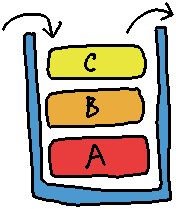
A stack is a type of restricted-access data type. It can store a series of items, but you can only add and remove items from the top.
6.1. Declaration
stack<char> myStack;
6.2. Accessing the size
cout << "Size: " << myStack.size();
6.3. Adding data
The push function will add a new item to the top of the stack.
myStack.push( 'A' );
myStack.push( 'B' );
myStack.push( 'C' );
6.4. Accessing data
Only the top-most element of a stack can be accessed.
cout << "Top item is: " << myStack.top() << endl;
6.5. Removing data
This removes the top-most item of the stack.
myStack.pop(); // Remove top item
7. STL std::queue
Documentation: https://cplusplus.com/reference/queue/queue/
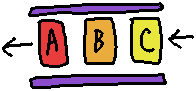
A queue is another type of restricted-access data type. It stores a series of items, with items being added at the back of the queue, and being removed from the front of the queue, similar to waiting in line at the store.
7.1. Declaration
queue<char> myQueue;
7.2. Accessing the size
cout << "Size: " << myQueue.size() << endl;
7.3. Adding data
The push function will add a new item to the back of the queue.
myQueue.push( 'A' );
myQueue.push( 'B' );
myQueue.push( 'C' );
7.4. Accessing data
Only the front-most item can be accessed in a queue.
cout << "The front item is: " << myQueue.front() << endl;
7.5. Removing data
This removes the front-most item in the queue.
myQueue.pop(); // Remove front item
8. STL std::map

Documentation: https://cplusplus.com/reference/map/map/
Our traditional arrays have index numbers (0, 1, 2, …) and elements stored at that position in the array.
With a map, we can have any data type as a unique identifier for an element. This could be an integer, but it doesn't have to be 0, 1, 2, and so on - it could be an employee ID, a phone number, etc., but the data type of the identifier (called a key) can be any data type.\
8.1. Declaration
Specify the type of the key and the type of the value.
map<int, string> area_codes;
8.2. Adding data
Use the subscript operator with a key, and assign it a value.
area_codes[913] = "Northeastern Kansas";
area_codes[816] = "Northwestern Missouri";
8.3. Accessing the size
cout << "Size: " << area_codes.size();
8.4. Accessing data
You can access elements of the map via the key, if it exists in the map.
int key;
cout << "Enter an area code: ";
cin >> key;
cout << "The region for that is: " << area_codes[ key ];
8.5. Iterating over elements
Use a range-based for loop to easily iterate over all of the elements. Use item.first to get the key and item.second to get the value.
for ( auto& item : area_codes )
{
  cout << "Key: " << item.first << ", Value: " << item.second << endl;
}