Table of Contents
- 1. Introduction
- 2. Smart fixed array structure
- 2.1. SmartFixedArray - Functionality
- 2.2. SmartFixedArray - Predicting errors/exceptions
- 2.3. SmartFixedArray - Creating a class to wrap the array
- 2.3.1. Constructor - Preparing the array to be used
- 2.3.2. int Size() const
- 2.3.3. bool IsEmpty() const
- 2.3.4. bool IsFull() const
- 2.3.5. void Display() const
- 2.3.6. int Search( T item ) const
- 2.3.7. void ShiftRight( int index )
- 2.3.8. void ShiftLeft( int index )
- 2.3.9. void PushBack( T newItem )
- 2.3.10. void PushFront( T newItem )
- 2.3.11. void PushAt( T newItem, int index )
- 2.3.12. T GetBack() const
- 2.3.13. T GetFront() const
- 2.3.14. T GetAt( int index ) const
- 2.3.15. void PopBack()
- 2.3.16. void PopFront()
- 2.3.17. void PopAt( int index )

1. Introduction
First we're going to start off by building a "Smart" fixed-length array, taking a traditional C-style array:
int myArray[100];
and wrapping it within a class, so that we can create functions and helper variables to provide a nice interface for a user, so they don't have to worry about the specifics of how the array is implemented, they just know that they can add, remove, and access their data. (In this context the "user" would be another programmer using your data structure.)
With the Smart Fixed-Length Array, we'll work through the steps together. Then, for a little more challenge, you'll work on a Smart Dynamic Array, which uses pointers to allow "resizing" of the array. There will be a lot of functionality in common between these two "Smart" Arrays, but also some differences.
2. Smart fixed array structure
In previous programming courses you've probably worked with arrays to store data. You've probably encountered out-of-bounds errors and had to deal with array indices, moving items around, and generally micro-managing your array's data as the program goes. With our traditional array wrapped inside of a class, we can look out for these error states and how to manage our array, and do it within the functions - the "programmer-user" doesn't have to think about how it's implemented.
So, what will our array actually do?
2.1. SmartFixedArray - Functionality
Pretend you're licensing out a special Data Structures library that other developers use. Our "programmer-user" is going to want to do some basic tasks:
- Store data (PUSH)
- Access data (GET)
- Discard data (POP)
There could also be other features like Search. We'll be implementing these features and seeing how the implementations are different for each of our different types of data structures.
So how do we achieve this core functionality?
2.1.1. Creating the array:
If we weren't storing our array inside a class, we might declare it in a program like this:
// Create an array + helper variables
const int ARR_SIZE = 100;
int totalItems = 0;
string data[ARR_SIZE];
With a fixed-length array, we have to keep track of the array size
ARRAY_SIZE to ensure we don't go out-of-bounds in the array… valid indices
will be 0 until ARRAY_SIZE - 1.
We are also keeping track of the totalItems in the array, because even though
we have an array with some size, it could be useful to know that currently
no data is stored in it. Then, when new data is added, we could increment
totalItems by 1.
~
Our empty array (totalItems = 0):
| index | 0 | 1 | 2 | 3 | 4 | 5 |
| value | "" | "" | "" | "" | "" | "" |
2.1.2. Adding onto the array:
Adding on to the array would mean choosing an index to put new data. If we were wanting to fill the array from left-to-right, we would start at index 0, then 1, then 2, then 3, and so on.
The totalItems variable begins at 0. Once the first item is added, it is
then 1. Once a second item is added, it is then 2. Basically, the
totalItems corresponds to the next index to store new data at…
// Add new item
data[totalItems] = myNewData;
totalItems++;
~
One item added (totalItems = 1):
| index | 0 | 1 | 2 | 3 | 4 | 5 |
| value | "Cats" | "" | "" | "" | "" | "" |
2.1.3. Removing items from the array:
We may also want to remove an item at a specific index from the array. There's not really a way to "delete" an item from an array, but we can overwrite it, if we wanted to…
// Remove an item
int index;
cout << "Remove which index? ";
cin >> index;

data[index] = "";
totalItems--;
But if we did it this way we would create an array with gaps in it.
Additionally now totalItems doesn't align to the next index to insert at.
While we could design our SmartArray this way (I have this type of array as
the base for our eventual HashTable data structure), but the design we're going
for here, we don't want gaps in the array and we're
filling it up from left-to-right.
Before removing an item (totalItems = 6):
| index | 0 | 1 | 2 | 3 | 4 | 5 |
| value | "Cats" | "Dogs" | "Mice" | "Birds" | "Snakes" | "" |
After removing an item (totalItems = 5):
| index | 0 | 1 | 2 | 3 | 4 | 5 |
| value | "Cats" | "Dogs" | "Mice" | "" | "Snakes" | "" |
If we designed our array to allow gaps, we would then have to add code to find a new available place to add an item we'd have to use a for loop to look for an empty spot to use - this means every time we add a new item it would be less efficient because of the "search" operation.
Instead, we could design our arrays so that after a remove, we shift elements
backwards to "overwrite" the empty spot. This also solves our issue with
totalItems not aligning to the next-index-to-insert-at.
After removing an item with a "Shift Left" (totalItems = 5):
| index | 0 | 1 | 2 | 3 | 4 | 5 |
| value | "Cats" | "Dogs" | "Mice" | "Snakes" | "" | "" |
Here, we've shifted everything after index 3 (where we removed "Birds" from) and shifted everything backwards by 1, so now "Snakes" is at position 3 instead of 4.
2.1.4. Searching for an item:
Another thing a user of this data structure might want to do is search for an item - is this thing stored in the array? If so, what is the index? If the array is unsorted (we're not going to do sorting yet), then really the only way to search for the item is to start at the beginning and keep searching until the end. If we find a match, we return that index number to let the user know where in the array that data was found.
If we get to the end of the loop and nothing has been returned, that means
it isn't in the array so we would have to return something to symbolize
"it's not in the array – such as returning -1 as the index (negative
numbers are invalid indices), or perhaps throwing an exception.
Populated array (totalItems = 5):
| index | 0 | 1 | 2 | 3 | 4 | 5 |
| value | "Cats" | "Dogs" | "Mice" | "Birds" | "Snakes | "" |
Searching through the array would look like this:
// Search for an item
string findme;
cout << "Find what? ";
getline( cin, findme );

int foundIndex;

for ( int i = 0; i < totalItems; i++ )
{
    if ( data[i] == findme )
    {
        foundIndex = i;   // Found it
        break;
    }
}

// Did not find it
foundIndex = -1;
Once we implement this structure within a class, we will turn this into a function that returns data - this is just an example as if we were writing a program in main().
2.1.5. Retrieving an item at some index:
Besides adding, removing, and searching for items, users will want to retrieve the data located at some index. This would be a simple return once we're writing our class, but generally accessing item at index looks like:
// Display element at index
int index;
cout << "Which index? ";
cin >> index;
cout << data[index] << endl;
2.1.6. Visualizing the array:
Another feature could be to display all elements of the array, which might look something like this:
// Display all items
for ( int i = 0; i < totalItems; i++ )
{
    cout << i << ". " << data[i] << endl;
}
2.2. SmartFixedArray - Predicting errors/exceptions
2.2.1. Invalid indices:
When working with arrays one of the most common errors encountered are out-of-bounds errors: When we have an index that is less than 0, or equal to or greater than the size of the array…
// Out of bounds!
cout << data[-1]        << endl;    // error!
cout << data[ARR_SIZE]  << endl;    // error!
Additionally, if the user tries to access an index \(\geq\) totalItems then
they would retrieve data that is invalid, though this wouldn't crash the
program if it is still less than ARR_SIZE.
2.2.2. Array is full:
With the fixed-length array, we could also run out of space, and we would have
to design a way to deal with it. For example, if totalItems was equal to
ARR_SIZE, then we are out of space and doing this would also cause an
out-of-bounds error.
data[totalItems] = "Ferrets";       // error if full!
totalItems++;
As part of designing our data structure, we need to make sure we account for reasonable scenarios that would cause the program to crash and guard against logic errors. This would all be part of how we implement the functionality.
2.3. SmartFixedArray - Creating a class to wrap the array
For our wrapper class we will need the array and array size / item count integers as part of the private member variables. The public functions would include the "interface" of what the user will want to do with the array, and we could also add private/protected helper functions.
| SmartFixedArray | |
|---|---|
- m_array |
: TYPE[100] |
- m_itemCount |
: int |
- m_arraySize |
: const int |
+ SmartFixedArray() |
|
+ PushFront( newData : TYPE ) |
: void |
+ PushBack( newData : TYPE ) |
: void |
+ PushAtIndex( index : int, newData : TYPE ) |
: void |
+ PopFront() |
: void |
+ PopBack() |
: void |
+ PopAt( index : int ) |
: void |
+ GetFront() |
: TYPE& |
+ GetBack() |
: TYPE& |
+ GetAtIndex( index : int ) |
: TYPE& |
+ Search( item : TYPE ) |
: int |
+ Clear() |
: void |
+ IsEmpty() |
: bool |
+ IsFull() |
: bool |
+ Size() |
: int |
- ShiftLeft( index : int ) |
: int |
- ShiftRight( index : int ) |
: int |
The class declaration could look like this:
template <typename T>
class SmartFixedArray
{
public:
  SmartFixedArray();

  void PushBack( T newItem );
  void PushFront( T newItem );
  void PushAt( T newItem, int index );

  void PopBack();
  void PopFront();
  void PopAt( int index );

  T GetBack() const;
  T GetFront() const;
  T GetAt( int index ) const;

  int Search( T item ) const;
  void Display() const;
  int Size() const;
  bool IsEmpty() const;
  bool IsFull() const;

private:
  const int m_arraySize;
  T m_array[100];
  int m_itemCount;

  void ShiftLeft( int index );
  void ShiftRight( int index );
};
For this example data structure, we are hard-coding the array size to 100 elements. It is unlikely that anyone would use this data structure for anything, but I wanted to start off with a basic fixed-length array. Next, we will move to a dynamic array, which will be more useful.
With this class structure set up, lets look into how to actually implement the functionality.
2.3.1. Constructor - Preparing the array to be used

When the constructor is called, we need to set the value of m_arraySize as
part of the initializer list since it is a const member and needs to be
initialized right away. Otherwise, we can initialize m_itemCount to 0 as well,
since are creating an empty array.
template <typename T>
SmartFixedArray<T>::SmartFixedArray()
    : m_arraySize( 100 )
{
  m_itemCount = 0;
}
2.3.2. int Size() const

This function returns the value from m_itemCount - the current amount of
items in the array.
2.3.3. bool IsEmpty() const

Returns true if the array is empty and false if not. The array is empty if m_itemCount is 0.
2.3.4. bool IsFull() const

Returns true if the array is full and false if not. The array is full
if m_itemCount is equal to m_arraySize.
2.3.5. void Display() const

Iterates over all the elements of the array displaying each item.
void SmartFixedArray<T>::Display() const
{
  for ( int i = 0; i < m_itemCount; i++ )
  {
    cout << i << ". " << m_array[i] << endl;
  }
}
2.3.6. int Search( T item ) const

Iterates over all the elements of the array searching for the item. If a match is found, it returns the index of that element. Otherwise, if it finishes looping over the array and has not yet returned, it means that nothing was found. Return -1 in this case, or throw an exception (this is a design decision).
int SmartFixedArray<T>::Search( T item ) const {
  for ( int i = 0; i < m_itemCount; i++ ) {
    if ( m_array[i] == item ) {
      return i;
    }
  }
  throw runtime_error( "Could not find item!" );
}
2.3.7. void ShiftRight( int index )

Error checks:
- If the array is full, then throw an exception.
- If the index is invalid, then throw an exception.
Functionality:
- Iterate over the array, starting at the index of the first empty space. Moving backwards, copy each item over from the previous index. Loop until hitting the index.
void SmartFixedArray<T>::ShiftRight(int index) {
    if ( index < 0 || index >= m_itemCount ) {
        throw out_of_range( "Index is out of bounds!" );
    }
    else if ( IsFull() ) {
        throw length_error( "Array is full!" );
    }

    for ( int i = m_itemCount; i > index; i-- ) {
        m_array[i] = m_array[i-1];
    }
}
2.3.8. void ShiftLeft( int index )
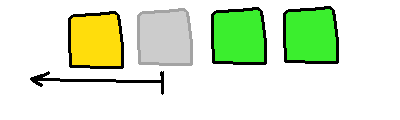
Error checks:
- If the index is invalid, then throw an exception.
Functionality:
- Iterate over the array, starting at the index given and going until the last element. Copy each neighbor from the right to the current index until we get to the end.
void SmartFixedArray<T>::ShiftLeft(int index) {
{
  if ( index < 0 || index >= m_itemCount ) {
    throw out_of_range( "Index is out of bounds!" );
  }

  for ( int i = index; i < m_itemCount-1; i++ ) {
    m_array[i] = m_array[i+1];
  }
}
(Continued…)
2.3.9. void PushBack( T newItem )

We have three different Push functions in order to add an item to different
parts of the array, which will each require slightly different logic.
PushBack adds a new item to the end of the list of elements.
Functionality:
- ERROR CHECK:
- Use the
IsFull()function to check if the array is full… if it is, then throw an exception, because we can't resize this type of array!
- Use the
- All good to go:
- The
m_itemCountis also the index of the next available space in the array… Add thenewItemto them_arrayat the indexm_itemCount. - Increment
m_itemCountby 1.
- The
BEFORE:
| index | 0 | 1 | 2 | 3 | 4 | 5 |
|---|---|---|---|---|---|---|
| value | "Cats" | "Dogs" | "Mice" | "Birds" | "" | "" |
m_itemCount is 4.
AFTER:
| index | 0 | 1 | 2 | 3 | 4 | 5 |
|---|---|---|---|---|---|---|
| value | "Cats" | "Dogs" | "Mice" | "Birds" | "Ferrets" | "" |
m_itemCount is now 5.
2.3.10. void PushFront( T newItem )
PushFront adds a new item to the beginning of the list of elements.
This requires shifting everything forward to make space for the new item…
Functionality:
- ERROR CHECK:
- Use the
IsFull()function to check if the array is full… if it is, then throw an exception, because we can't resize this type of array!
- Use the
- All good to go:
- The front of the array is always index
0. To make space for our new item, we need to callShiftRight( 0 )to scoot everything over by 1 space. - Add the
newItemto them_arrayat the index0. - Increment
m_itemCountby 1.
- The front of the array is always index
BEFORE:
| index | 0 | 1 | 2 | 3 | 4 | 5 |
|---|---|---|---|---|---|---|
| value | "Cats" | "Dogs" | "Mice" | "Birds" | "" | "" |
m_itemCount is 4.
MAKE ROOM by calling ShiftRight(0)
| index | 0 | 1 | 2 | 3 | 4 | 5 |
|---|---|---|---|---|---|---|
| value | "" | "Cats" | "Dogs" | "Mice" | "Birds" | "" |
m_itemCount is now 5.
AFTER:
| index | 0 | 1 | 2 | 3 | 4 | 5 |
|---|---|---|---|---|---|---|
| value | "Ferrets" | "Cats" | "Dogs" | "Mice" | "Birds" | "" |
2.3.11. void PushAt( T newItem, int index )

PushAt adds a new item to the index given. This requires shifting everything
forward to make space for the new item…
Functionality:
- ERROR CHECKS:
- Use the
IsFull()function to check if the array is full… if it is, then throw an exception, because we can't resize this type of array! - If
indexis out of bounds (less than 0 or greater thanm_itemCount!) then throw an exception - can't add at an invalid index!
- Use the
- DRY (Don't Repeat Yourself) checks:
- If the index is 0, call
PushFront(newItem)instead. - If the index is
m_itemCount, callPushBack(newItem)instead.
- If the index is 0, call
- ELSE:
- The
indexfor our new item has been passed in. To make space for our new item, we need to callShiftRight(index)to scoot everything over by 1 space. - Add the
newItemto them_arrayat the indexindex. - Increment
m_itemCountby 1.
- The
BEFORE:
| index | 0 | 1 | 2 | 3 | 4 | 5 |
|---|---|---|---|---|---|---|
| value | "Cats" | "Dogs" | "Mice" | "Birds" | "" | "" |
m_itemCount is 4.
MAKE ROOM by calling ShiftRight( 2 )
| index | 0 | 1 | 2 | 3 | 4 | 5 |
|---|---|---|---|---|---|---|
| value | "Cats" | "Dogs" | "" | "Mice" | "Birds" | "" |
AFTER PushAt("Ferrets", 2)
| index | 0 | 1 | 2 | 3 | 4 | 5 |
|---|---|---|---|---|---|---|
| value | "Cats" | "Dogs" | "Ferrets" | "Mice" | "Birds" | "" |
m_itemCount is now 5.
2.3.12. T GetBack() const

The Get functions just return data from the array. The "Back" of the array will
be at m_itemCount-1 (the last valid index), the "Front" of the array is at
0. Note that with the Get functions, we need to check IsEmpty() first -
if the array is empty, we can't retrieve any data!
Functionality:
- ERROR CHECK:
- Use the
IsEmpty()function to check if the array is empty… if it is, then throw an exception, because we can't retrieve from an empty array!
- Use the
- All good to go:
- Return the item from
m_arrayat the indexm_itemCount-1.
- Return the item from
2.3.13. T GetFront() const

Functionality:
- ERROR CHECK:
- Use the
IsEmpty()function to check if the array is empty… if it is, then throw an exception, because we can't retrieve from an empty array!
- Use the
- All good to go:
- Return the item from
m_arrayat the index0.
- Return the item from
2.3.14. T GetAt( int index ) const

Functionality:
- ERROR CHECK:
- Use the
IsEmpty()function to check if the array is empty… if it is, then throw an exception, because we can't retrieve from an empty array! - If
indexis out of bounds (less than 0 or greater than or equal tom_itemCount!) then throw an exception - can't retrieve from an invalid index!
- Use the
- All good to go:
- Return the item from
m_arrayat the indexindex.
- Return the item from
2.3.15. void PopBack()

Functionality:
- ERROR CHECK:
- Use the
IsEmpty()function to check if the array is empty… if it is, then throw an exception, because we can't remove data from an empty array!
- Use the
- All good to go:
- Just decrement
m_itemCountby 1. (Next time something is added, it will overwrite this location!)
- Just decrement
BEFORE:
| index | 0 | 1 | 2 | 3 | 4 | 5 |
|---|---|---|---|---|---|---|
| value | "Cats" | "Dogs" | "Ferrets" | "Mice" | "Birds" | "" |
m_itemCount is 5.
AFTER PopBack()
| index | 0 | 1 | 2 | 3 | 4 | 5 |
|---|---|---|---|---|---|---|
| value | "Cats" | "Dogs" | "Ferrets" | "Mice" | "" | "" |
m_itemCount is now 4.
2.3.16. void PopFront()

Functionality:
- ERROR CHECK:
- Use the
IsEmpty()function to check if the array is empty… if it is, then throw an exception, because we can't remove data from an empty array!
- Use the
- All good to go:
- Call
ShiftLeft(0), which will essentially "erase" the item by overwriting it. - Decrement
m_itemCountby 1.
- Call
BEFORE:
| index | 0 | 1 | 2 | 3 | 4 | 5 |
|---|---|---|---|---|---|---|
| value | "Cats" | "Dogs" | "Ferrets" | "Mice" | "Birds" | "" |
m_itemCount is 5.
AFTER PopFront()
| index | 0 | 1 | 2 | 3 | 4 | 5 |
|---|---|---|---|---|---|---|
| value | "Dogs" | "Ferrets" | "Mice" | "Birds" | "" | "" |
m_itemCount is now 4.
(Continued…)
2.3.17. void PopAt( int index )

Functionality:
- ERROR CHECK:
- Use the
IsEmpty()function to check if the array is empty… if it is, then throw an exception, because we can't remove data from an empty array! - If
indexis out of bounds (less than 0 or greater than or equal tom_itemCount!) then throw an exception - can't remove data from an invalid index!
- Use the
- All good to go:
- Call
ShiftLeft(index), which will essentially "erase" the item by overwriting it. - Decrement
m_itemCountby 1.
- Call
BEFORE:
| index | 0 | 1 | 2 | 3 | 4 | 5 |
|---|---|---|---|---|---|---|
| value | "Cats" | "Dogs" | "Ferrets" | "Mice" | "Birds" | "" |
m_itemCount is 5.
AFTER PopAt(2) and ShiftLeft(2)
| index | 0 | 1 | 2 | 3 | 4 | 5 |
|---|---|---|---|---|---|---|
| value | "Cats" | "Dogs" | "Mice" | "Birds" | "" | "" |
m_itemCount is now 4.