Table of Contents
1. Restricted access data structures: Stack and Queue
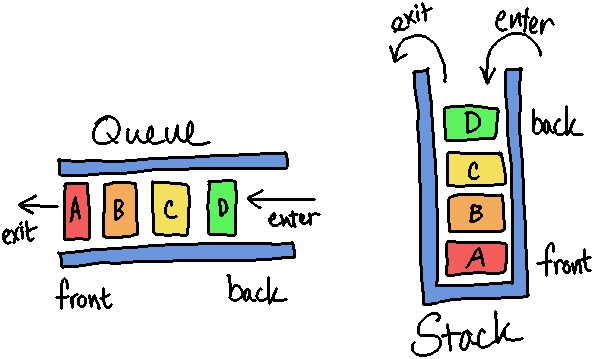
Remember that a data structure will have functionality to add, remove, and access (and sometimes search) the structure, but some data structures are for special types of applications. With Stack and Queue structures, we restrict access to where items can be added, accessed, and removed in order to use them for special purposes.
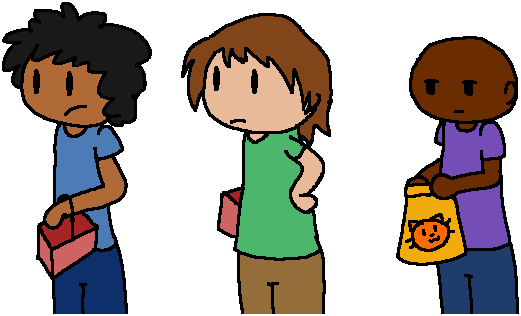
Queues are a type of structure that only allows new items to be added to the end of the queue, and only allows items to be removed at the beginning of the queue. It is commonly called FIFO: First In First Out. A queue is basically any line you have to stand in at a store.
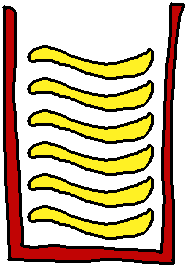
Stacks are another type of restricted-access data structure. In a way, it's a cousin to a Queue, since they both only allow access to certain items stored within and are used for specialized operations. The Stack, however, is LIFO: Last In First Out. The stack can be visualized as a can of Pringles chips, where you only have access to whatever is on the top of the internal stack of chips.
Since a Stacks and Queues only have one place items can be added, we
would only have a simple Push function instead of having a
PushFront and PushBack, and same for the rest of the functions.
Available functionality:
| Vector/Array | List | Queue | Stack |
|---|---|---|---|
PushFront |
PushFront |
- | - |
PushBack |
PushBack |
Push |
Push |
PushAt |
- | - | - |
PopFront |
PopFront |
Pop |
- |
PopBack |
PopBack |
- | Pop |
PopAt |
- | - | - |
GetFront |
GetFront |
Front |
- |
GetBack |
GetBack |
- | Top |
GetAt |
- | - | - |
- The Stack and Queue only has a PushBack function, so we just call it
Pushbecause it's the only one. - The Queue only removes items from the front, so it has PopFront…
but since it's the only Pop function we just say
Pop. - The Stack only removes items from the back, so it has PopBack…
but we just call it
Pop. - The Queue only allows us to access the front-most item…
Instead of being called "Get", this is usually labeled as
Front. - The Stack only allows us to access the "top-most" item…
We usually label this as
Top.
1.1. Building on top of an array/list
Additionally, we can implement our Stack or Queue structure on top of another linear structure, like an Array or a List.
For the most part we've been visualizing our arrays and structures horizontally, from left to right:
| Value: | "Cats" |
"Dogs" |
"Mice" |
"Birds" |
"Snakes" |
"" |
|---|---|---|---|---|---|---|
| Index: | 0 | 1 | 2 | 3 | 4 | 5 |
| Queue | FRONT | BACK | ||||
| Stack | BOTTOM | TOP |
With a Stack, we think of it as having a Top and a Bottom. For the way we're working with Stacks in my class, "Bottom" wlil be at index 0 and "Top" will be at the last index.
1.2. Use of a Queue in software
With this single-minded, "access the front item of the Queue, then discard that and access the next front item", what is a Queue structure used for?
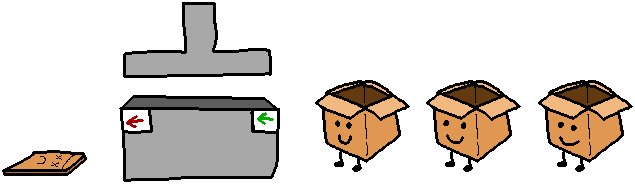
Similarly to in real life, it's a way to make items wait their turn for some form of processing. At the grocery store, there are limited resources (cash registers). At each register, people queue up, waiting for their time until they can go through the process of having their items rung up and paying for them. And, we wait in a "first come, first served" order (people will generally get angry if you try to enter at the front of the line).
The same is true of a Queue. Perhaps we have many different things we want to process, but a limited amount of resources. So, as these items come in, if we're busy processing something, everything else queues up and waits its turn.
1.3. Use of a Stack in software
Stacks are a handy instruction in computer science, allowing us to essentially "pause" where we're at with something when we push a new task to the top of the stack, and simply pop that task off and return directly to the previous item. Stacks are a bit less intuitive than queues, so let's look at more examples of how they might be used.
1.3.1. Screen navigation
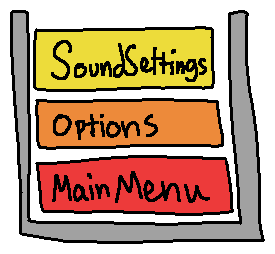
In a program that generally only displays one screen at a time - such as a video game, or a small computer device like a GPS - we can Push new view states onto a "view stack" any time we navigate to a new screen.
Maybe the first screen of the program is the main menu (Push(mainMenu);).
When the user clicks the "options" button, they go to the options
menu (Push(options);). Then, they may click the "sound settings"
tab, taking them to the sound settings menu (Push(soundSettings);).
Once they're done adjusting the sound, they click the back button. Instead of having to write logic like "what comes before sound settings?" we simply Pop() the current view off the stack, which returns us to the options menu.
- Undo functionality
Let's say you're typing some text, and behind-the-scenes, the computer is storing all the text you've typed in a buffer like this…
"C" |
"a" |
"r" |
"s" |
|
|---|---|---|---|---|
| 0 | 1 | 2 | 3 | 4 |
| BOTTOM | TOP |
But oops, you meant to type "Cats", not "Cars". The backspace button is
essentially a Pop(), and each time you hit backspace, the "top-most"
(i.e., most recent) keystroke is removed from the buffer. We hit backspace
twice (Pop(); Pop();) and we have gone backwards twice:
Pop()…
"C" |
"a" |
"r" |
||
|---|---|---|---|---|
| 0 | 1 | 2 | 3 | 4 |
| BOTTOM | TOP |
Pop()…
"C" |
"a" |
|||
|---|---|---|---|---|
| 0 | 1 | 2 | 3 | 4 |
| BOTTOM | TOP |
Now as we type in our correction, each new keystroke is a Push() onto the
buffer stack. We fix our error (Push("t"); Push("s");)…
Push("t")…
"C" |
"a" |
"t" |
||
|---|---|---|---|---|
| 0 | 1 | 2 | 3 | 4 |
| BOTTOM | TOP |
Push("s")…
"C" |
"a" |
"t" |
"s" |
|
|---|---|---|---|---|
| 0 | 1 | 2 | 3 | 4 |
| BOTTOM | TOP |
1.3.2. Call stack
A stack is utilized any time we make a function call.
When debugging, you should notice that there is a Call Stack pane, which lists all the functions that have been called, leading up to where the program is currently paused (when using breakpoints).
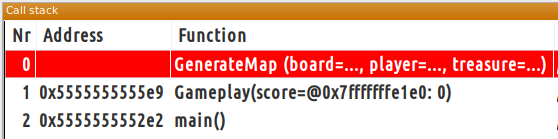
The top-most item in the call stack is the most recently called function. The
bottom-most is the first function called (such as main().)
When a function is called, it is Pushed onto the call stack. When the function ends, it is Popped off of the call stack, returning us to whatever previous function was active before it.
Review 1. For my class:
a Stack's Bottom is at ○ Index 0 / ○ Last index
and its Top is at ○ Index 0 / ○ Last index
Review 2. Queue Push calls its underlying structure's ○ PushBack / ○ PushFront
and Stack Push calls its underlying structure's ○ PushBack / ○ PushFront
Review 3. Queue Pop calls its underlying structure's… ○ PopBack / ○ PopFront
and Stack Pop calls its underlying structure's… ○ PopBack / ○ PopFront
Review 4. Queue Front calls its underlying structure's… ○ GetBack / ○ GetFront
and Stack Top calls its underlying structure's… ○ GetBack / ○ GetFront
2. Queues
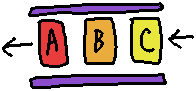
2.1. What are Queues?
A queue has add, remove, and access, but these are all restricted - you can't insert in the middle or beginning of the queue, or remove from the middle or end of the queue.
A Queue, in and of itself, is just an idea. We can use our dynamic array
structure or our linked list structure to build a Queue, and only allowing
certain functions to be called and others to be unavailable. We could simply
do this by writing a Queue class that inherits from or contains a LinkedList
or Vector, and only providing access to certain methods.
2.2. Adding to a Queue (Push/Enqueue)
The Queue will add items using PushBack functionality, adding each item to
the end of the list. Let's say we're running the following commands in order:
Push("A");Push("B");Push("C");Push("D");
We start off with an empty Queue:
| 0 | 1 | 2 | 3 | 4 |
| FRONT | BACK |
After Push("A");, the item enters the BACK and makes its way to the first
available spot closest to the front - in this case, the front itself:
"A" |
||||
|---|---|---|---|---|
| 0 | 1 | 2 | 3 | 4 |
| FRONT | BACK |
Next, Push("B");, which also enters from the BACK and goes to the next
available spot:
"A" |
"B" |
|||
|---|---|---|---|---|
| 0 | 1 | 2 | 3 | 4 |
| FRONT | BACK |
With each item filling in from left-to-right:
"A" |
"B" |
"C" |
||
|---|---|---|---|---|
| 0 | 1 | 2 | 3 | 4 |
| FRONT | BACK |
And finally:
"A" |
"B" |
"C" |
"D" |
|
|---|---|---|---|---|
| 0 | 1 | 2 | 3 | 4 |
| FRONT | BACK |
2.3. Removing from a Queue (Pop/Dequeue)
When we remove items from the Queue, the front item will be removed, and each item will be shifted one space toward the front.
Pop();Pop();Pop();
Let's say this is our starting Queue state:
"A" |
"B" |
"C" |
"D" |
|
|---|---|---|---|---|
| 0 | 1 | 2 | 3 | 4 |
| FRONT | BACK |
After our first Pop() the item at the front of the Queue ("A") is
removed and everybody else moves forward:
"B" |
"C" |
"D" |
||
|---|---|---|---|---|
| 0 | 1 | 2 | 3 | 4 |
| FRONT | BACK |
The second pop then removes "B":
"C" |
"D" |
|||
|---|---|---|---|---|
| 0 | 1 | 2 | 3 | 4 |
| FRONT | BACK |
The the third pop removes "C":
"D" |
||||
|---|---|---|---|---|
| 0 | 1 | 2 | 3 | 4 |
| FRONT | BACK |
2.4. Access with a Queue (Get/Peek)
When we call the function to access from a Queue, we can only access one item: the front-most item.
- Front()
The Front function is our GetFront() equivalent. This is how we get the next
item to work with in our program. If we were thinking of customers in a store
line, while checking out the current customer, we would be using the
"queue.Front()" to work with that customer until they're done. (Then they get
removed with Pop()).
"A" |
"B" |
"C" |
"D" |
|
|---|---|---|---|---|
| 0 | 1 | 2 | 3 | 4 |
| FRONT | BACK |
For this queue, accessing queue.Front() would return "A".
Review 5. Given a Queue:
"A" |
"B" |
"C" |
|---|---|---|
| 0 | 1 | 2 |
| FRONT | BACK |
What is returned when Front() is called?
Review 6. Given a Queue:
"Cat" |
||
|---|---|---|
| 0 | 1 | 2 |
| FRONT | BACK |
What does the Queue look like after Push( "Dog" ) is called?
Review 7. Given a Queue:
"NES" |
"SNES" |
"N64" |
|---|---|---|
| 0 | 1 | 2 |
| FRONT | BACK |
What does this Queue look like after Pop() is called?
2.5. Implementing a Queue
A Queue will be simplest to implement if you build the class on top of an
existing structure. If your underlying Array or List has PushBack,
PopFront, and GetFront functions, you can set it up like this:
Array version
template <typename T>
class ArrayQueue
{
public:
  void Push(const T& newData );
  void Pop();
  T& Front();
  int Size();
  bool IsEmpty();

private:
  SmartDynamicArray<T> vector;
};
This one contains vector.
- The Push function will call
vector.PushBack( newData ); - The Pop function will call
vector.PopFront(); - The Front function will call
vector.GetFront();(make sure toreturnthis value!)
Linked version
template <typename T>
class LinkedQueue
{
public:
  void Push(const T& newData );
  void Pop();
  T& Front();
  int Size();
  bool IsEmpty();

private:
  LinkedList<T> list;
};
This one contains list.
- The Push function will call
list.PushBack( newData ); - The Pop function will call
list.PopFront(); - The Front function will call
list.GetFront();(make sure toreturnthis value!)
3. Stacks
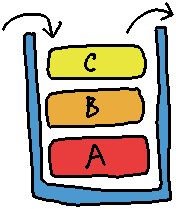
3.1. What are Stacks?
Of course, we don't usually think of arrays or linked lists in a vertical manner, so it might also help to see the stack structure like this:
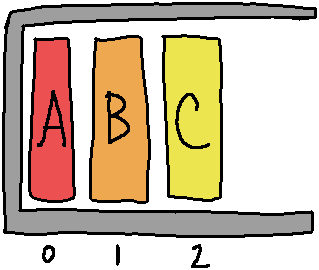
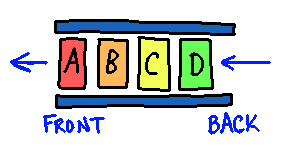
While similar to a Queue, which allows add data to the back and accessing/removing data from the front, a Stack only allows adding, accessing, and removing data all from the "top".
- Queue:
- Stack:
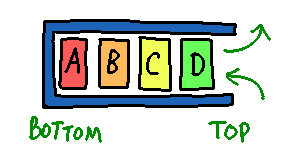
Just like with a Queue, we can implement a Stack on top of an array or linked structure, taking advantage of code we've already previously written to create our new data structure, the Stack:
3.2. Adding to a Stack (Push)
The Stack will add items using PushBack functionality, adding each item to
the top of the list. Let's say we're running the following commands in order:
Push("A");Push("B");Push("C");Push("D");
We start off with an empty Stack:
| 0 | 1 | 2 | 3 | 4 |
| BOTTOM | TOP |
After Push("A");, we insert the "A" at the "TOP" (or the "back"), and it
"falls down" as far as it can to the "BOTTOM" (or "front"):
"A" |
||||
|---|---|---|---|---|
| 0 | 1 | 2 | 3 | 4 |
| BOTTOM | TOP |
Next, Push("B") will drop in "B" from the top, and it will land
"on top of" "A".
"A" |
"B" |
|||
|---|---|---|---|---|
| 0 | 1 | 2 | 3 | 4 |
| BOTTOM | TOP |
And so on, building a Stack of items:
"A" |
"B" |
"C" |
||
|---|---|---|---|---|
| 0 | 1 | 2 | 3 | 4 |
| BOTTOM | TOP |
"A" |
"B" |
"C" |
"D" |
|
|---|---|---|---|---|
| 0 | 1 | 2 | 3 | 4 |
| BOTTOM | TOP |
We could also visualize the stack like this:
| TOP | 4 | |
| 3 | "D" |
|
| 2 | "C" |
|
| 1 | "B" |
|
| BOTTOM | 0 | "A" |
3.3. Removing from a Stack (Pop)
When we remove items from the Stack, the top item will be removed.
Pop()Pop()Pop()
With the Pop function, we will only be able to access the "top-most" item in the stack. So, items are removed the same way they came in.
Starting Stack:
"A" |
"B" |
"C" |
"D" |
|
|---|---|---|---|---|
| 0 | 1 | 2 | 3 | 4 |
| BOTTOM | TOP |
After first Pop():
"A" |
"B" |
"C" |
||
|---|---|---|---|---|
| 0 | 1 | 2 | 3 | 4 |
| BOTTOM | TOP |
After second Pop():
"A" |
"B" |
|||
|---|---|---|---|---|
| 0 | 1 | 2 | 3 | 4 |
| BOTTOM | TOP |
After third Pop():
"A" |
||||
|---|---|---|---|---|
| 0 | 1 | 2 | 3 | 4 |
| BOTTOM | TOP |
3.4. Access with a Stack (Get/Peek)
When we call the function to access from a Stack, we can only access one item: the top-most item.
Top()
The Top function is our GetBack() equivalent. The next item we work with is
going to be the one sitting at the top of the pile. This also happens to be the
"newest" item in a Stack.
"A" |
"B" |
"C" |
"D" |
|
|---|---|---|---|---|
| 0 | 1 | 2 | 3 | 4 |
| BOTTOM | TOP |
For this Stack, accessing stack.Top() would return "D".
Review 5. Given a Stack:
| TOP | 2 | "C" |
| 1 | "B" |
|
| BOTTOM | 0 | "A" |
What is returned when Top() is called?
Review 6. Given a Stack:
| TOP | 2 | |
| 1 | ||
| BOTTOM | 0 | "Cat" |
What does the Stack look like after Push( "Dog" ) is called?
Review 7. Given a Stack:
| TOP | 2 | "N64" |
| 1 | "SNES" |
|
| BOTTOM | 0 | "NES" |
What does this Stack look like after Pop() is called?
3.5. Implementing a Stack
Same as with the Queue, we can also build a Stack on top of an Array or Linked
List structure. In this case, we use PushBack, PopBack, and GetBack for
these classes in order to implement our Stack's Push, Pop, and Top.
Array version
template <typename T>
class ArrayStack
{
public:
  void Push(const T& newData );
  void Pop();
  T& Top();
  int Size();
  bool IsEmpty();

private:
  SmartDynamicArray<T> vector;
};
This one contains vector.
- The Push function will call
vector.PushBack( newData ); - The Pop function will call
vector.PopBack(); - The Top function will call
vector.GetBack);
Linked version
template <typename T>
class LinkedStack
{
public:
  void Push(const T& newData );
  void Pop();
  T& Top();
  int Size();
  bool IsEmpty();

private:
  LinkedList<T> list;
};
This one contains list.
- The Push function will call
list.PushBack( newData ); - The Pop function will call
list.PopBack(); - The Top function will call
list.GetBack();